Table of contents
Below the version description, i.e., the description that was given when launching the optimization and validation messages are result summary tables.
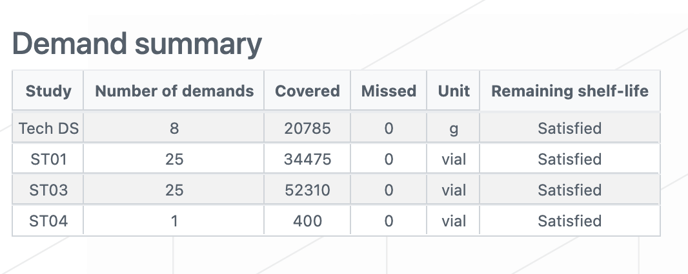
Demand summary
With this table, users can directly see for each study, the number of demands and if they are covered/missed, the unit of the product and if the remaining shelf life constraint could be respected for all demands or not.
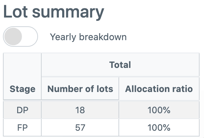
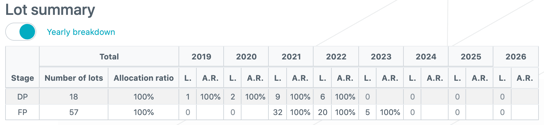
Lot Summary
With this table, users can see the number of lots for each stage (including initial lots, frozen productions and optimized lots), as well as their allocation ratio, i.e., the percentage of the lot that will be transformed into another product or allocated to a demand, to other products manufacturing or studies. In addition, users can visualize the yearly breakdown of the number of lots and allocation ration.
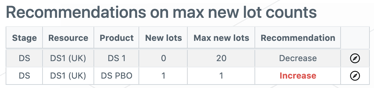
Recommendations on max new lot counts
Through this new table, recommendations are provided to users regarding maximum new lot count so that they have information on whether they should increase or decrease the maximum number of new lots for a given [resource-product] combination.
|
The system will recommend:
The “New lots” column excludes initial lots and frozen productions to cover only new optimized lots. If multiple production configurations have the same [production resource - product(s)] combination, the max lot count of those different lines are summed and the sum appears in the “Max new lots” table. |
|
Tip
|
Useful links: