This sheet allows you to access more advanced information on the lots and to build a table depending on the analysis needs. it gives you the possibility to choose which columns to display based on a set of lot characteristic and values. These additional filters are accessible in the left panel (see screenshot below).
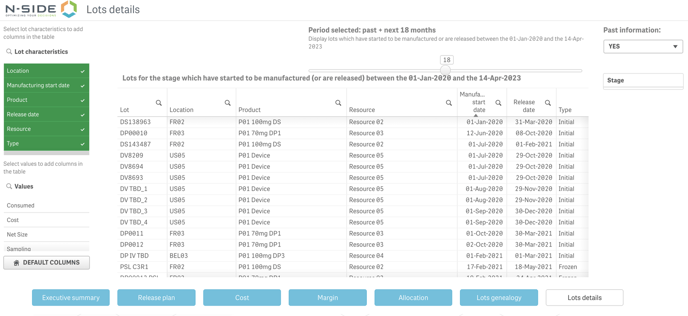
Building a custom table with these additional filters allow you to answer additional questions (per lot), for example:
-
What is the availability date?
-
What is the period of time during which the lot is transformed into a product of the next stage or allocated to demand? (Date first/last used)
-
What is the expiry? In case of expiry extensions, there could be multiple expiries, what is the maximal one?
-
What is the quantity breakdown?
-
How much goes to sampling?
-
How much is used as input of subsequent productions?
-
How much is used to fulfil a demand?
-
-
What is the manufacturing cost (fix and variable cost)?
Clicking on DEFAULT COLUMNS allows you to come back to the initial state (default columns).