![logo.svg]](https://knowledge.n-side.com/hubfs/content-lifeSciences/Logos/logo.svg)
Table of content:
1 - Enforce remaining shelf life constraints at given location (i.e. China constraint)
2 - Access the inventory level history when monitoring depot level inventories in the monitoring dashboard
3 - Ease of life improvements
3.1 - Plan - Ignore recruitment setup in a plan
3.2 - IRT setup - Define short window based on the lead time
3.3 - Recruitment setup - batch shift dates
3.4 - Initial state setup - Sum of rows computed in some tables
3.5 - Initial state setup - site group added in sites inventories
4 - Bug fixes and smaller updates
1 - Enforce remaining shelf life constraints at given location (i.e. China constraint)
🧩 What changed
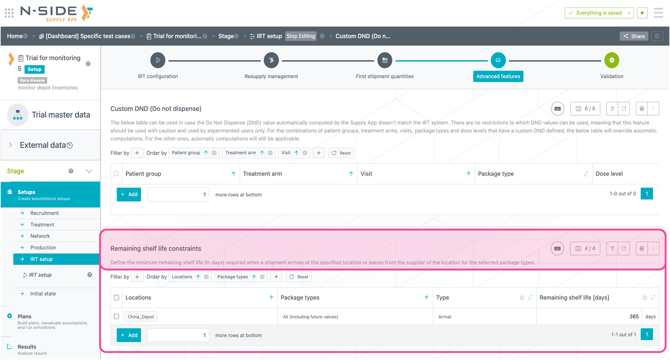
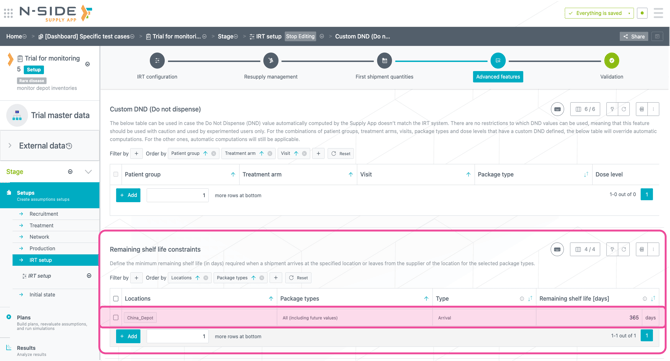
It is now possible to define remaining shelf life constraints directly in a dedicated table. You can specify minimum validity rules by location and package type, and choose whether they apply on arrival at a location or on departure from a location.
🎯 Value it brings/problem it solves
This enhancement removes the need for indirect MSP-based workarounds previously used to enforce remaining shelf life rules, for example in country-specific contexts such as China. It simplifies modeling, improves clarity, reduces manual errors, and ensures more consistent simulation results.
⚙️ Impact on current usage/point of attention
Simulations now account for remaining shelf life constraints in a more explicit and accurate way. For studies that previously relied on MSP-based workarounds, a slight reduction in overage may be observed due to improved shipment optimization.
🚀 How to leverage
Simply define the remaining shelf life constraint in the new table.
Example: China requests a minimum of 12 months of remaining shelf life for all kits arriving at China depot:
2 - Access the inventory level history when monitoring depot level inventories in the monitoring dashboard
🧩 What changed
It is now possible to display the past evolution of inventory actuals in the inventory monitoring tab of the monitoring dashboard.
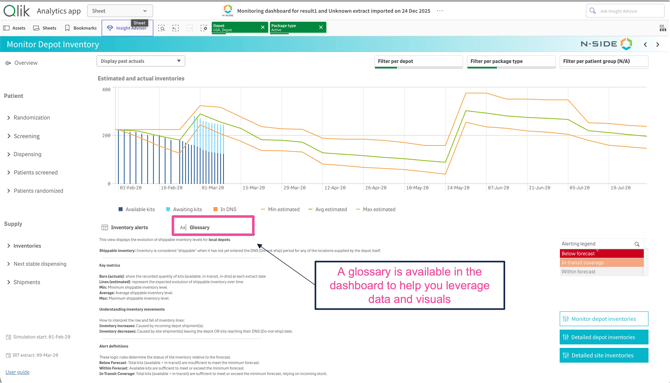
By default, historical actuals are hidden and only the latest inventory status is shown. To display past actuals, simply use the drop-down menu at the top of the chart.
🎯 Value it brings/problem it solves
Access to inventory level history helps better interpret depot inventory situations and understand what explains a stock level that is not aligned with the forecast. Users can quickly assess whether a situation requires manual intervention or additional attention, or if it remains under control.
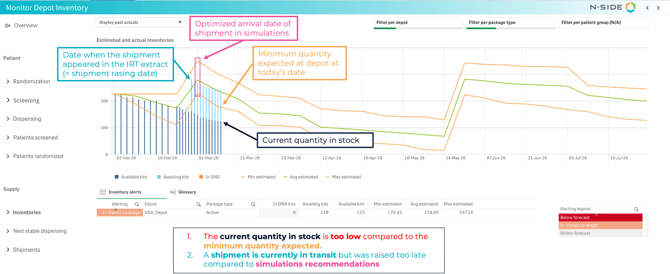
Example: a stock situation flagged as “In transit coverage” indicates that the current stock level is below forecast, but will be back above minimum once the shipment currently in transit arrives.
🚀 How to leverage
⚙️ Impact on current usage/point of attention
If you do not have an automatic IRT data extract connection but have access to past IRT extracts, you can still manually build the inventory history.
Older data are progressively aggregated to optimize visualization and performance:
-
After 20 days: data are displayed every 2 days
-
After 50 days: data are displayed every 4 days
3 – Ease of life improvements
Be more efficient within the Supply App
3.1 - Plan - Ignore recruitment setup in a plan
🧩 What changed
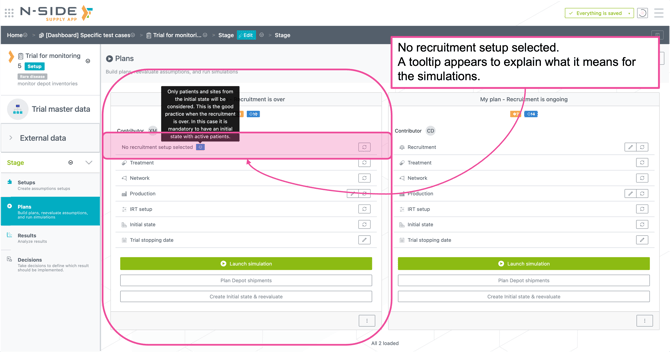
Users can now create a plan and launch simulations without selecting a recruitment setup. If no recruitment setup is selected, only patients and sites from the initial state are considered.
🎯 Value it brings/problem it solves
This is particularly useful in studies where the recruitment is over. Users will not have to create a recruitment setup and tweak it to avoid any extra patients to be recruited or sites to be opened.
🚀 How to leverage
When creating a plan: Skip the step where you select the recruitment setup
When updating a plan: Click on the switch button next to the recruitment setup and unselected the recruitment setup.
3.2 - IRT setup - Define short window based on the lead time
🧩 What changed:
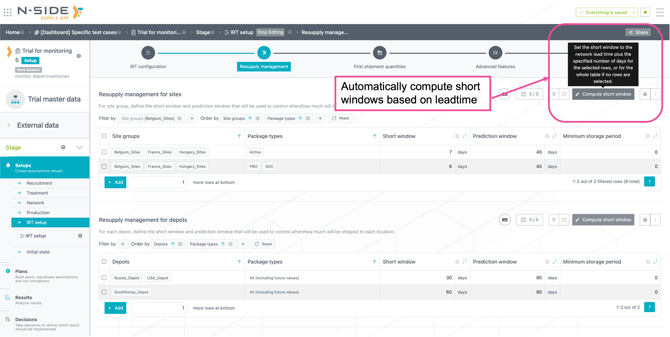
A helper is now available in the IRT setup to easily define the short window based on the lead time of a selected network setup + a defined number of days.
🎯 Value it brings/problem it solves
The short window parameter is usually linked to the lead time (example: lead time from Central depot to Belgium sites = 8 days → short window = 10 days).
Previously, users had to manually check lead times and compute the short window. This is now automated and updated in one click.
🚀 How to leverage
In the IRT setup, select the rows you want to update (if no row is selected, the whole table will be updated) and click on the button “Compute short window”. There, select the network setup from which you want to use the lead times and enter the number of days to add on top of the lead time.
3.3 - Recruitment setup - batch shift dates
🧩 What changed
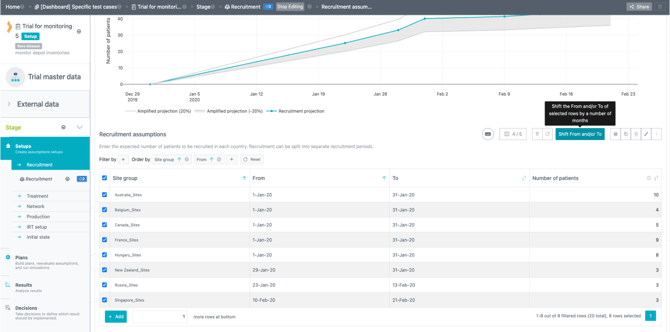
A new option allows users to shift a batch of dates on selected rows by a defined number of months.
🎯 Value it brings/problem it solves
This allows users to easily shift the start or end of recruitment by a number of months, for example when recruitment is delayed or when running alternative recruitment scenarios.
This action is also available in the following tables:
-
Buffer levels (IRT setup)
-
IMP release builder (Production setup)
-
Expiry extension (Production setup).
🚀 How to leverage
After selecting the rows to update, click on the new action button “shift from and/or to” and enter the number of months you want to shift.
ℹ️ To move dates back in time (rather than delaying them), enter a negative value.
3.4 - Initial state setup - Sum of rows computed in some tables
🧩 What changed
The total quantity is now displayed for the entire table, including rows on other pages when the table contains more than 10 rows.
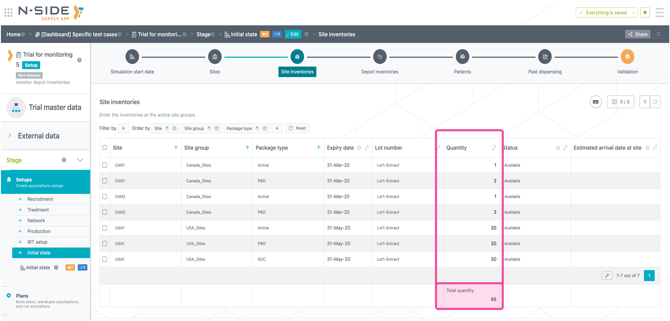
It will react to the filters applied to the table.
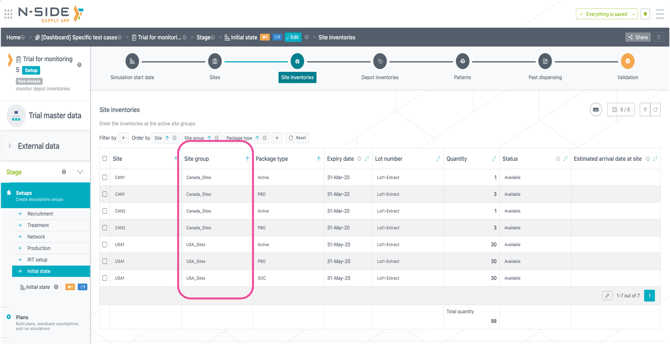
3.5 - Initial state setup - site group added in sites inventories
🧩 What changed
A “Site group” column has been added to the “Sites inventories” table and can now be used for filtering and sorting.
4 - Bug fixes and smaller updates
-
The Supply App training catalogue (PDF) is now available in the side menu of the application.
-
Cookies and legal terms must now be accepted once by all users when connecting to the Supply App.