![logo.svg]](https://knowledge.n-side.com/hubfs/content-lifeSciences/Logos/logo.svg)
Supply.2025.5 includes all enhancements originally planned for Supply.2025.4, which was not deployed.
1 – Ease of life improvements
2 - Reporting upgrades
3 - Depot shipments reporting improvement
4 - IMP releases allocation to relevant central depot
5 - Miscellaneous improvements and bug fixes
6 - Bug fixes and smaller updates
1 – Ease of life improvements
Be more efficient within the Supply App
1.1 - Recruitment setup - default metric update
🧩 What changed
The default metric when creating a new setup or adding a row in recruitment constraints is now Randomized instead of Screened.
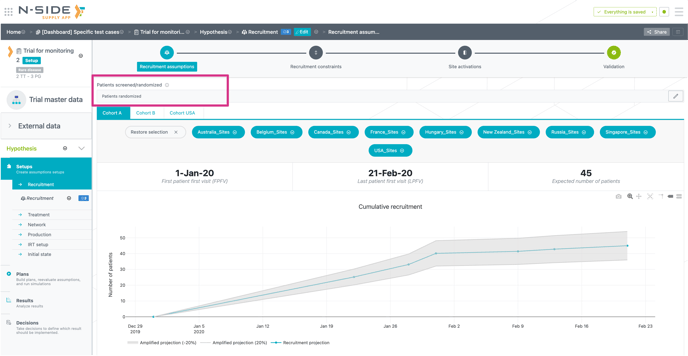
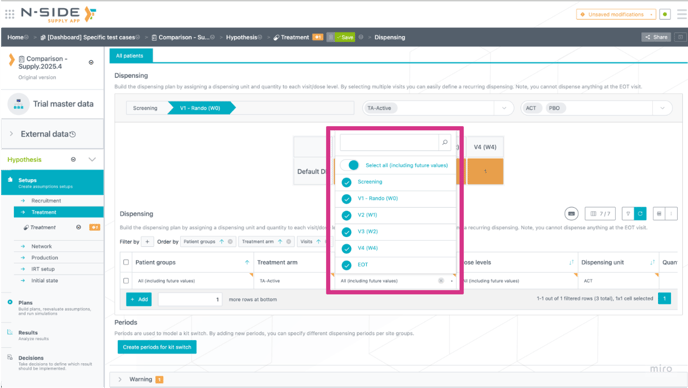
1.2 - Treatment setup - “Select All” option
🧩 What changed:
“Select all” is now available for:
-
Visits in the Dispensing table
-
Dispensing categories in the Dispensing per category view
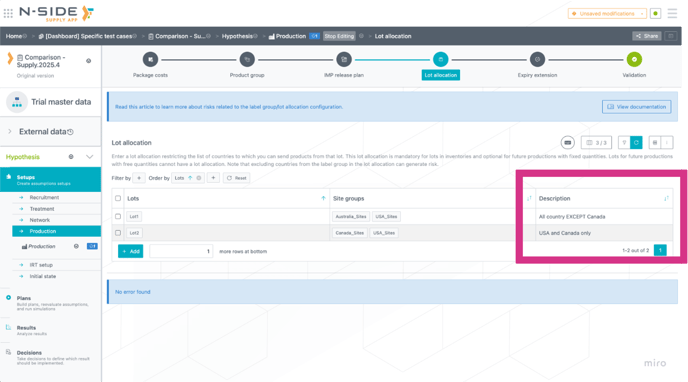
1.3 - Production setup - Lot allocation description, IMP release builder and release on weekend
🧩 What changed
1 - New wizard for release frequency and RSL scenarios. Create IMP release for multiple products at the same time.
2 - New description field in lot allocation. Add any relevant description to explain the lot allocation. This will ease handover between study managers and from one reevaluation to the next.
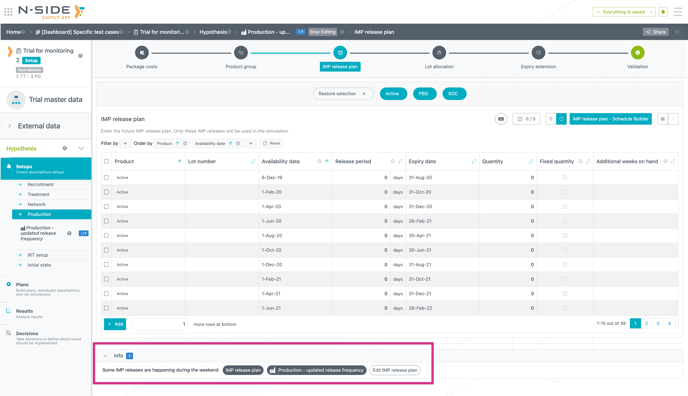
3 - Info message if release date is on a weekend. Easily spot if an availability date is happening during a weekend (Saturday and Sunday).
1.4 - Initial state - Creation eased:
🧩 What changed
Users can now update the IRT extract and matching directly from the initial state creation window. This will ease initial state creation and avoid back and forth steps.
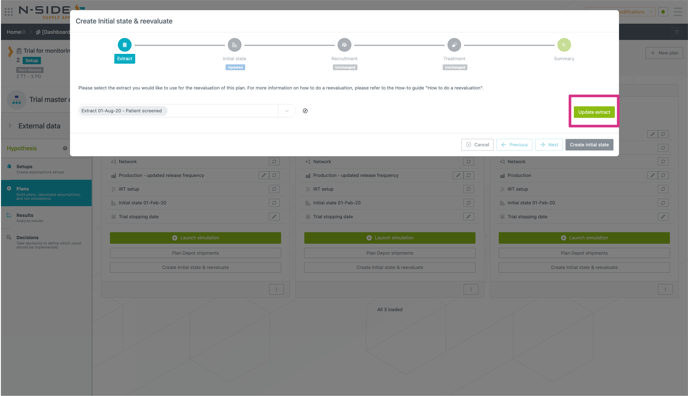
1.5 - External data - IRT Extract:
🧩 What changed
-
A Delete button appears when a patient has an empty treatment arm
-
Import/Export to Excel is now directly available on the Extract card. This will ease edits of very large extracts that could slow down the App when opened.
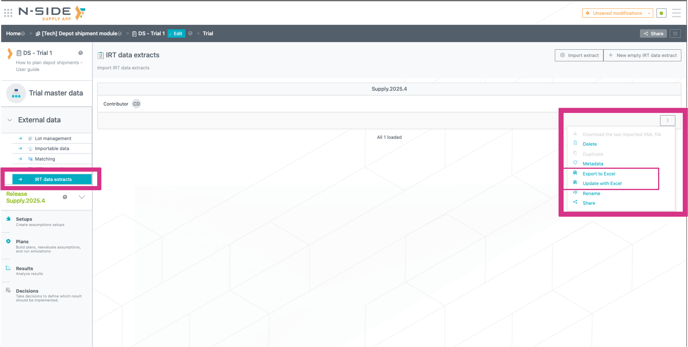
2 - Reporting upgrades
2.1 - Comparison dashboard - IMP plans comparison
🧩 What changed
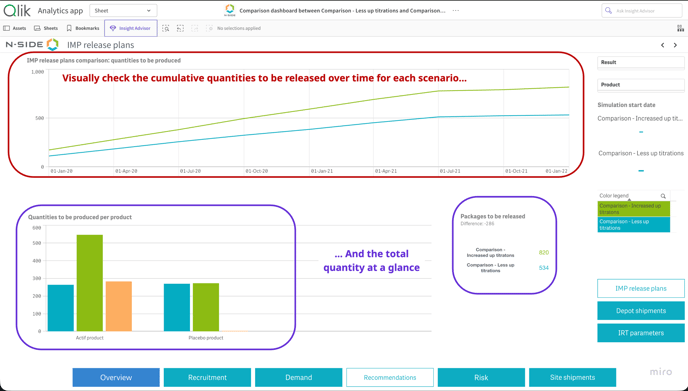
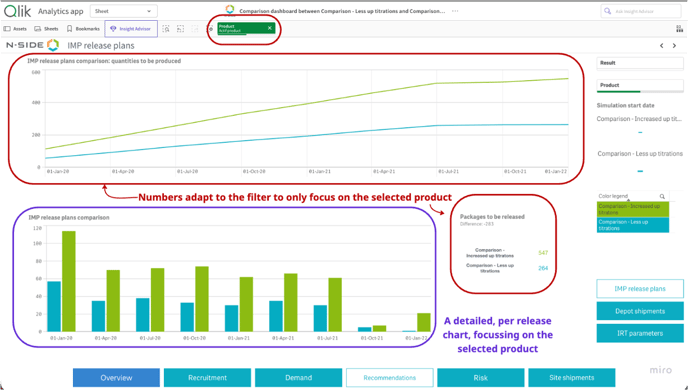
The IMP plan comparison view has been revamped to ease analysis and provide more insights to users.
Depending on wether a package type filter is applied, different visuals will be displayed:
-
No filter on product:
-
Global view of the cumulative quantity to be released over time
-
Total quantity to be released per product and overall
-
-
By filtering on one specific product:
-
The cumulative quantity chart adapts to the selected filter
-
A new view appears, displaying all releases and their quantities over time
-
⚙️ Impact on current usage/point of attention
This view only shows products to be released, not the current package in stock.
Current stock can be found in the executive summary of the comparison dashboard
2.2 - Results dashboard - View on future local depot stock level
🧩 What changed
-
A new dashboard view shows the projected evolution of shippable inventory at each local depot. Shippable inventory corresponds to kits that have not yet entered the DNS period for any site supplied by that depot.
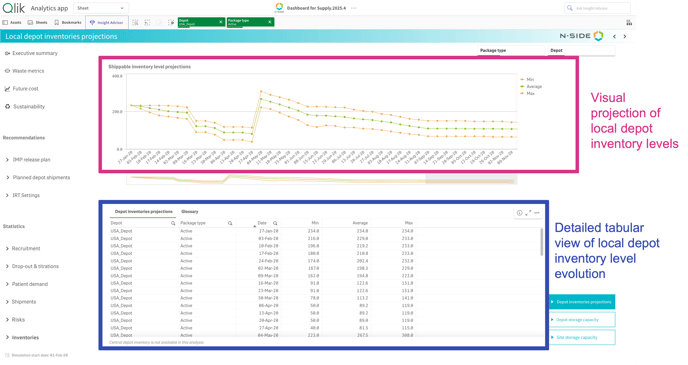
The upper chart displays the projected minimum, average and maximum shippable inventory levels over time.
The lower chart provides the corresponding weekly values for each depot to support detailed analysis.
⚙️ Impact on current usage/point of attention
This view is only available for results run on Supply.2025.4 or a more recent version.
Data is available for the first 12 months of the simulation and excludes the central depot.
🚀 How to leverage
This stock forecast can be used to explain the need for a depot shipment and to show when stock goes too low.
It can help understand resupply risk by looking at the forecasted stock level and make sure that results are safe and that stock does not drop too low in any local depot.
2.3 - Monitoring dashboard - Monitoring of patient screened
🧩 What changed
A new view is now available in the Monitoring dashboard to track screened patients (actuals vs forecast), in addition to the existing randomization monitoring.
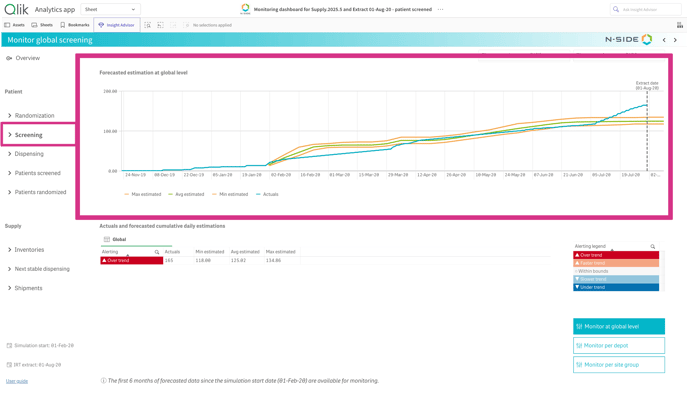
🎯 Value it brings/problem it solves
In some studies, especially those using smart prediction, kits are shipped as soon as a patient is screened.
This means that:
-
A faster-than-expected screening rate
-
Combined with a higher-than-expected screen failure rate
can empty depots even when randomization stays within expected bounds.
This new metric strengthens oversight for these scenarios, enabling earlier detection of risky screening patterns and helping prevent unexpected out of stock.
2.4 - Excel results report - New performance KPIs
🧩 What changed
New KPIs added to Executive Summary:
-
Allocation rate (global + per package type)
-
Waste percentage (global + per package type)
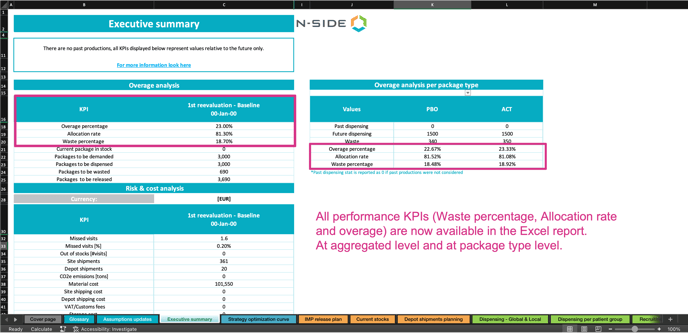
🎯 Value it brings/problem it solves
User can now evaluate trial performance using metrics aligned with their standard.
Displayed data is now aligned between the results dashboard and the Excel results report.
⚙️ Impact on current usage/point of attention
-
Raw data sheets and the Executive summary have been updated with the new data. All details about the Excel template update can be found on this page
-
All results generated before this Supply App version will have empty values for these new metrics.
-
Depending on if there is past production or not, the KPI will be global (past and future) or future only. This will be indicated in the text box just below “Executive summary”
2.5 - Excel results report - Product name in IMP release plan
🧩 What changed
The Product Name info is now included in the “ProductionSchedule” raw data.
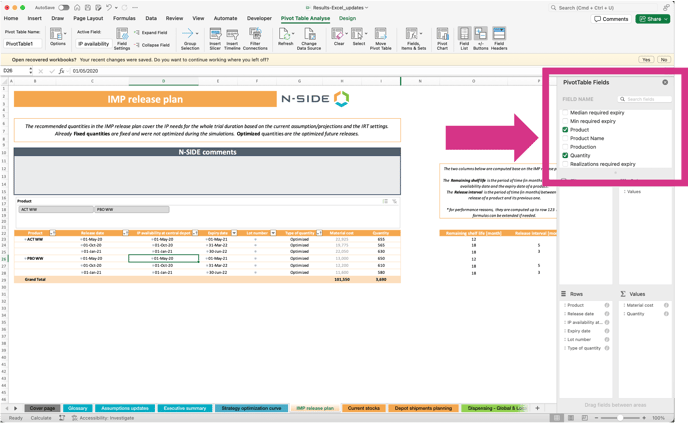
⚙️ Impact on current usage/point of attention
The raw data “Production schedule” has a new column.
2.6 - Global performance dashboard - navigation and data quality
2.5.1 - Easily remove label column from raw data view
🧩 What changed
Users can now select which columns to include or exclude from the raw data view in the GPD. 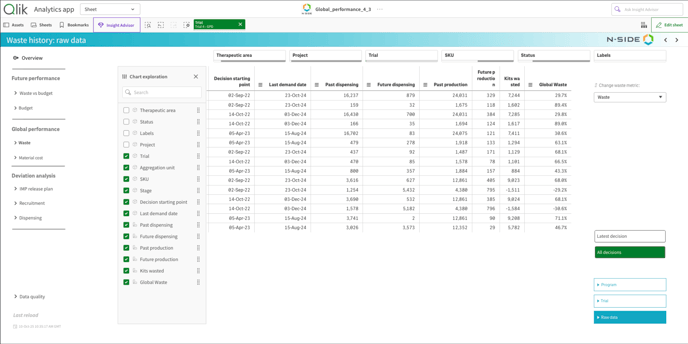
🚀 How to leverage
Remove the label column to avoid study duplication in the table, since a study with multiple labels would otherwise appear multiple times based on the number of labels applied.
Because labels can be created in a custom way by users, removing them when exporting data for analysis ensures that each study is counted only once.
2.5.2 Improved interface
🧩 What changed
-
Material cost view: The Past/Future split is now set as the default view.
-
Data quality: Rows with data quality issues can now be filtered to help users better isolate decisions and entries with past production inconsistencies or exclusions.
-
Glossary update for waste computation: Added clarification to explain the case related to updated result overage.
-
Color coding update: Modified color coding for the “Last decision” filter across all raw data sheets.
-
Navigation menu: When clicking on Budget, “Waste & Budget” now remains the active tab.
-
Detailed overview button: Font sizes have been standardized.
-
Budget view: Added a breakdown by cost category.
3 - Depot shipments reporting improvement
Unified depot shipment reporting (Excel, Results dashboard, API endpoint, depot shipment module)
🧩 What changed
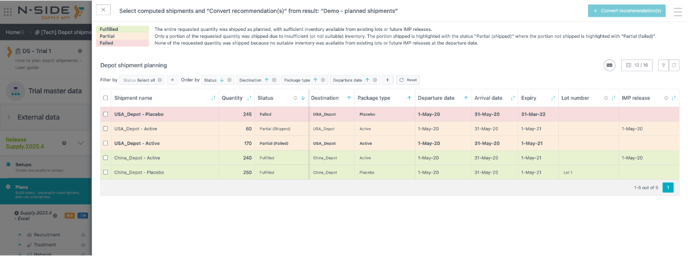
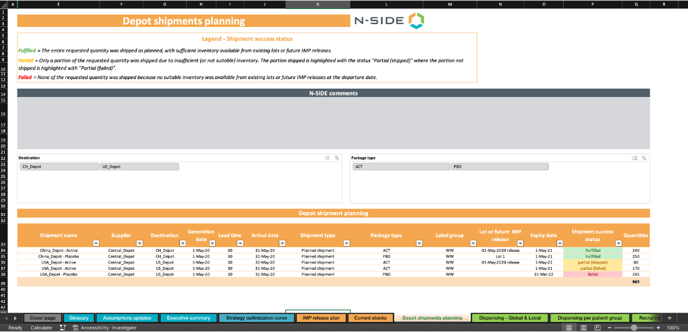
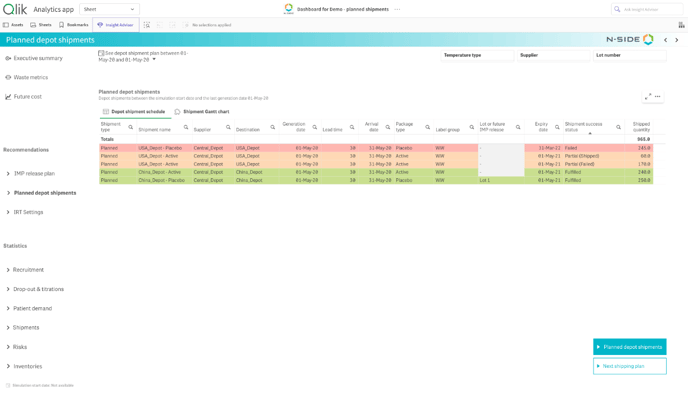
Depot shipment reporting is now fully unified across all tools: Excel report, Results dashboard, API endpoint and the depot shipment module.
All interfaces now display the same shipment information using a consistent set of status categories:
Fulfilled
The entire requested quantity was shipped as planned, with sufficient inventory available from existing lots or future IMP releases.
Partial
Only a portion of the requested quantity was shipped due to insufficient (or not suitable) inventory. The portion shipped is highlighted with the status "Partial (shipped)" while the portion not shipped is highlighted with "Partial (failed)".
Failed
None of the requested quantity was shipped because no suitable inventory was available from existing lots or future IMP releases at the departure date.
In the depot shipment module:
In the Excel result report:
In the result dashboard:
🎯 Value it brings/problem it solves
This change removes past discrepancies between reporting tools and provides a single source of truth.
Users can now interpret shipment data reliably, making the creation, validation and communication of depot shipment schedules significantly easier.
⚙️ Impact on current usage/point of attention
-
The Results dashboard no longer displays the separate “requested” and “shipped” columns.
-
Older Excel sheets are still included but hidden by default when opening the report.
4 - IMP releases allocation to relevant central depot
🧩 What changed
For studies with more than one central depot for the same temperature type and no label group to assign the product to ONLY one of the central depot, the Supply App now shows how many kits will be required at each central depot individually (only for free releases).
If a label group clearly assigns the product to ONLY one of the central depot, only this central depot will be linked to this release.
This makes the reporting more reliable, especially in complex supply networks.
⚙️ Impact on current usage/point of attention
This applies only if both conditions are met:
-
Multiple central depots exist for the same temperature type
-
There is no label group that already assigns product to a specific depot, meaning that the product could be required in both central depots to supply downstream local depots and sites.
The IMP release plan will be impacted as follows:
-
Free releases will be split to clearly show how many kits are required in each central depot.
- Fixed releases will be displayed are part of all central depot as the App will not split a fixed release
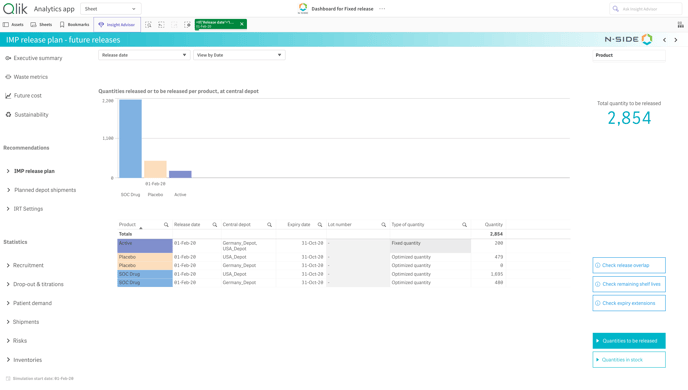
Active: Fixed release → No split between central depots
Placebo: Free release -> Nothing is required in Germany (but in theory kits could be needed there), the release is split in two.
SOC: Free release → Kits are needed in both depots, release split in two.
Impact on Excel
-
Excel: A new column appears in the raw data of the IMP release plan (ProductionSchedule). For now, this column is not yet visible in the pivot table, ONLY in the raw data.
5 - Miscellaneous improvements and bug fixes
5.1 -Inventory level historisation
In the IRT extract, a new table is now visible where stock level will be recorded day after day and stored for 6 months.
-
The table will be populated daily with the daily extract but it is also possible to manually fill this table with another extract
-
This feature will later be leveraged to display inventory level evolution in the monitoring dashboard and enhance the monitoring of local depots
5.2 - IRT resupply parameters API endpoints:
New API endpoints are now available to easily export the IRT resupply parameters from a result to external clients system. This will help with result implementation and ensure that IRT recommendations are followed, avoiding misalignment in the applied strategy.
-
Endpoints available:
-
Buffer levels
-
Short window
-
Long window
-
6 - Bug fixes and smaller updates:
-
Switch setup in the plan card is now properly working.
-
It is no longer possible to have a failed partial shipment with a “0” kits quantity.
-
Publishing to the portfolio is not allowed if another result is being published.
-
Discrepancies in departure dates in the strategic dashboard compared to the results dashboard.