![logo.svg]](https://knowledge.n-side.com/hubfs/content-lifeSciences/Logos/logo.svg)
Table of contents
- 1. Better capture shipments in transit
- 2. Set additional weeks on hand at central depot
-
3. Benefit from an improved overstocks distribution among future productions
- 4. Other updates
- 5. Bug fixes
1. Better capture shipments in transit
Previously, you had to perform extensive data manipulations to reflect shipments in transit in the Depot Shipment module. The Supply App lacked information about the estimated departure of these shipments and was unable to accurately model their transit. Consequently, shipments with an "awaiting" status were treated as available at the destination location on the simulation day.
Depot-to-Site shipments encountered a similar issue. However, there was no workaround since the "reserved shipments" feature does not apply to site shipments. As a result, kits were automatically considered available at the destination site, even if they were still in transit.
With this new version, N-SIDE updated its IRT specifications to receive more information on shipment in transit from IRT vendors.
❗However, please note that this is optional and needs to be implemented at the IRT provider side first.
A new "shipmentGenerationDate="mm/dd/yyyy" field is available in the inventory section of the .xml file (see examples below).
<DepotPackage depotRef=" " packageTypeRef=" " expiryDate="mm/dd/yyyy" lotNumber=" " status="awaiting" quantity=" " shipmentGenerationDate="mm/dd/yyyy"/>
<Site depotRef=" " packageTypeRef=" " expiryDate="mm/dd/yyyy" lotNumber=" " status="awaiting" quantity=" " shipmentGenerationDate="mm/dd/yyyy"/>
❗The Supply App will only import the shipment generation date for inventories with the "awaiting" status.
1.1. How does it work?
In the IRT extract, within the “Inventory” table, a new column called “shipment generation date” has been added (see image below).

💡 In case the IRT provider provided the “shipment generation date” in the IRT data extract, this field is automatically filled in.
Otherwise, you can manually add the shipment generation date.
When creating an initial state, the system uses this shipment generation date and the lead time (defined in the network setup, see image below) to compute the estimated arrival date automatically.
💡 You can also manually enter the estimated arrival date in the initial state if needed.
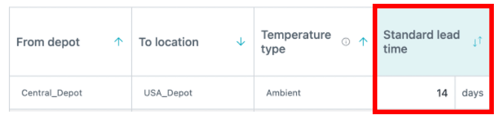
In the initial state, the Supply App will display this computed estimated arrival date in the Depot or Sites Inventories table (see image below).

All inventories with an estimated arrival date and an "awaiting" status are processed in the simulations as follows:
-
For depots: Inventories are considered as shippable to sites starting from the estimated arrival date.
-
For sites: Inventories are considered as dispensable to patients starting from the estimated arrival date.
With this updated approach to reflecting in transit shipments, there is no longer a need to enter reserved shipments in the Depot Shipment Module. As a result, these shipments are not displayed in the results as such but are part of the stocks.
2. Set additional weeks on hand at central depot
For each release, you can now enforce an additional coverage period, measured as "weeks on hand", in your IMP release plan.
This feature is particularly useful in scenarios where release delays are expected, as it helps ensure adequate stock availability. This enhancement also eliminates the need for users to manually add extra quantities to their release plans.
In the IMP Release Plan tab, an additional column titled "Additional Weeks on Hand" is available (see image below).
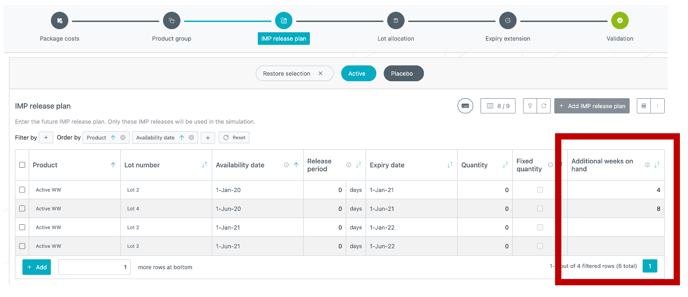
"Weeks on hand" refers to the amount of inventory needed to cover one week of demand at the central depot.
Here, you can specify the extra number of weeks of demand to cover with each release, supplementing the quantity calculated by the App. Demand at the central depot includes what needs to be shipped to local depots and sites connected to it. This is defined per package type and per release and is based on the forecasted average demand at the central depot.
This feature is entirely optional. Leaving the field blank will result in the feature being ignored.
Using this "weeks on hand" feature, the App calculates the required kits to cover the specified weeks of demand while ensuring they meet the minimum shelf life. These kits are then added to the release. In practice, the App incorporates an additional quantity of kits sufficient to cover the selected weeks of demand into the release.
2.1. Illustration with a simplified example
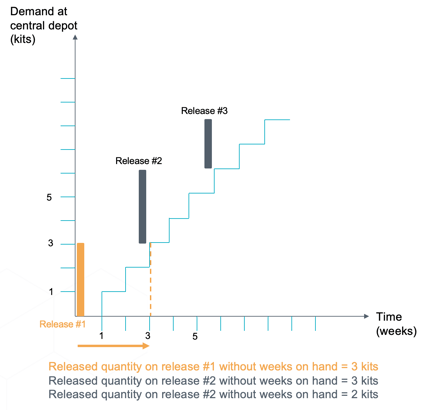
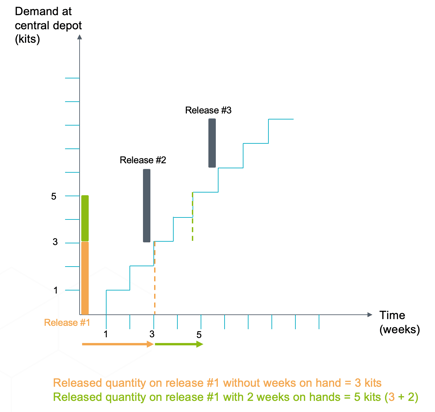
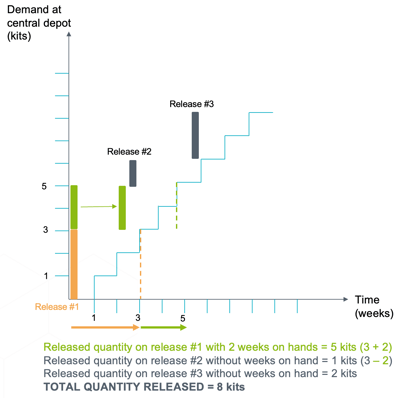
Let’s assume the following:
-
Demand at central depot is 1 kit per week,
-
3 weeks release frequency.
What happens without weeks on hands:
What happens with 2 additional weeks on hands on release #1:
2.2. Impact on the overage
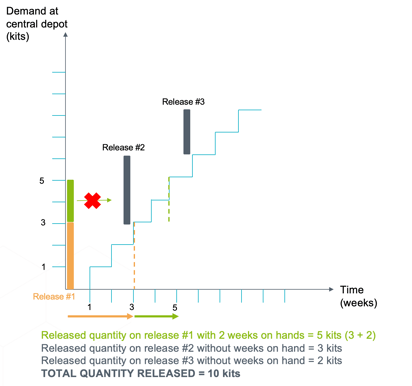
In summary, requesting a high number of weeks on hand while dealing with poor expiry conditions can increase global overage.
Adding extra weeks of supply means the Supply App anticipates quantities that would typically be produced in future releases. When calculating quantities for the next release, the App first checks whether any remaining inventory has a sufficient shelf life to be reused (a concept known as overstock, see section 3. below).
However, if kits cannot be reused due to insufficient shelf life, they will be discarded and replaced with newer kits to meet demand.
What happens if the expiry of the kits released in release #1 have a good enough expiry to be reused after release #2:
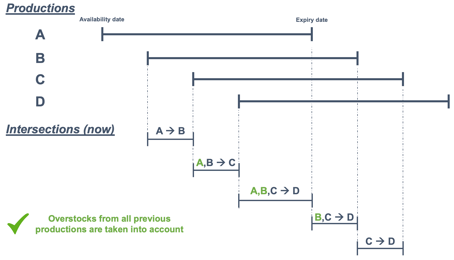
The Supply App algorithm has been enhanced to use overstocks from all previous releases, which can help slightly reduce waste in certain cases.
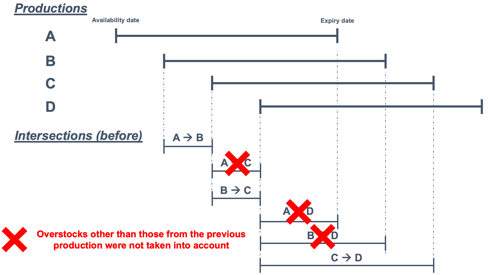
Overstocks represent the difference between the quantity produced by a given production and the patient demand before the next production of the same product.
Previously, overstocks different than those from the previous production were not taken into account to cover patient demand in future intersections (i.e., overlapping production periods, see image below). This suboptimal use of the overstocks could lead to higher production when increasing the release frequency, which was counter intuitive.
3.1. Which trials benefit from this optimized use of overstocks?
-
High variability in the simulations: overstocks are used to reduce the quantity produced to cover the variability.
-
High frequency release: having a high release frequency results in short period of time before another production is available. The higher the release frequency, the shorter the intersections, leading to smaller periods of time during which overstocks can be used to cover the demand.
-
Long remaining shelf life: having a long remaining shelf life combined with a high release frequency results in a lot of intersections. The greater the number of overlaps, the greater the number of intersections, leading to additional intersections where those overstocks can be used to cover the demand.
4. Other updates
Previously, while it was technically possible to use the same patient attribute for pre-randomization, evolution, and dispensing factors, the Supply App would re-roll the attribute each time. This meant the system did not treat patient attributes as persistent.
What does re-rolling mean?
For each stage (pre-randomization, evolution, dispensing), the Supply App independently determined the attribute based on predefined ratios. This could result in inconsistent attributes for the same patient.
For example, a patient might be considered male for the pre-randomization factor but female for the evolution or dispensing factor. A patient randomized according to the male ratio could titrate as female and receive female-specific dispensing.
❗This applied only to patients without a predefined attribute. Once attributes were defined in the IRT extract, they were no longer re-rolled.
Now, the Supply App "remembers" any determined attribute. If a patient is identified as male at pre-randomization, they will retain that attribute for the remainder of the simulation process (e.g., titrations and dispensing).
As a result, you can now safely use the same attributes across pre-randomization, evolution, and dispensing factors.
4.2. Inactive sites are no longer discarded
Sites in the initial state considered as inactive (meaning without patient or inventory) will no longer be discarded during simulations.
This was causing inconsistencies in the results outputs as the total number of sites was lower than expected.
4.3. Global performance dashboard: new "Waste cost %" metric
A new "Waste cost %" metric is now available in the Global Performance Dashboard. This metric provides a view of what percentage of the global manufacturing cost is due to the waste and provides insights about how much the waste costs compared to the total manufacturing cost.
The metric is available at program (see image below) and trial levels and per package type in the global waste view. 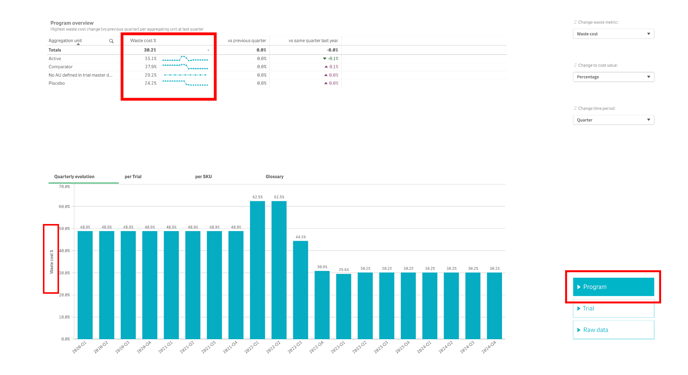
ℹ️ Waste cost % = "Waste cost"/"Material cost" with:
"Waste cost" = [ Total number of kits wasted (Past & Future) ] * [Package cost + labelling cost]
"Material cost" = [Total number of kits produced (Past & Future) ] * [Package cost + labelling cost] + Release cost
4.4. Result dashboard updates
4.4.1. Select different waste metrics
A new sheet called Waste metrics is now available in the Result dashboard (see image below).
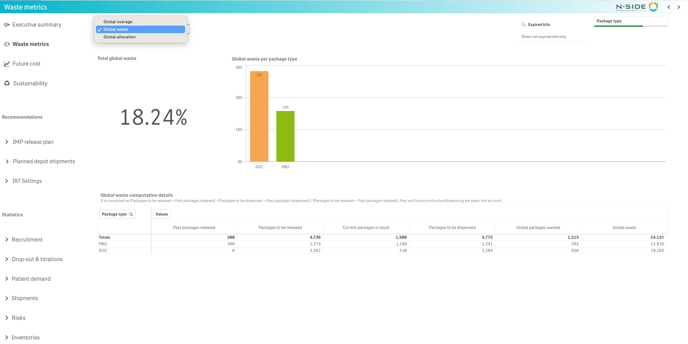
This sheet provides a refined view on the future waste and allows the selection of the most relevant waste metrics between:
-
Global overage
-
Global waste
-
Global allocation
❗If there is no past production, only the future waste metrics instead of the global ones will be available.
4.4.2. Better visualize expired kits
Filters are introduced to easily filter out expired kits in the Waste metrics and Inventories sheets (see images below).
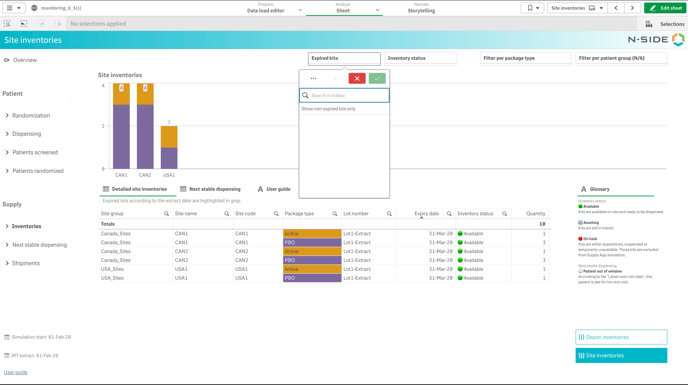
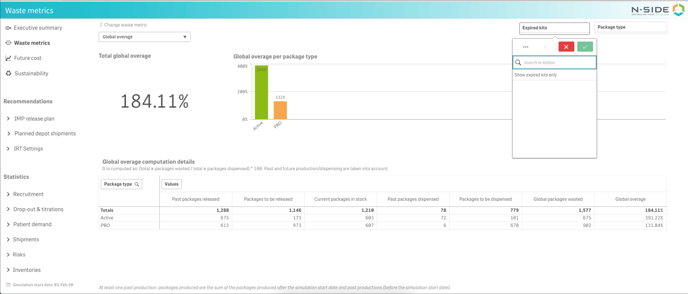
❗If there is no initial state, those filters are hidden as there cannot be expired kits without initial state.
4.5. API integration: site shipments
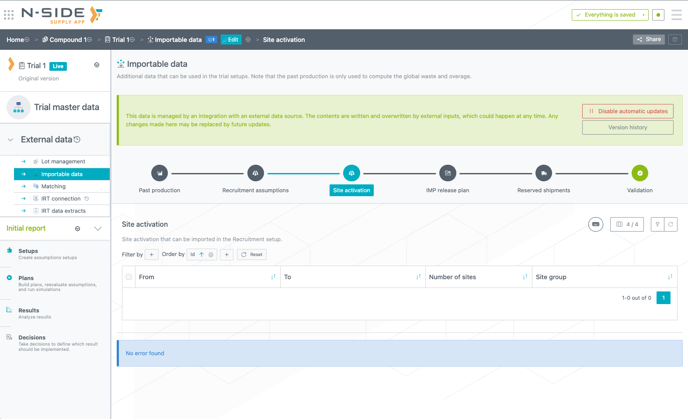
You can now use API to import sites activation table in the Supply App. This can be found in the Importable data section (see image below).
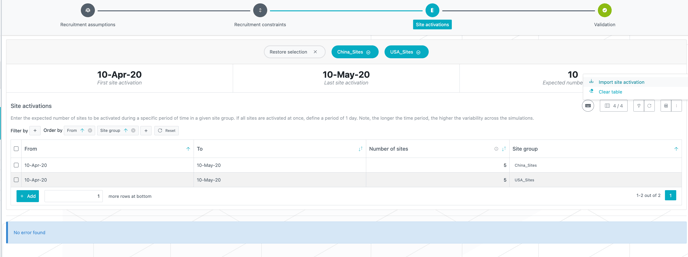
Once available, you can import sites activation in the recruitment setup through the Import site activation action (see image below).
5. Bug fixes
Recruitment setup:
-
Rows in the Recruitment assumptions table with the same "from date" and "to date" (daily recruitment) are no longer ignored during simulations
Network setup:
-
Adding warehousing cost from Master data no longer causes a fatal error.
Depot shipment module:
-
Required countries list is no longer empty after converting suggested shipments into planned shipments.
Reporting (Dashboards and Excel reports):
-
Global Performance Dashboard: In the Waste section, filtering on dates now shows correct waste values.
-
The Strategic dashboard can be exported to Excel.
-
Result dashboard:
-
In the IMP release plan sheet:
-
The central depot name is now displayed correctly in the Central depot column.
-
If a kit (from a certain temperature type) can be released at multiple central depots (according to the routes defined on the network setup), all possible central depots are now listed.
-
-
In the Recruitment sheet:
-
Terminology changed from “enrolled” to “screened”.
-
Patient screened (average) values are now properly reported in the dashboard.
-
-
In the IRT settings sheet: Site groups displayed in the table are now aligned with the location selected in the trial master data.
-
-
Excel results report: In the Patient expected at state sheet, the names in the stratum filter are now understandable.