![logo.svg]](https://knowledge.n-side.com/hubfs/content-lifeSciences/Logos/logo.svg)
Highlights
Leverage shipment statistics that are closer to business reality.
Ease the integration of external data in the N-SIDE Suite and their import in the setups.
Table of contents
1. Leverage shipment statistics that are closer to business reality
2. Ease the integration of external data and their import in the setups
1. Leverage shipment statistics that are closer to business reality
1.1. Model different resupply strategies for depots and sites
Setting the resupply parameter to “Products at minimum” to match the site resupply strategy generally resulted in an overestimation of number of depot shipments as this parameter was applied to both depots and sites.
With this new version, you are now able to set up a different resupply strategy for sites and depots in the IRT setup, i.e., it is now possible to have the “Products at minimum” resupply strategy for sites with the “All products” strategy for depots (see screenshot below).
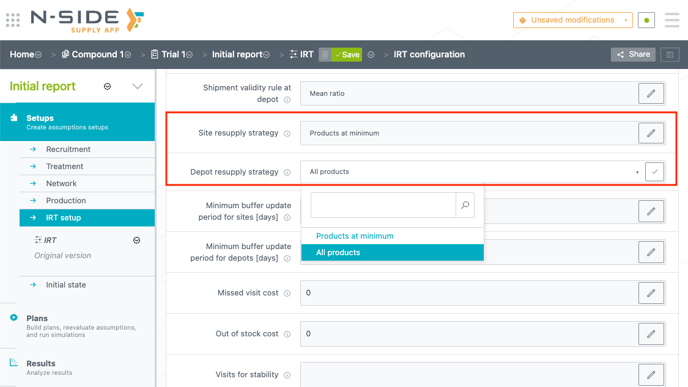
📝 Notes
-
The default resupply strategies are “All products” when creating a new IRT setup.
-
For existing trials, the resupply strategy parameter defined in the IRT setup will remain the same for both sites and depots. This means that the value set in the “Resupply strategy” field will be set as for “Site resupply strategy” and “Depot resupply strategy” when deploying the new version of the App.
1.2. Benefit from an improved algorithm to compute the number of depot shipments
The depot shipments algorithm has been improved to have forecasts that are less conservative and closer to business reality:
-
Shipments displaying a zero quantity in the recommendations are not counted anymore.
-
Shipments only covering expiry replacements during the trial duration are not counted anymore.
-
Shipments are scheduled at a fixed interval defined by the depot prediction window for each package type. If the prediction window is the same for some package types (with the same frozen period) their shipments will be aligned on the same date and frequency.
📝 Note
-
For results generated prior Supply.2023.1: to leverage this new way to compute the number of depot shipments, your need to re-run the associated plan.
1.3. Get site shipments statistics at a weekly granularity
You can now access site shipments at a weekly granularity for the next 12 months of your trial.
These are available in the Results report only in the following sheets: “Weekly shipping schedule” and “Weekly shipping quantities”.
📝 Notes
For results generated prior Supply.2023.1: the new sheets for weekly statistics per patient group will be empty.
The only way to leverage the new reporting granularity is to re-run the associated plan.
2. Ease the integration of external data and their import in the setups
2.1. Import setups data automatically
In case your IT system is linked to the Supply App, you can now automatically import data in the new “Importable data” section.
This new section is composed of:
-
The existing “Past production” table
-
Three new tables where you can respectively import:
-
Recruitment assumptions
-
IMP release plan
-
Reserved shipments
-
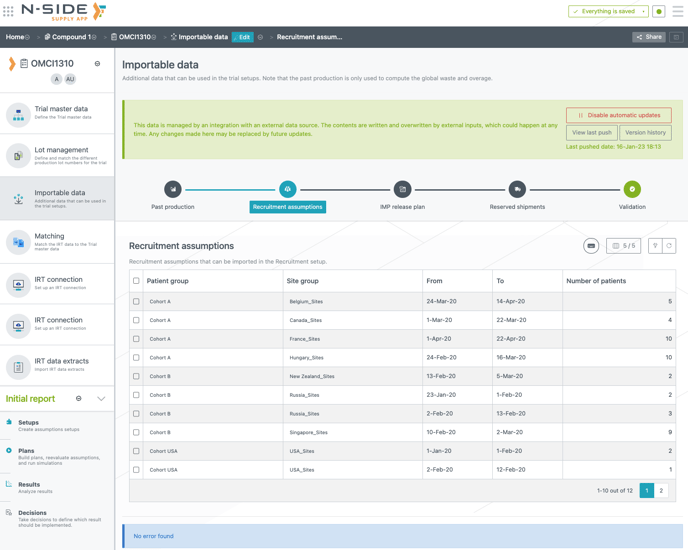
These tables can be filled automatically via an API integration or via a manual edit action. If data is pushed in these tables through an API integration, the content of the tables is replaced. This is pointed out with the banner at the top of the tables. The automatic import through API integration can be disabled if needed.
⚠️ Warning
Those 3 tables are not used in the simulations. They are used as an entry point in the Suite to review the data and ease the import in the corresponding tables from plans/setups.
To know more on how to enable API integration and configure your systems to connect to the N-SIDE Supply App, please reach out to your N-SIDE main point of contact or to the N-SIDE Support Team.
2.2 Review then import data in the setups
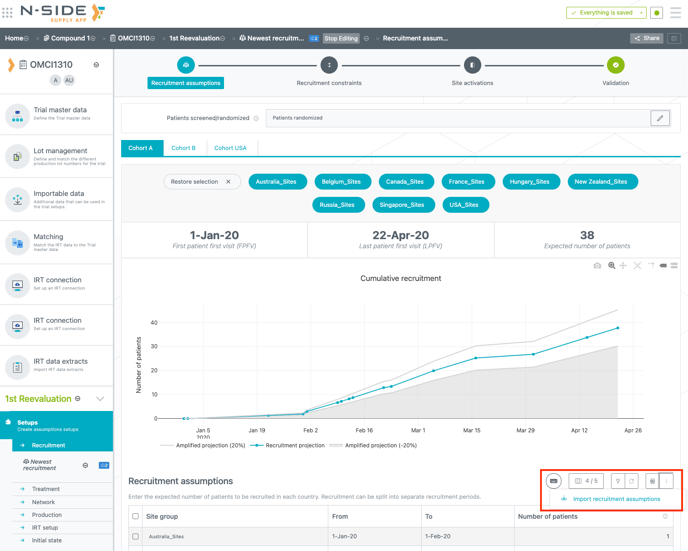
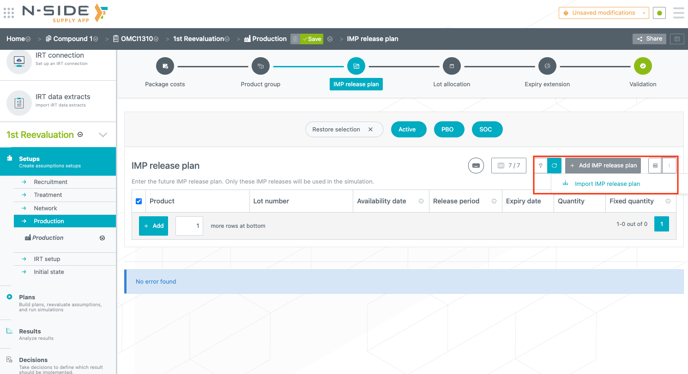
Once you reviewed the imported data, you can import it again in the targeted setups with a new import action, accessible through the “3 dots menu” (see screenshots below):
-
Recruitment setup → “Recruitment assumptions” table:
-
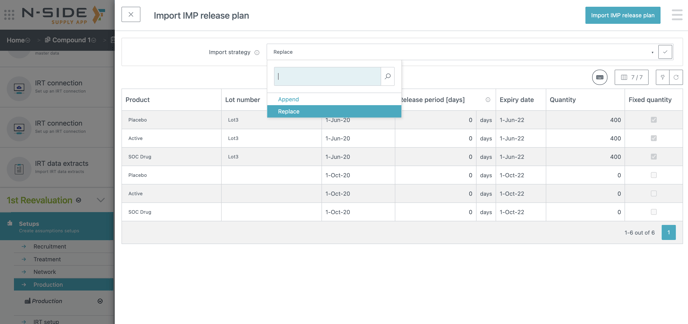
Production setup → “IMP Release plan” table:
-
Depot shipments planning → “Reserved shipments” table
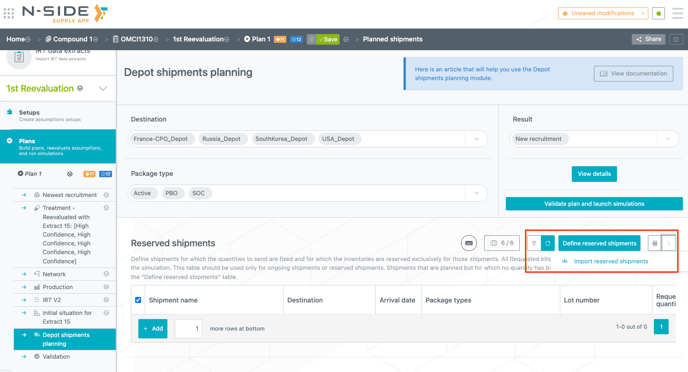
The import action opens a side panel where you can visualize data actually imported in the “Importable data” section and that will be imported within the setup/ module you selected.
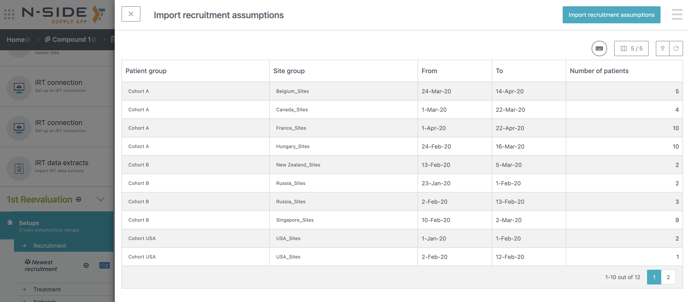
Importing data in both “Recruitment assumptions” and “Reserved shipments” tables will replace all existing rows with the ones from the “Importable data” section.
For the IMP release plan, you can choose between two import strategies:
-
Replace: Replace all existing rows with the ones coming from the “Importable data” table.
-
Append: For each product, append the table by keeping the existing production that will be released after the latest newly imported one. With this import strategy, the long term productions that were already part of the IMP release plan will remain.
3. Other updates
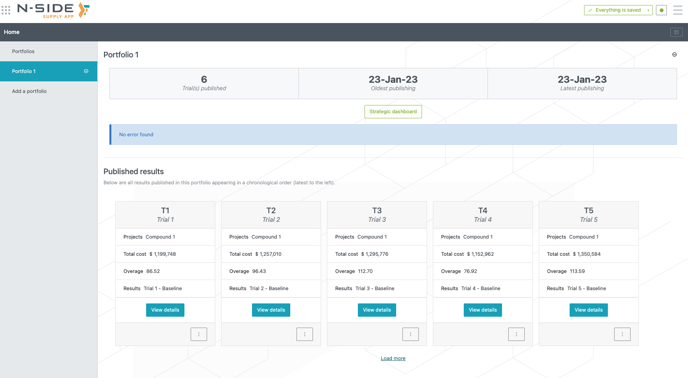
To improve the Supply App loading time performance, only the 5 latest trial cards within a portfolio are displayed by default and users can load more to see the other cards if needed. The strategic dashboard still contains all the trials published to the portfolio.
4. Bug fix
The following issue is now fixed:
The Supply App applies the same minimum storage period (MSP), short window (SW) and prediction window (PW) to several package types if they were entered on the same row in the “Packages types” table (Network setup).
You can now enter several package types on the same row in their Network setup and, at the same time, specify two different MSPs, SWs and or PWs for them in the IRT setup.
5. User documentation
The following articles are added (or have been modified) to enrich the documentation and help you in your usage of the N-SIDE Supply App: