![NSIDE_SupplyAPP_FullColorGray_Logo.png]](https://knowledge.n-side.com/hs-fs/hubfs/content-lifeSciences/Logos-LS/NSIDE_SupplyAPP_FullColorGray_Logo.png?height=40&name=NSIDE_SupplyAPP_FullColorGray_Logo.png)
Table of contents
- IRT credentials
- IRT connection
- IRT data extracts
- Matching
- Creating an initial state from an extract & Reevaluation
The N-SIDE Suite has been built to allow an easy integration with the IRT systems. IRT data extracts can be set up with the help of N-SIDE consultants and uploaded every day on a secured server by the IRT providers. Then, these data can be retrieved inside the Suite as often as daily to be used in simulations or for monitoring.
IRT credentials
The “IRT credentials” section is accessible from the Home page (see image below) for users with:
-
IRT Manager or IRT Reviewer role
-
All Access profile.
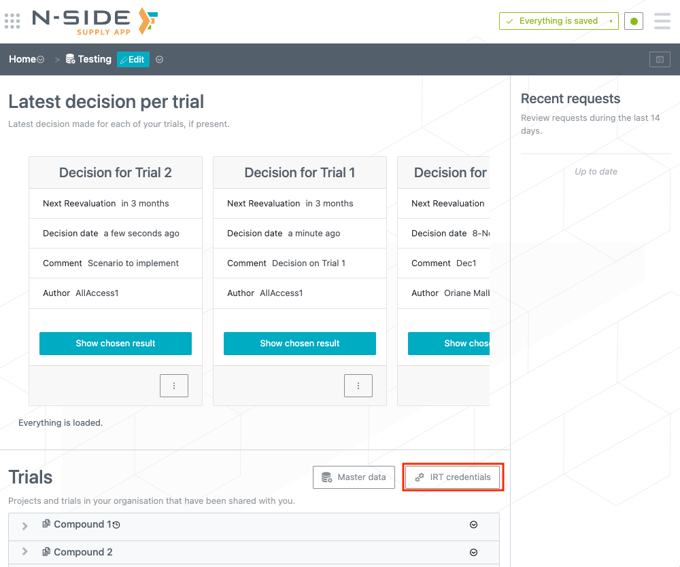
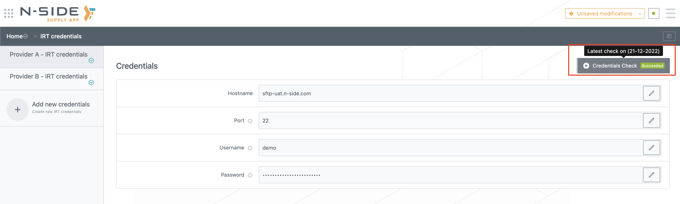
In this section, IRT Managers and All Access users are able to:
-
Create new IRT credentials and/or manage existing IRT credentials common to many trials (see image below).
-
Directly check the validity of your credentials in a single click (see red frame on the image below).
IRT connection
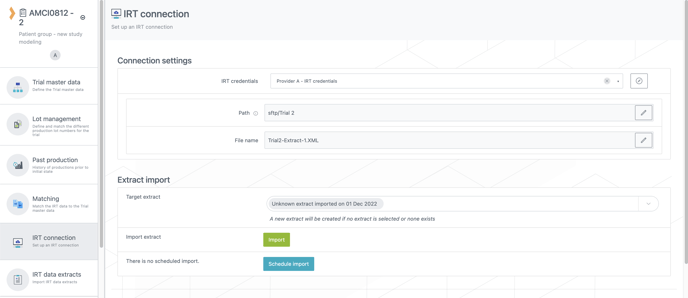
The connection with the IRT server will be done through a SFTP connection that is set up inside the trial view.
Connection settings
Only IRT connection managers profiles can set them up and the configuration needs 3 parameters:
-
The IRT credentials
-
The location of the file inside the server
-
The name of the file on the server.
Extract import
You can choose to target an existing IRT data extract or to create a new one.
The import can either be done manually by clicking on Import or scheduled to run on a regular basis by clicking on Schedule import.
⚠️ Warning
An IRT connection is strictly personal and cannot be shared with any other user as it could lead to connexion issues.
IRT data extracts
Extracts are databases containing standardized information coming from the IRT systems, to provide information on the trial actuals.
The information contained in an extract is:
-
Extract date
-
Trial name
-
Randomization table (only future assignments)
-
Sites info (including sites localization, status and activation date)
-
Patients status (including recruitment site, treatment arm, patient attributes, stata and screening/randomization dates)
-
Patients visits history (including visit dates, dose level and medication received)
-
Inventory at sites and depots.
❗ Important information
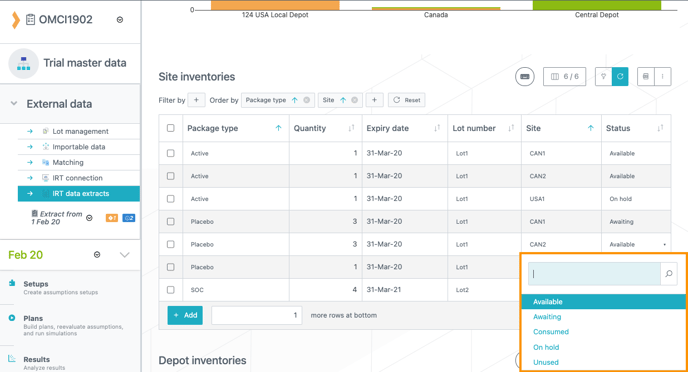
When an XML file is imported into the Supply App, the following inventory statuses are also imported into the IRT data extract (see image below):
-
Available = kits are available on site/depot and ready to be dispensed/shipped.
-
Awaiting = kits are still in transit to the location.
-
On hold = kits are either quarantined, suspended or temporarily unavailable.
-
Unused = kits will never be dispensed (damaged, lost, etc.).
On hold" and "Unused" kits are not used in the simulations.
Matching
The matching is the place where you define how each item in the extract is defined in the trial plan. As the IRT systems may not have the same naming as the Suite users, the matching is necessary to perform the translation and allow both systems to communicate.
The different items that should be matched are as follows:
-
Locations (depots and countries)
-
Supplies (package types and lot numbers)
-
Treatment (visits, treatment arms and dose levels)
-
Patient attributes (patient groups, factors and strata)
-
Reevaluation confidence levels (treatment and recruitment confidence levels) (non-mandatory).
Creating an initial state from an extract & Reevaluation
Creating an initial state from an extract should be done by using the reevaluation feature. Reevaluation is the process by which you can let the software adapt the inputs based on the trial actuals received in the IRT extracts.
noteTo learn how to do a reevaluation, please read these articles:
-
Advanced User: How to do a reevaluation (Advanced User)
-
Power User: How to do a reevaluation (Power User)