![NSIDE_SupplyAPP_FullColorGray_Logo.png]](https://knowledge.n-side.com/hs-fs/hubfs/content-lifeSciences/Logos-LS/NSIDE_SupplyAPP_FullColorGray_Logo.png?height=40&name=NSIDE_SupplyAPP_FullColorGray_Logo.png)
Table of contents
As with the company Master Data, some concepts will be defined at trial level to be used in trial models afterwards.
Simulation parameters
In the Simulation parameters tab, the user assigns a name to the trial and defines different parameters:
-
A maximum budget, overage, risk of missed visits and risk of out of stock: these values are only used as references and will trigger a
 /
/ messages when inspecting the simulation results if the constraints are not respected.
Products
In the Products tab, the user defines multiple concepts related to the medication used in the trial:
-
The package types that will be dispensed to patients during their treatment.
-
The label groups that can be applied to all or some of the package types. Label groups will be applied for the whole trial duration.
💡 Tip
- In cases the trial starts with a single label and then all package types are labeled with a worldwide booklet, only one worldwide label group should be defined and the single label should be defined as a specific lot allocation in the production setup.
-
The products, that are combinations of stock keeping units, package types and label groups. For example, a package type A for which two label groups can be applied will generate two different products.
-
The lot numbers, which are the different lot numbers to be used in the trial: past, present and future. In most cases, most of the future lot numbers will be undefined, which means that the user will have to define their name. It is ok to define only one lot number for the future, and use it for all future productions (except if some future productions have special restrictions on where they can be shipped).
Locations
In the Locations tab, the user imports all sites and depots that will be used in the network setup. Each location is already defined and linked to a country in the global Master Data.
Lot pooled trials
When defining site groups and depots in the Location tab of the Trial master data, you have the possibility to create lot pooled trials through the Create lot pooled trials action.
The Create lot pooled trials action will display a new Lot pooled trials table along with the creation of two new columns in the Site groups and Depots tables (see video below). If all rows in the Lot pooled trials table are deleted, the additional columns in the Site groups and Depots table will be removed.
Once created, the lot pooled trials can be associated with site groups/depots in the corresponding table.
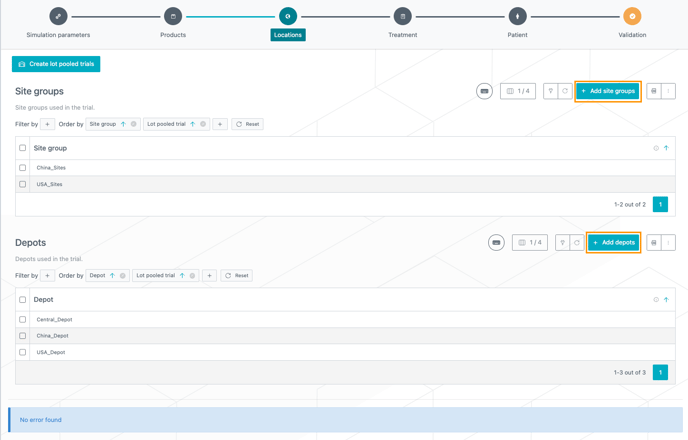
Adding site groups/depots is done through the dedicated actions next to the Site groups and Depots tables (see image below).
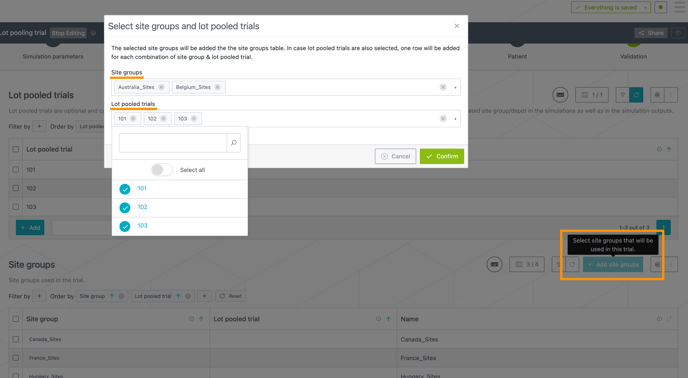
Clicking on any of those buttons opens a new window where you can select site groups/depots you want to associate with a lot pooled trial. The selected site groups will be added to the site groups table. In case lot pooled trials are also selected, one row will be added for each combination of site group & lot pooled trial, e.g., in the image below, 6 new rows will be created.
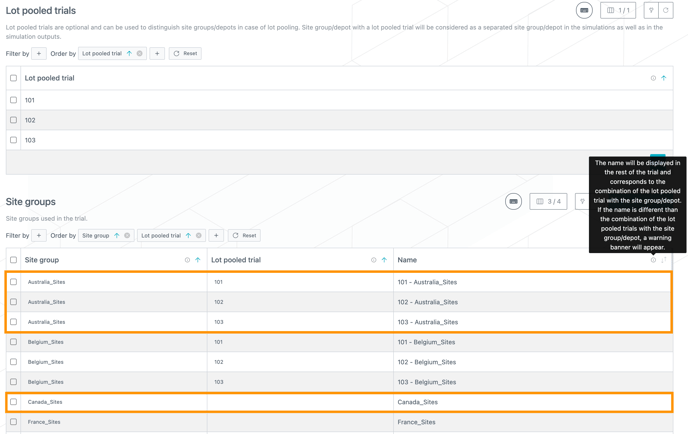
The combination of a site group/depot with a lot pooled trial will be considered as a separated site group/depot in the trial as well as in the simulation outputs. Site groups/depots will be displayed with their names defined in the Name column (see image below).
❗To avoid any confusion, it is important to distinguish the site groups/depots of lot pooled trials from the others:
-
By default, the name will be the combination of the lot pooled trial (if any) and the site group/depot.
-
Names can be manually updated to reflect the site group/depot name in reality.
-
If the name is not aligned with the default rule, a warning banner will appear and users can apply the default rule through the Align names and codes action (see video below).
You can use lot pooled trials specific locations to model:
-
different recruitment assumptions (number of patients, site opening, targets) as displayed in the video below),
-
different resupply management (windows, buffers),
-
lot allocation per specific site group of one trial.
Table filters can facilitates the information input per lot pooled trials or per country (see video below).
⚠️ The lot pooled trials feature can only be used with an IRT integration that is able to manage lot pooled trials and cannot be used as a tweak for other purposes (see following examples).
|
With an IRT integration for lot pooled trials
|
Without an IRT integration for lot pooled trials
|
Treatment
In the Treatment tab, the user defines:
-
The patient groups to be used for the recruitment. It will be possible to define different recruitment rates per patient group. Typically, this concept can be used to represent cohorts being enrolled separately. There should be at least one patient group defined.
-
All the patient visits to consider in the trial, including the (non-dispensing) end-of-treatment visit. Additional visits for safety follow-up treatments will be defined inside the trial setups.
-
The treatment arms: there should always be at least one default (e.g. "Not yet randomized") treatment arm.
-
The initial treatment arm, that is, the treatment arm on which patients start. This treatment arm will typically be the “Not yet randomized” treatment arm, if defined above.
-
The dose levels: if there are no dose levels, the user has to define a default dose level that will be constant during the whole trial duration.
-
The initial dose level, that is, the dose level on which the patients start.
Patient
In the Patient tab, the user defines the patient characteristics that will have an impact on the treatment to be received, namely:
-
Characteristics that influence the randomization (e.g. strata).
-
Characteristics that influence the medication to be received (e.g. weight groups, BSA groups, age).
-
Characteristics that influence the titration/dosage probabilities (e.g. age).
These will be defined as patient attributes, that will each have attribute categories. For example, an attribute can be “strata”, and its categories can be “Female” and “Male”. By default, a trial will be created with two attributes: strata and weight factor, each having one default attribute category.
💡Tip
You can change and rename the two "Strata" and "Weight factor" default attributes, if needed.
The user also has to choose a patient attribute to define a pre-randomization factor that will impact the randomization ratio (see Treatment setup - Treatment visits & Randomization ). If there is no patient attribute impacting the randomization, a default patient attribute still has to be chosen.
❗If the dispensing of the trial is impacted by two or more patient attributes, please combine them as a single dispensing factor that represents them all. Combinations of attribute categories should then also be defined to correctly model the dispensing.
📖 To learn more about this and how to use patient attributes, please read this page : How to use patient attributes