![NSIDE_SupplyAPP_FullColorGray_Logo.png]](https://knowledge.n-side.com/hs-fs/hubfs/content-lifeSciences/Logos-LS/NSIDE_SupplyAPP_FullColorGray_Logo.png?height=40&name=NSIDE_SupplyAPP_FullColorGray_Logo.png)
Table of contents
Patient evolution probabilities
This tab is dedicated to the patient evolution in the trial, and more precisely on titrations, skipped visits and discontinuation.
📝 Note
For more information on how to enter data in these tables, please read this article: How to enter patient evolution probabilities
Titrations
Titrations are defined as the transition from a dose level to another in between visits. The algorithm needs to have probabilities assigned to those transitions to be able to simulate patient treatment.
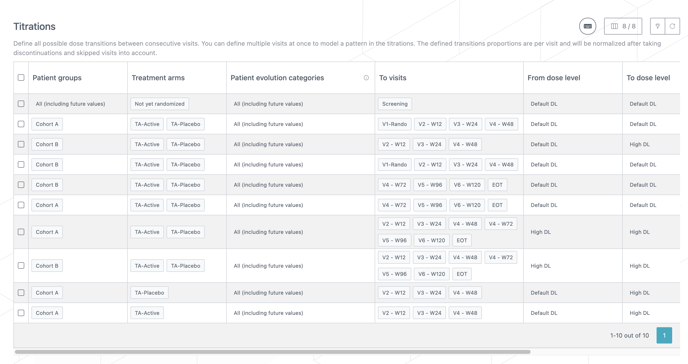
A transition is defined by 8 elements:
-
Patient groups: patients can observe a different titration scheme depending on which patient group they belong to.
-
Treatment arms: patients can observe a different titration scheme depending on the treatment they receive.
-
Patient evolution categories: patients might titrate differently based on some characteristics. The patient attribute impacting titrations is called the patient evolution factor and is selected from the patients attributes defined in the Trial Master Data. This selection is done in the Randomization tab within the treatment setup.
For more information on how to use of patient attributes : How to use patient attributes
-
The second visit of the transition, the first visit will be deduced from the visits list.
-
The dose level that patients are starting the transition from.
-
The dose level that patients are ending the transition on.
-
The probability of observing that transition. They are expressed as ratios, which means that the Suite will check how much more probable some transitions are compared to others.
-
Prediction mode: You can decide to predict (or not) each transition (row) in the table. The modes can be set as:
-
Default: The system only predicts kits for transitions where patients stay on the same dose level and uses buffers to cover for the probability of down/up titrating.
-
Predict transition: The system predicts the transition so that buffers do not need to do so. The “predict transition” mode applies to each titration individually. For example, if you want to predict one up-titration and one down-titration for a specific dose level, you will need to enter two lines: one for the up-titration and one for the down-titration
-
💡 Tips
- The probability that a patient stays on the same dose level is also a transition that needs to be entered in the table.
- Multi-selection can be used on treatment arms, patient attributes and visits if the same patient behavior applies to several of them. If applicable, multi-selection should be used to reduce the size of this table.
❗Important information
- If multiple patient groups are defined in the same row of a table, the reevaluation values will be computed per patient group and split on different rows.
- The system only predicts from the previous visit to the next one.
Skipped visits
A skipped visit transition is very similar to a titration (see above), but differs in three ways:
-
The transition can be done between two non-consecutive visits.
-
The probabilities can be defined per patient group, that can be cohorts for example.
-
The probabilities should be entered as percentages, in a range from 0 to 100. The percentage of patients that do not skip visits will follow the titration scheme defined in the Titrations table.
Note
Skipped visits can be used to model patient groups with different visits schedules, see: What if patient groups have different visit schedules?

Discontinuation probabilities table
Discontinuation from treatment is always a possibility in clinical trials, and it should be entered in the trial model. The discontinuation probabilities can either be entered visit by visit, or over a sequence of visits. In the first case, the column from visit should have the same data as the column to visit. In the second case, the probability entered will be split across all the visits contained between the "from visit" and the "to visit" visits.
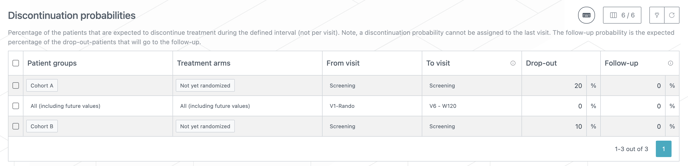
❗A patient that skips a visit ignores the associated drop-out.
You can enter different inputs per patient group and per treatment arm. If the same discontinuation probabilities apply to all patient groups or treatment arms, multi-selection on the treatment arm column can be used.
📝 Notes
- If multiple patient groups are defined in the same row of a table, the reevaluation values will be computed per patient group and split on different rows.
- If a follow up stage exists in the trial, you should also define what percentage of the patients withdrawing from treatment will enter the follow up stage.
Global evolution graphs
On top of the three tables described above are evolution graphs that capture the expected patient evolution through the trial.
You can use filters for patient groups and treatment arms to focus on specific graphs (see image below).
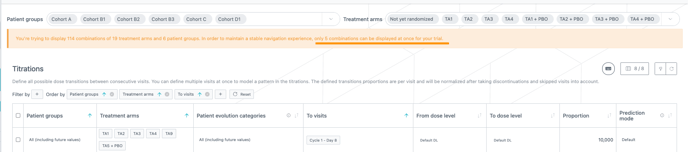
The Supply App calculates graph complexity before loading the page.
For data-heavy trials, a banner is displayed instead of the graph, informing you about the number of graphs that can be loaded at once for that trial (see image above).
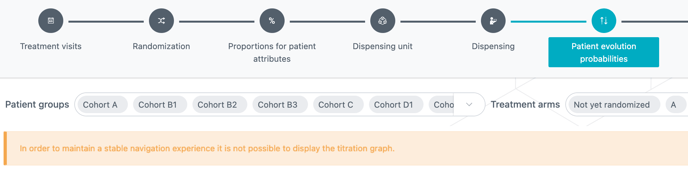
If the complexity of a trial exceeds the maximum loading time, the graph is not displayed. A banner is displayed instead of the graph informing you about this situation. This way you are no longer blocked trying to load a graph that will display constant "Page unresponsive" messages (see image below).
 When the complexity of a trial does not have an impact on the performances, the graphs are loaded all at once. However, you can still select a specific combination of patient group and treatment arm to facilitate your analysis.
The graphs show the percentage of patients to be expected at each visit and on each dose level during the treatment, after the dropout defined for their previous visit. Transitions are represented by the grey areas, and the discontinuations are represented in orange.
Different actions can be performed on this graph:
-
Scrolling left and right.
-
Clicking on the graph of a specific treatment arm will zoom in on it.
-
Clicking on a dose level shows the proportion of patients on this treatment arm at each visit.
-
Clicking on a visit shows the split of proportions of patients between dose levels at this visit.
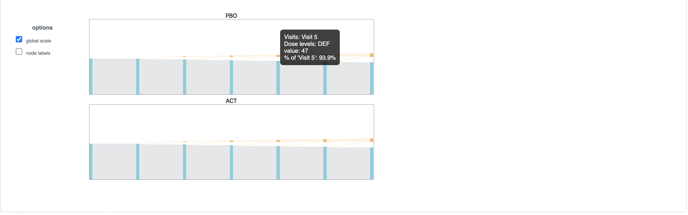
The purpose of these graphs is to allow you to double check that the data were entered properly, by having a look at how the patients are expected to behave during treatment.
❗ The numbers shown in the graph are not results of simulations but forecasts, so they should be taken as indicative values and not results. Depending on the actual state of all the patients already active in the trial, the simulation results might differ.