![NSIDE_SupplyAPP_FullColorGray_Logo.png]](https://knowledge.n-side.com/hs-fs/hubfs/content-lifeSciences/Logos-LS/NSIDE_SupplyAPP_FullColorGray_Logo.png?height=40&name=NSIDE_SupplyAPP_FullColorGray_Logo.png)
Shipments
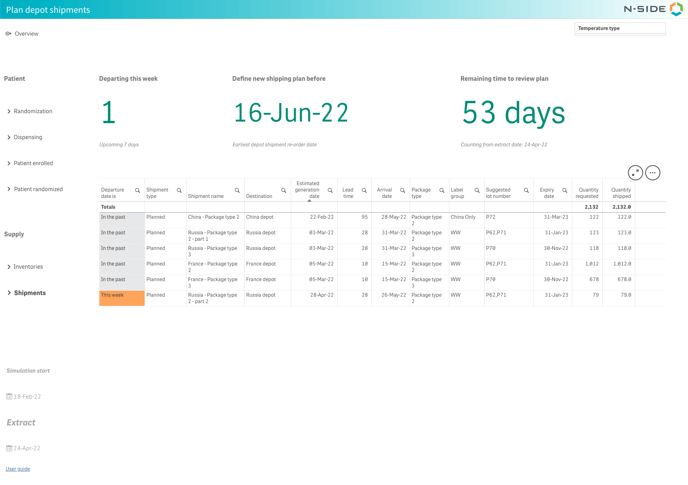
With this view, you are able to follow up the implementation of the depot shipments planning that was defined with the Depot shipments planning module.
In the top of the sheet are displayed three indicators :
-
Number of shipments departing this week (sum of shipments with a departure date falling during the 7 days after the extract date)
-
Earliest depot shipment re-order date (a new shipping plan should be defined before this date)
-
Remaining time to review the depot shipments plan (counting from the extract date).
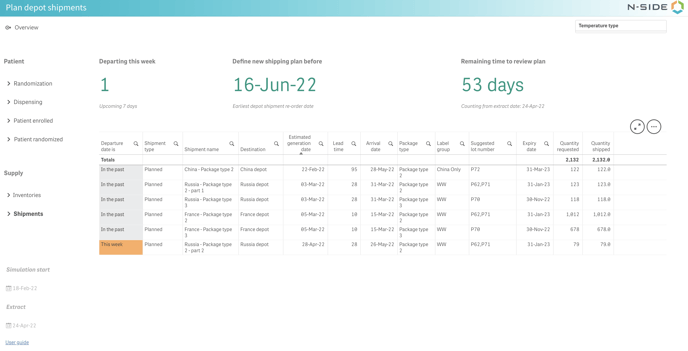
Below the indicators, a table displays information on planned shipments that were scheduled. Depending on the arrival date, shipments are associated to color-coded indicators :
-
"In the past": shipments arriving in the past (before the extract date).
-
"This week": shipments arriving during the next 7 days after the extract date.
-
"In 8 days or more": shipments arriving 8 days or more after the extract date.
You are also able to filter the depot shipments by temperature type (see image below), which can be very helpful when there is a multi-network in the trial.