![NSIDE_SupplyAPP_FullColorGray_Logo.png]](https://knowledge.n-side.com/hs-fs/hubfs/content-lifeSciences/Logos-LS/NSIDE_SupplyAPP_FullColorGray_Logo.png?height=40&name=NSIDE_SupplyAPP_FullColorGray_Logo.png)
Table of contents
Program level
In the Program view (see image below), you can perform a global waste retrospective analysis for kits shared over multiple trials by selecting aggregation units, or SKUs, shared among different trials. You can see the evolution of waste per quarter, per trial or per SKU (see red frame in the image below).
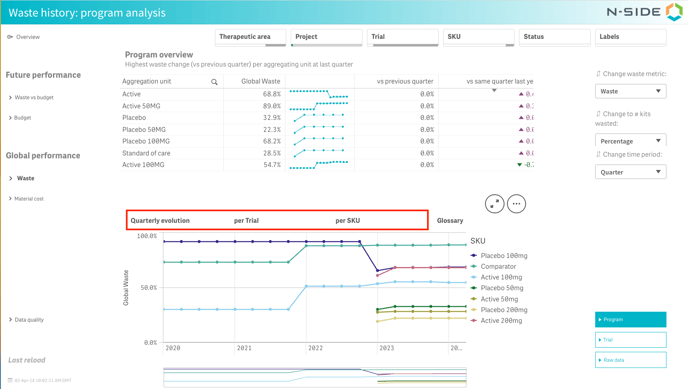
With the 3 filters on the right side of the view (see image above), you can:
- Change the waste metric (see definitions below): overage, waste, waste cost, allocation.
- Change the value of the waste metric: expressed as a percentage or a number of kits wasted.
- Change the time period: quarter, month, year.
📝 Note
The relevant decision considered for each period is the decision with the most recent starting point during that period. If no decisions were made during a specific period for a specific trial, the most recent decision from the previous period will be used instead.
Metric definitions
|
Global waste metric |
Formula (# = number of) |
|---|---|
|
Overage |
#packages wasted / #packages dispensed |
|
Allocation |
#packages dispensed / #packages produced |
|
Waste |
#packages wasted / #packages produced |
|
Waste cost |
#packages wasted x (Labelling cost + Packaging cost) |
-
#packages wasted
= (past productions + future productions) - (past dispensing + future dispensing) -
#packages dispensed = past dispensing + future dispensing
-
#packages produced = past productions + future productions
💡You can always find the definitions of the 4 main metrics in the Glossary tab.
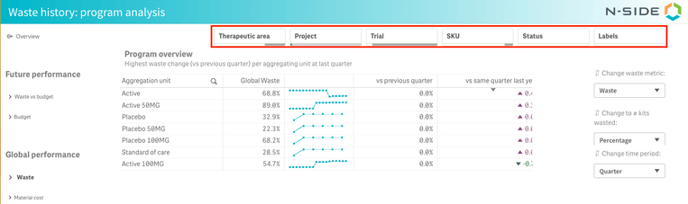
To help you perform your analysis, you can use the relevant filters at the top of the sheet (see image below). Those filters are applicable to all sheets of the dashboard.
This history of waste metric across all trials can help answer the following questions:
-
What is the evolution of the aggregated waste metrics across my portfolio or across specific aggregation units ?
-
Which trial is driving the evolution of the waste?
-
For which trial does the waste increased the most compared to the previous decision?
-
For which trial did the waste increase the most compared to the baseline (first decision)?
Trial level
In this view, you have access to the history of waste metrics at trial level with an additional aggregation unit or SKU level of granularity (see red frame in the image below). This view can help you deep dive into the waste evolution of a specific trial and identify what could be driving potential deviations.
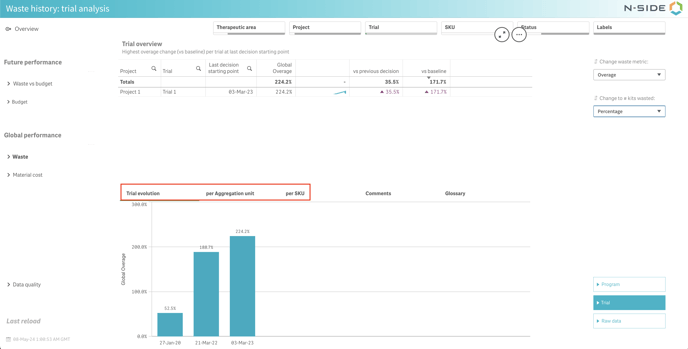
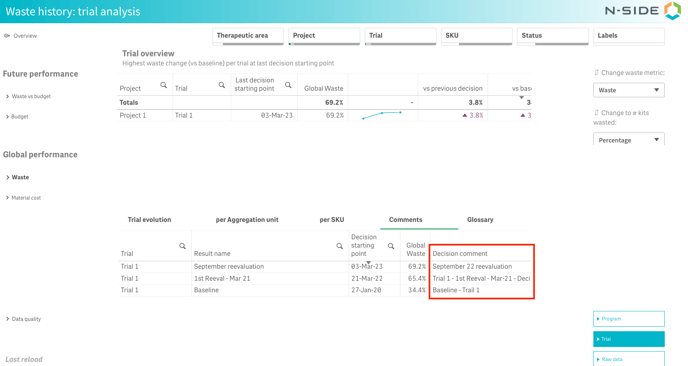
You can provide decision comments (see N-SIDE Supply App - Decisions) to add context and explain potential deviations in the Global performance dashboard. You can find those comments in the “Decision comment” column (see image below).
Additionally:
- You can also export the table if you need to use the decision comment in another tool.
- You can get an overview of comments across a program. The “Comments” tab is available even if multiple trials are selected (see image below).
This view can help you answer the following questions:
-
How is the waste evolving throughout a specific trial?
-
What package types drive the waste in that trial?
-
How is the waste evolving for a particular package type?
❗Important information
The quality of the global waste computed depends on the quality of the input. Therefore, automatic data checks have been implemented to identify results with inconsistent data.
To learn more about this please read: GPD - Data inconsistency
Raw data
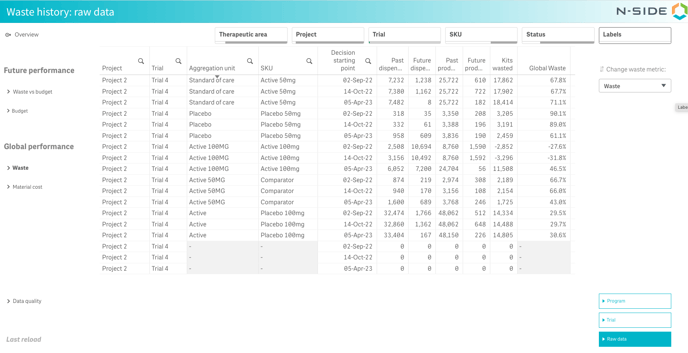
You can access the raw data used for the waste computations (see image below). The detailed parameters used to compute the metrics are available for each trial, product and decision.