![NSIDE_SupplyAPP_FullColorGray_Logo.png]](https://knowledge.n-side.com/hs-fs/hubfs/content-lifeSciences/Logos-LS/NSIDE_SupplyAPP_FullColorGray_Logo.png?height=40&name=NSIDE_SupplyAPP_FullColorGray_Logo.png)
Table of contents
In this sheet, you can verify the quality of data used in the Global performance dashboard.
Overview per trial
This tab clearly displays which trials and decisions have inconsistent data (see image below). This inconsistency can be of 4 types:
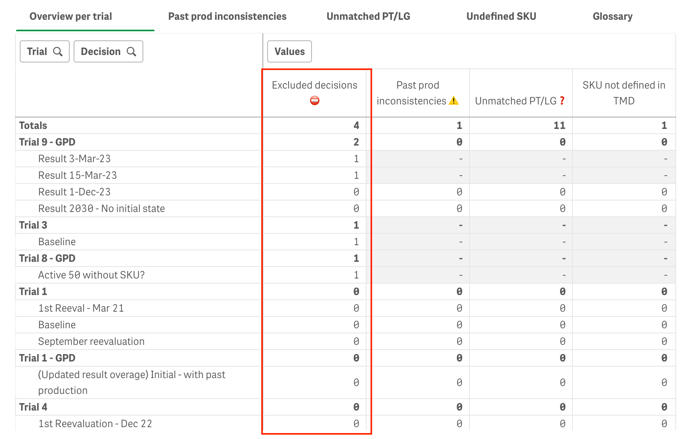
- Excluded decisions: decisions with no past information are excluded from the analysis
- Past production inconsistencies: a package type is flagged as "inconsistent" when there is less past productions than [Past dispensing + Non expired stock].
- Unmatched package type or label group: if old products, package types and label groups are deleted from the Trial master data, the dashboard cannot associate SKU and aggregation unit.
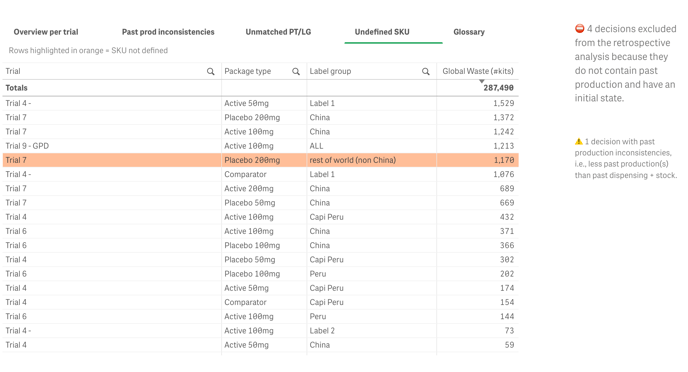
- Undefined SKU: products that are not associated with any SKU.
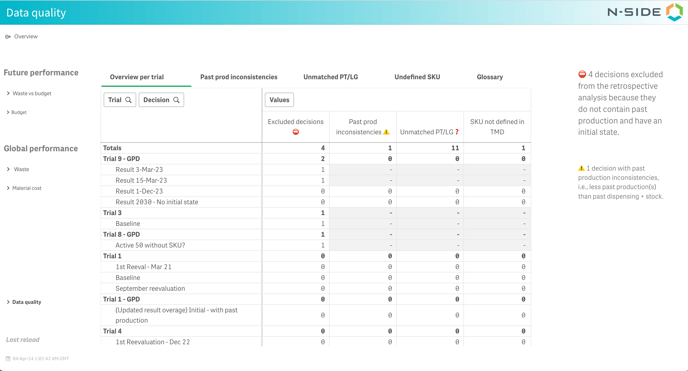
No past production defined
❗To maintain a qualitative analysis, decisions having no past information are excluded from the analysis (see red frame in the image below).
Past production inconsistencies (for some or all package types)
The automatic inconsistency check is triggered when the result has an initial state with existing stocks and there are inconsistencies between the productions, the stocks and the dispensing.
ℹ️
A package type is flagged as "inconsistent" when there is less past productions than [Past dispensing + stock*]. In other words, a package type is inconsistent when:
Past production - Past dispensing - Stocks < 0 (see orange line in the image below).
*expired and non-expired stock is considered.
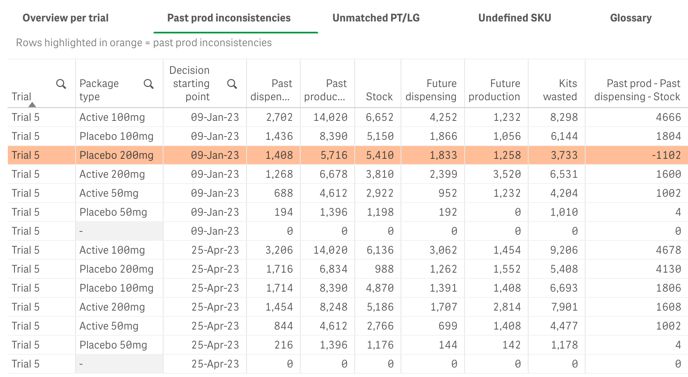
In the Overview per trial tab, a decision is flagged as “inconsistent” if data is inconsistent for at least one package type.
How to fix past production inconsistencies
For each trial repeat the following:
-
In the Overview per trial tab, see the name of the problematic result(s).
-
In the Supply App, find the trial and the associated result.
-
Fix the inconsistencies by entering the correct info in the past productions.
-
Go back to the result and use the
Update result overage actionin the result contextual menu. -
Take a new decision for this result.
-
To apply the changes in the dashboard, reload the dashboard manually or wait for the automatic overnight reload.
Unmatched package type or label group
The dashboard relies on the current state of the Trial master data to retrieve SKUs and Aggregation units. If old products, package types or label groups are deleted from the Trial master data, the dashboard cannot associate SKUs and Aggregation units.
In the Unmatched PT/LG tab, rows are highlighted in orange when the association does not exist anymore (see image below). You can also see the number of kits impacted by the issue to assess the impact of this issue.
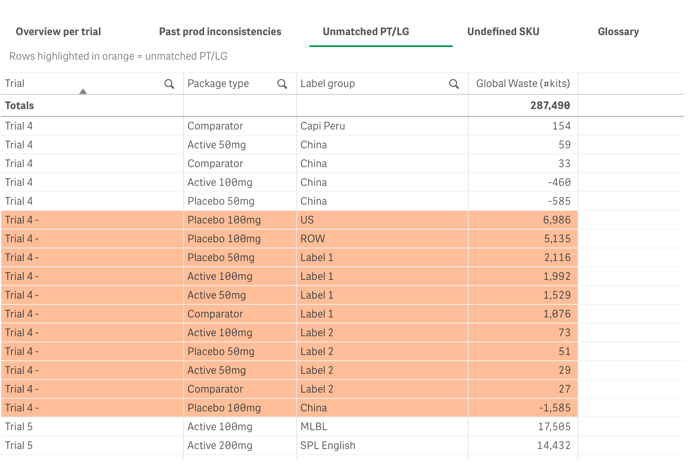
How to avoid unmatched package types and label groups inconsistencies
Apply the following guideline during trial life cycle:
-
Do not delete label groups and package types.
-
Do not delete products.
The good practice is to only create new products.
How to fix unmatched package types and label groups inconsistencies
You can manually add the missing product in Trial master data proceed in 3-steps:
-
In the “Unmatched PT+LG” tab, spot (in orange) the package types and label groups that are unmatched for each trial.
-
Add the missing product in the Trial master data using the same label group and package type.
-
Assign the relevant SKU.
Undefined SKU
You can quickly identify which trials have products without any associated SKU as they are highlighted in orange in the Undefined SKU tab (see image below).
How to fix undefined SKU
-
If need be, create a new SKU in the Master Data.
-
Go to the Trial master data and assign the relevant SKU to the product and click save. The change will be effective in the Global performance dashboard as soon as the reload is done. Note that the reload is done automatically every night but can also be performed manually, if needed.
Trial name changes
If you changed the name of your trial in the Simulation parameters tab (of the Trial master data) and it is not updated in the Global Performance Dashboard, you need to re-run simulations to obtain a new result and then take a new decision.