![NSIDE_SupplyAPP_FullColorGray_Logo.png]](https://knowledge.n-side.com/hs-fs/hubfs/content-lifeSciences/Logos-LS/NSIDE_SupplyAPP_FullColorGray_Logo.png?height=40&name=NSIDE_SupplyAPP_FullColorGray_Logo.png)
Table of contents
- Create a personal bookmark
- Access a bookmark
- Share a bookmark with other users
- Search for a particular bookmark
You can use bookmarks in the Global performance dashboard to save filters for recurring analyses. Bookmarks can be created and saved for personal use, or published and shared with colleagues as community bookmarks.
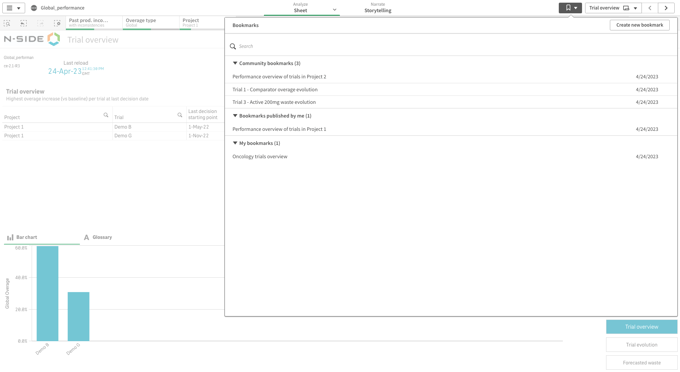
Any user can access, create, share and search for bookmarks from the top right bookmark menu (see image below).
📝 Note
Bookmarks are persistent and remain after logging out.
Create a personal bookmark
You can create your personal bookmarks from the Bookmark menu. Toggle the Save layout option to include the filtering/sorting (see video below).
Access a bookmark
You can access community bookmarks and personal bookmarks from the bookmark menu (see video below).
Share a bookmark with other users
You can publish a personal bookmark to share with all other users (see video below).
Search for a particular bookmark
Bookmarks are automatically organized by date. Type in the Search bar at the top of the bookmarks menu to find saved bookmarks that contain key words in their titles (see video below).