![NSIDE_SupplyAPP_FullColorGray_Logo.png]](https://knowledge.n-side.com/hs-fs/hubfs/content-lifeSciences/Logos-LS/NSIDE_SupplyAPP_FullColorGray_Logo.png?height=40&name=NSIDE_SupplyAPP_FullColorGray_Logo.png)
Table of contents
❗Important information
Prerequisites
In order to leverage this new dashboard, there are three prerequisites:
-
The use of decisions so that the history of a trial can be displayed
-
The use of past productions so that the global waste can be computed.
- The use of aggregation units to match several stock keeping units (SKUs), that are used in different trials, in order to analyze performance metrics at the program level.
Removal of the overage views from the strategic dashboard
With version Supply.2023.3., this Global performance dashboard becomes the single source of truth for aggregation of results and global waste metrics. Previous versions provided aggregation of result waste metrics in a dedicated view in the Strategic dashboard. This view is removed.
Therefore, you should now leverage the Global performance dashboard to access the waste information previously available in the Strategic dashboard.
You can leverage the Global Performance Dashboard to analyze waste evolution and track or identify waste deviations at the program or trial level.
Access and overview
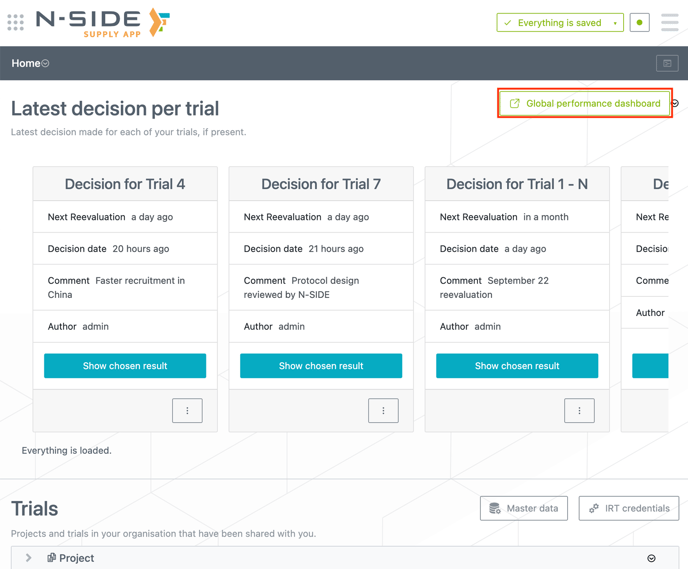
You can access the dashboard from the top right of the home page (see image below). The dashboard will then open in a new tab.
By default, the dashboard opens on the Overview sheet. You can quickly see the performance metrics (e.g., global waste and global material cost) and their deviations (compared to previous decisions) at the trial level (see image below) or at the aggregation unit level.
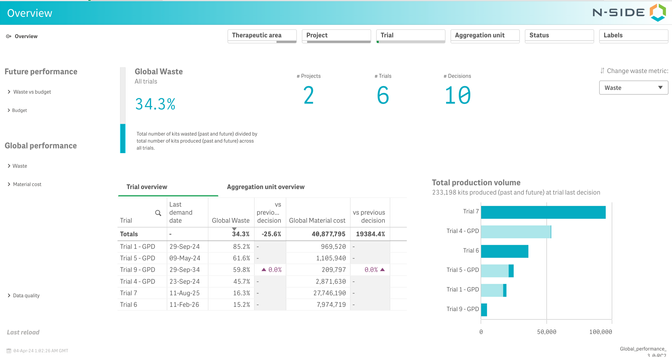
This overview can help you answer the following questions:
-
What is the aggregated waste metrics across my portfolio of trials?
-
What is the performance of each trial/aggregation unit?
-
How has the performance evolved since the previous time point (Decision or Quarter)?
-
How significant is the performance evolution in terms of cost?
-
What is the material cost of each trial/aggregation unit?
You can then deep-dive into your analysis:
- Global performance: perform a retrospective analysis of waste metrics (Waste sheet) or track the evolution of the material cost (Material cost sheet).
- Future performance: take decisions based on future waste (Waste vs budget sheet) or get a quick understanding of the future budget distribution over time (Budget sheet).
Decisions as the source of truth to create the historization
This dashboard gathers and uses the waste information from decisions. This means that only trials with at least one decision will display relevant data.
-
The historization is done based on a date per decision: the decision starting point
-
If there is an initial state, the decision starting point is the simulation start date (from the initial state),
-
If there is no initial state, the decision starting point is the first site activation date.
-
-
If there are 2 decisions with the same decision starting point, the dashboard considers the latest decision that was taken.
-
“Last decision” refers to the decision with the most recent decision starting point.
-
“Baseline” refers to the decision with the oldest decision starting point.
This dashboard is shared between all users at the same time, meaning that you have access to the same dashboard (with all the available information) as every other dashboard user, even if a decision is not shared with you.
Data update
-
Automatic (default): data is reloaded overnight (4am GMT), so any change in decisions are visible the next day in the dashboard.
-
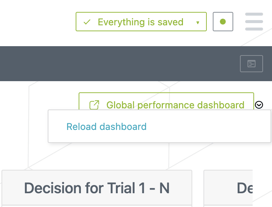
Manual: any user can manually reload the dashboard by clicking on the relevant action next to the dashboard button (see screenshot on the right). As the volume of data can get quite significant, the reload can take some time. This action will not create a service interruption of the dashboard.