
Table of contents
Production resources
Production resources are entities that can handle the production of a given stage at a given production site. Multiple products of a same stage can be assigned to a production resource (see Production configurations below). Availability dates can be defined in case a resource is only available at a certain time.
|
Tips
|
Production configurations
This table defines the list of products that can be handled by each production resource and the associated production parameters.
|
Tip
|
The basic parameters are divided in four tabs:
Basic
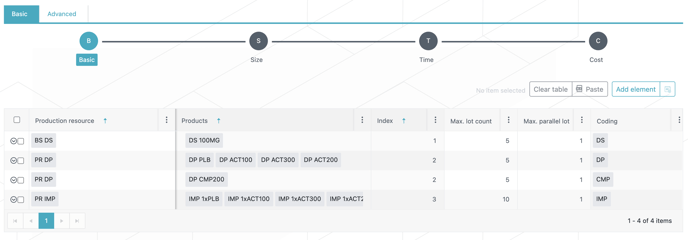
The user can choose to use “indexed configurations” by entering a number for each configuration in the Index column. This index will be used to define the order of consumption of productions resources, i.e., the next configuration is used only when all new lots of the previous one have been produced, according to the maximum lot count parameter (e.g., IMP/DP productions only start when the max lot count of DP/DS are respectively available, see example in screenshot below) .
|
Frozen productions always use the first available configuration but do not consume it (max lot count is relative to new lots only). |
-
For example, Indexed configurations can be used to take into account decreasing sampling or improving yield, lead-times or cost with lot occurrence.
For each configuration, an estimation of the upper bound on the required number of “new” lots over the planning horizon must be provided, i.e., Max lot count column. The exact number of lots will be optimized by the system taking into consideration this upper bound.
|
Tip
|
For each configuration, a maximum number of lots that can be produced in parallel also has to be defined (Max. parallel lot column).
|
The Production App considers the [production resource - product] combination as a whole. This means that 2 (or more) products can be produced at the same time on the same resource even if the Max.parallel lot is set to 1. |
Size
In this tab, minimum and maximum lot sizes are entered together with sampling either as a fixed or a variable value (fraction taken from the lot).
Users can also enter a percentage of output product loss (Output loss column). This output loss is a fraction of the output product that is lost during the production of one unit of the output product.
|
This loss is combined with the input loss so that the consumption of input product to produce one unit of output product = Rate/(1-input loss)(1-output loss). |
-
For example: If the rate is 2 and the input and output losses are both of 10%. The consumption of input product to produce one unit of output product will be 2/0.9x0.9 = 2/0.81 = 2.47.
Time
This tab mainly regards the definition of lead-times.
The manufacturing lead-time can be expressed as a fixed duration, i.e., not depending on the lot size, and/or as a variable duration, i.e., depending on the lot size. The total manufacturing lead-time (fixed plus variable) should include the overall lead-time from the start of the manufacturing to the availability of the lot in stock.
The release lead-time is the time between the availability of the lot in stock and the release of the lot. It is a fixed duration.
The idle time can be used to represent the time between the end of manufacturing of a lot and the beginning of manufacturing of the next lot under the same configuration, e.g., a cleaning time or a process setup time.
Cost
In this tab, fixed (per lot) and variable (per unit) manufacturing costs are entered. Costs are key components in the optimization of the production plan of the supply chain (DS-DP-IMP), it is important to properly differentiate
their fixed and variable parts. Master Data provides some standard costs that can be used alternatively.
Production constraints
This table allows to add specific production availability constraints applying to some time window.
-
Examples:
-
A production resource could be unavailable for a couple of months for maintenance purposes. In this case, the unavailability period should be entered in the Date from and Date to columns and the Max lot count should be set to 0.
-
This table can also be used to impose a capacity constraint on a resource, or a group of resources, in a more general way than what is already possible in the Production configurations table. If users need to limit the number of lots that can be produced at the same time by a resource (or a group of resources), regardless of the product(s) involved, one line must be added to the table for the resource (or group of resources) and products to which the “Max parallel lot” limitation applies and, possibly, the time window of the constraint.
-
E.g., the maximum number of parallel lots for a resource (or a group or resources) is 3 but you need to reduce this capacity to 1 between 1-Jan-21 and 1-Jun-21 regardless of the associated product(s).
-
-
|
Please notice that the decrease of computation performances, for any additional production constraint, is significant, especially if maximum parallel lots is enabled. Please use these constraints only if it is actually required and check first if the production resource availability could not be limited using only parameters in Production resources and Production configurations tabs. |
|
Tip
|
Production flows
This tab models all possible movements of products from a production resources to a subsequent production resource and defines possible associated shipment and reception lead-time and risk, i.e., probability of losing material during the shipment. Optionally, the flow availability can be limited in time using the Date from and Date to columns in the Advanced info tab.
Lead-time summary
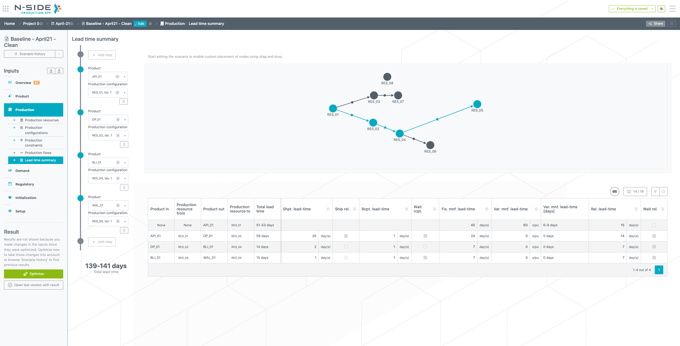
In this tab, you can see the total lead-time necessary to release of a specific product:
-
Select the product and the associated production configuration for each step of the manufacturing process via the dropdown on the left of the screen.
-
Add the steps until reaching the product for which the total lead time is needed.
The total lead-time range appears on the left of the screen and the inputs used to compute it appear in the table on the right (the range considers the time needed for the min and the max lot size).
|
Total lead-time = Ship. lead-time* + Rcpt. lead-time*+ Fix. mnf. lead-time + Var. mnf. lead-time + Rel. lead-time* Value retrieved from the production flow between the production resources |
-
Can be let outside of the computation via the checkbox aside
 Known limitation: when Ship. rel. is unticked, the shipment lead-time isn’t considered in the total lead-time of this step of the manufacturing process. The release lead-time of the previous step remains part of the calculation. This means that the total lead time isn’t exact as we should keep the maximum value between the release lead-time and the shipment lead-time of the product in (which isn’t always the release lead-time).
Useful links: