
Table of contents
Context
The N-SIDE Production App allows you to import a demand, i.e., an IMP release plan, directly from the N-SIDE Supply App. This is particularly interesting in case you want to further optimize your release schedule. Indeed, the N-SIDE Production App will be able to propose a different (improved) IMP release plan to meet the IMP demands, possibly with better expiries than initially requested and/or merging multiple demands. Moreover, this improved release plan will consider all of the constraints that you could have at the manufacturing level. This new IMP production schedule can then be re-introduced in the Supply App to further iterate and converge to a global optimum.
|
Pre-requisites: Stock Keeping Units (SKU) should be defined for the products in the N-SIDE Supply App. The N-SIDE Production App user needs to have access to the portfolios and results to be imported, as well as the corresponding trials and projects to be able to select them.
|
Import process
-
Click
and then choose Import demand from Supply App.
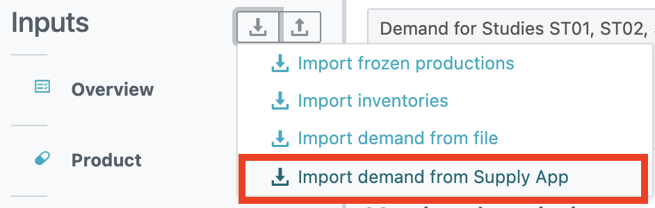
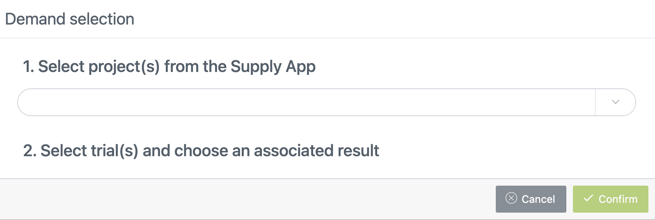
A “Demand selection” window opens where you have to select the project(s) from the N-SIDE Supply App that contain the result(s) (containing the IMP release plan(s)) you want to import.
-
Once you selected the projects, all trials belonging to those projects are listed below. The list is updated each time the user changes the selection of the projects.
-
You can then select the trials from which you want to import results. The number of available results per trial is displayed next to the trial’s name (whether the trial is selected or not).
-
For each selected trial, the list of available results is displayed in a dropdown menu. This list corresponds to the list of portfolios for which a result of this trial has been pushed (each portfolio can only have one result per trial).
-
Once you have chosen all results to be imported, click
.
Once the import process is done:
-
Each new imported trial is added to the Studies table and the Code and Label fiels are filled in.
-
Each newly imported product is added to the Imported Products table and the Code and Label fiels are filled in. Note that what we call product here actually corresponds to a Stock Keeping Unit (SKU) in the N-SIDE Supply App.
-
The import product and study fields are updated in the Imported demand mapping table.
-
For each imported trial, the Imported demand table is automatically filled in. If demands are already defined for a specific trial, they will be erased and replaced by the newly imported demands.
|
Remaining shelf-life considerations The Supply App Remaining Shelf Life (RSL) (Imported demands table) of a demand corresponds to the expiry that was used in the Supply App simulations. This RSL is not used in the computation of the Production App. Instead, the system computes a minimum RSL at corporate depot, i.e., a minimum RSL that the product must still have at the date of the release and before being shipped from the corporate/central depot. The computation of this minimum RSL at corporate depot takes into consideration the maximum visit interval, the maximum lead time (by temperature type) from the central depot to sites and the interval between releases. Using the minimum RSL at corporate depot can result in a more optimal production schedule with more frequent releases and shorter expiries, which can reduce the overage. See How to build a safe and optimal IMP release plan to know more about the impact of the a release schedule on the overage. |
Useful links :