
Table of contents
Context
In case you have known lot allocations that are meeting specific demands, you can enter them in the Production App to consider these in your optimization results. Once these allocations are entered, the App will accept them as optimal solutions and will not propose further changes to them. This can be particularly useful when you have pre-determined allocations that you cannot challenge anymore and want to keep constant.
|
Prerequisites Before entering these lots allocations, make sure that the following tables are up to date:
|
Process
1. Access the allocation side panel
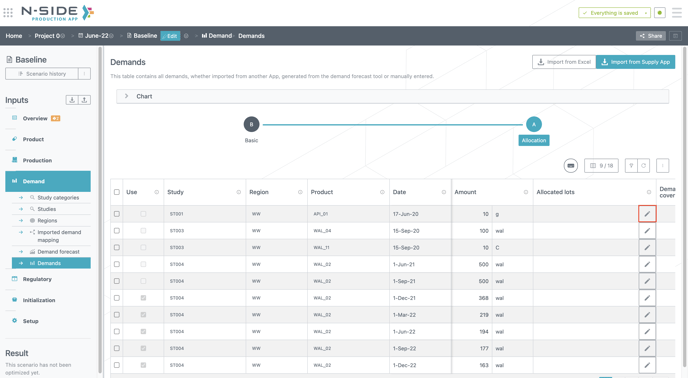
Go to the Allocation view of the Demands table and click on the “pen” button (see red frame in the image below).
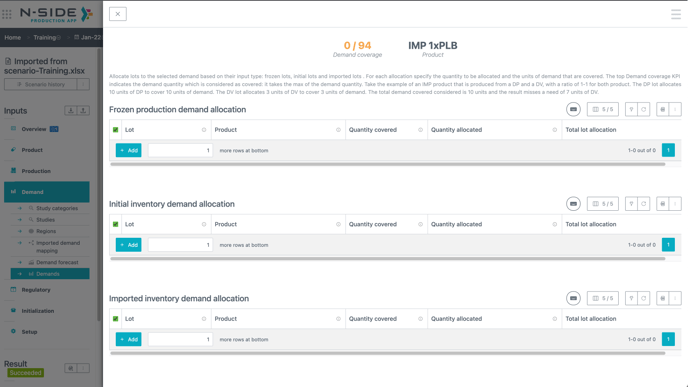
A side panel (see image below) opens where you can define the known fixed lot allocations.
2. Enter the known lot allocations information
From this side panel, you can select one or several lots to allocate to the demand. Three different tables are part of this side panel and contain the available lots from each of the three possible sources: initial inventories, imported inventories, frozen productions.
You can allocate lots of the product requested in the demand or lots of any upstream product that is part of the manufacturing chain of the requested product: from its first component (DS) to the requested product.
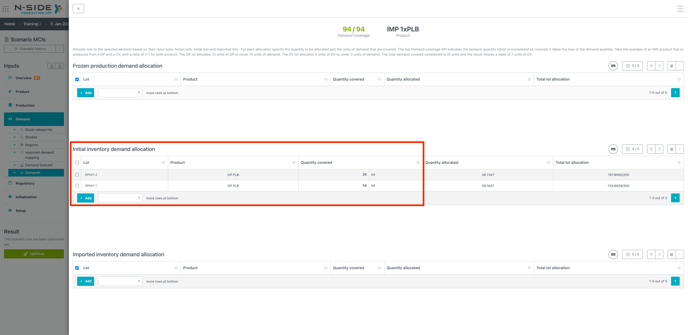
In this example, we are covering a demand of 94 kits of “IMP 1xPLB” product with 36 kits of “DP PLB” from lot “DP001-2” and 58 kits of “DP PLB” from lot “DP001-1” that are available in our initial inventory (see red frame in the image below).
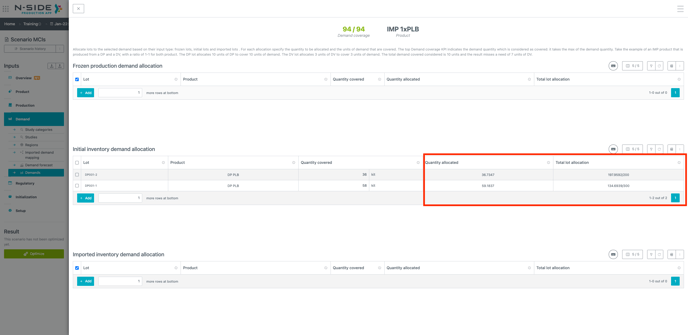
The two other columns on the right display the lot quantity allocated (taking into account the recipe rates, input and output losses) and the total lot allocation where you can see if you can still use this lot for other demands (see red frame in the image below). In this example, lot “DP001-2” is almost fully allocated to this demand whereas “DP001-1” still has more than half that can be allocated elsewhere (134/300).
Once this is done, you can come back to the Demands table by clicking the 'close window (X)” button at the top left.

What if several components are required to manufacture a product?
In order to provide a maximum flexibility a product demand can be covered by allocating only part of its components. In case several components are allocated to the demand, the demand quantity considered as covered is the maximum of the quantities entered for each product.
For example: 1 DP & 1 DV produces 1 FP
DP001 is allocated to answer a demand of 100 FP
DV001 is allocated to answer a demand of 50 FP
The total demand quantity which is considered as covered is 100 FP.
The quantity allocated of DP is 100 units while the quantity allocated of DV is 50 units.
Known limitation - no intermediary steps manufacturedIf downstream transformation of the allocated lot is needed to meet the demand, the optimization will not show the manufacturing steps of these intermediate stages. In the example above where 1 DP and 1 DV are allocated to the FP demand, the result will show DP001 and DV001 as directly allocated to the demand. The FP lot will not be shown in the optimized production schedule. |
How is the the lot allocation handled during the optimization?
During the pre-processing stage of the optimization:
-
The lot quantity which has been allocated is removed from the lot quantity available for the optimization.
-
The demand quantity which is covered by the lot allocation is removed from the demand quantity to be covered during the optimization.
During the post-processing stage of the optimization:
-
The allocated lot quantity is added back to the results.
-
The allocated demand quantity is added back to the results.
-
The allocation from the lot to the demand is added to the results.
|
Allocate initial lots to demands before the start of the optimization horizon only if those lots are still part of the initial inventory quantities entered in the app. In case this lot quantity has already been allocated and accordingly removed from the initial inventories, keeping the demand allocation means accounting 2 times for the lot consumption. A warning is raised in case a lot is allocated to a demand from the past. |
Visualize fixed allocations in the results
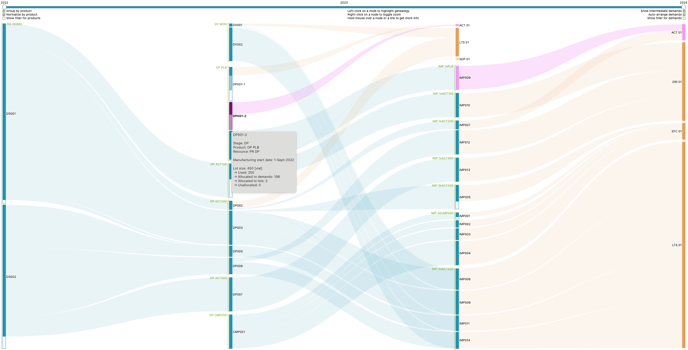
The Allocation chart reflects the fixed lot allocation to a demand in addition to optimized allocations.
The example below is the result of the allocation of a DP lot (DP001-2) to an IMP demand (194 units for ACT01) (see pink curves in the chart):
-
198 units of DP001-2 are allocated to the ACT01 study
This corresponds to the coverage of 194 units of demand in a 1-1 rate as well as the corresponding input and output losses (according to the recipe and the production configuration) -
the ACT01 study demand is split in two and partially shifted to the left because part of it is answered via the above mentioned DP lot while the rest is covered by an IMP lot.
The fixed allocations are also visible in the “Dmd allocated” column of the “Lot sum.” and “P lots” sheets from the Result report.
Useful links: