
Allocation chart
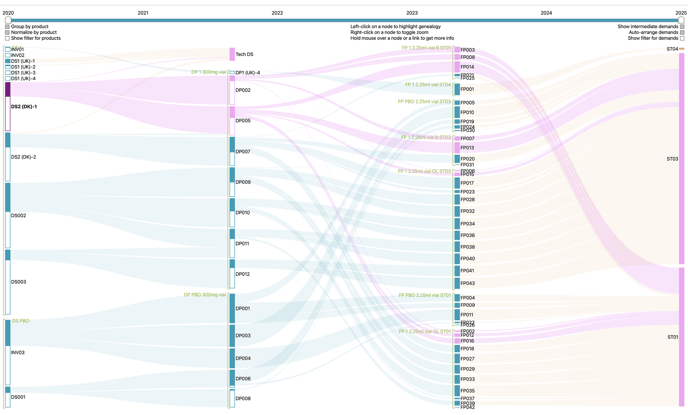
With this allocation chart, you can have an overview of the lot usage through the production cycle.
How to use it?
-
Left-clicking on a lot (blue bars on the far left side) highlights the genealogy of this lot, showing to which product lots (blue bars in the middle) and then to which demands it was allocated.
-
Left-clicking on a demand (orange bars on the far right side) highlights the genealogy of this demand, showing which lots are allocated to it.
-
The empty part of a blue bar indicates that the lot quantity isn’t completely used.
-
Holding the mouse over a blue bar (lot) allows to display additional information:
-
Stage
-
Product
-
Resource
-
Manufacturing date
-
Size :
-
Allocated to demands
-
Allocated to (subsequent)lots
-
Unallocated
-
-
-
Holding the mouse over an orange bar (demand) allows to display the size of the demand and its split among the products which are part of it.
-
Users can restrict the graph to lots manufactured during a specific time period thanks to the time cursor available above the chart.
-
Users can access additional filters above the blue (lots) and orange bars (demands), on both sides of the chart.