
- 1. Distribution Forecast [Trial scenarios]
- 2. Enhanced shipment constraints at trial scenario level [Trial scenarios]
- 3. Validation messages [Trial scenarios]
1. Distribution Forecast [Trial scenarios]
1.1 Limited Influence of the Distribution Plan on the Supply Plan
This release delivers a major re-engineering of the distribution forecast module, first introduced in 2024 (see https://www.n-side.com/knowledge/prediction-app/prediction.2024.4.1#distribution ).
Previous approach (2024 version)
In the previous design, packaging and distribution planning were computed simultaneously, following a backward sequence along the supply chain:
Packaging → Distribution → Demand-
Site demands were aggregated into shipments based on rules (interval, capacity, etc.).
-
These site shipments became demands for depot shipments, again governed by shipment rules.
-
Depot shipments, in turn, determined packaging needs.
As a result, distribution planning influenced packaging planning. This was often undesirable, since many users expected packaging to remain unconstrained by distribution rules, with shipments adapting afterward.
New approach (2025 version)
In the redesigned version, distribution planning is performed as a post-processing step after packaging planning:
Packaging  → Demand
           ↑
Distribution -
Packaging planning now ignores distribution constraints.
-
The only exceptions are shipment lead time and shipment DNS, which are considered to ensure that allocations of packaging lots to site demands respect the minimal required shipment time and that packaging lots can be shipped given the DNS value.
-
Once packaging allocations are made, distribution planning is computed as a post-processing step, fitting shipments into the existing demand–packaging plan.
-
The DNS can be defined for both site and depot shipments. It affects the supply plan in the sense that if the DNS is too large for shipments to ever respect the DNS constraint, then some demands can be missed. In particular, if DNS > lot remaining shelf life, then no demands can be allocated to this lot. The DNS doesn’t affect the release frequency since this would have as consequence that shipment interval impacts the release frequency.
-
The min. shipment parts constraint affects the distribution plan by ensuring that each campaign of shipments is split into the specified amount of shipments. This is typically used to mitigate risk caused by temperature excursion.
-
The capacity constraint is used to ensure that the capacity of each shipment does not exceed the specified value. The impact of using this constraint is an increase of number of shipments to respect the max capacity. When additional shipments are needed to avoid exceeding the max capacity, the system generates them on the same day.
-
The interval can be left empty, in which case the system considers that a packaging lot should be sent just-in-time, in one or multiple shipments, depending on other constraints, such as capacity or min. shipment parts.
-
The shipment strategy can be defined as Just-In-Time (JIT) or as soon as possible. In the default Just-In-Time (JIT) shipping strategy, shipments are scheduled to arrive on site precisely in time for the first demand they are intended to cover. In this mode, shipments are also organized, as much as possible, according to the defined shipping interval. When JIT is unchecked, shipments are dispatched as soon as possible — that is, on the release date for shipments leaving the packaging site, or on the arrival date of the depot shipment for shipments leaving a depot. In this case, any defined interval is ignored.
The JIT strategy gives more flexibility to group shipments of several products, hence decreasing the number of suggested shipments. -
Note that the grouping of shipments may depend on the safety buffer defined in the Guidelines for packaging lots. This buffer determines how far in advance lots are released relative to their actual usage:
-
Larger safety buffer → more opportunities to align and group quantities into fewer shipments.
-
Smaller safety buffer → shipments are less likely to be grouped.
-
You need to update your existing trial scenarios using the distribution plan
Because of this change, packaging plans may differ slightly compared to previous versions for scenarios where shipment computation was enabled.
We recommend:
-
Reviewing scenarios where a shipment interval (previously named shipment frequency) was defined.
-
Paying special attention to scenarios imported at the project level.
-
Republishing trial scenarios used at project level if needed, so that project stakeholders are notified of changes.
1.2 Input Data Changes
Depot / Site Shipments
-
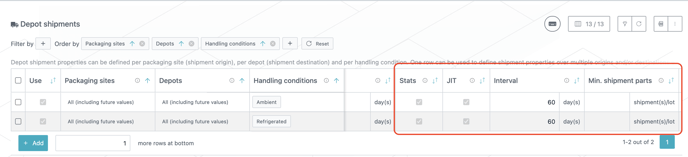
Shipment frequency → Interval
Renamed for clarity: this parameter expresses the desired number of days between shipments. -
Removed: Last shipment date and Trim (shipment planning for ongoing trials is now handled differently; see Unshipped size in Packaging lots).
-
New: Min. shipment parts - minimum number of parts per lot to enforce partial shipments of releases.
-
New: JIT - defines if the shipment should be sent as soon as possible or just in time. By default, shipments are sent just in time.
-
New: Stats - defines if the statistics for this specific route should be included in the result. By default, all statistics are included in the result.
Packaging lots
- New: Size at pkg site - defines the remaining quantity of a frozen lot still to be shipped from the packaging site within the planning horizon.
-
New: Size at depot - defines the remaining quantity of a frozen lot still to be shipped from the local depots within the planning horizon.
Already shipped quantities are excluded from depot and site shipment planning, they are considered as already on site.

-
Shipment planning is still carried out from the start of the planning horizon, ignoring the Size at pkg site and Size at depot parameters. In practice, this means the system first computes shipment planning as if the entire allocated quantity still had to be shipped, in order to reproduce or re-estimate past shipment plans.
-
From this full plan, the quantities that have already been shipped are then discounted when producing the final shipment statistics shown in the report.
Guidelines
-
Release frequency → Release interval
Renamed for clarity: this parameter expresses the desired number of days between releases.

1.3 Cockpit
-
When shipment planning was enabled in the previous version, the demand displayed in the Supply & Demand cockpit for a trial scenario corresponded to:
-
Depot shipments (if defined), or
-
Site shipments (if no depot was defined).
-
-
In the new version, the demand displayed in the cockpit corresponds instead to site demand shifted by the total shipment lead time.
-
This is the same behavior as when shipment planning was not enabled in earlier versions, or before the introduction of the distribution forecast.
-
-
Apart from the shipment lead time, all other shipment properties no longer affect the packaging plan and therefore have no visible impact on the chart displayed in the cockpit. Their effect is only reflected in the shipment section of the Excel report.
1.4 Excel
-
Shipment planning is now only visible in the Excel report
-
The structure of the shipment planning in the Excel report remains unchanged compared to the previous version.
2. Enhanced shipment constraints at trial scenario level [Trial scenarios]
2.1 Account for Licensing Constraints thanks to Approvals
This release introduces a new "Approvals" feature designed to streamline the supply plan by accounting for country-specific license requirements.
2.2 Manage Approval Dates
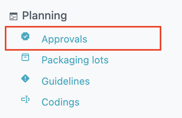
Create and manage approval contexts within the “Approvals” table under the “Planning” section.
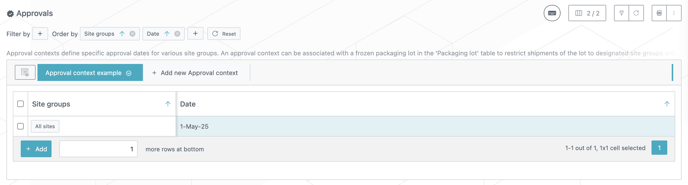
Each approval context allows you to define a set of countries, assigning an individual approval date for each one.
Add rows in the table to represent different approval dates that can be shared by various site groups.
2.3 Linking Approval Contexts
- Guidelines: Connect approval contexts to guidelines to restrict new recommended lots from being shipped to specific site groups prior to their respective approval dates.
- Frozen Lots: Associate approval contexts with frozen lots to ensure these are not shipped to designated site groups before the approval date.
These configurations help model scenarios, such as new licensing requirements for drug product processes, ensuring that supply plans are adjusted to meet regulatory demands.
To completely block all lots of a product (both frozen and recommended) until a specific date, approval contexts should be linked with both the relevant guidelines and frozen lots.
Note that utilizing approval contexts solely for frozen lots will not prevent the shipment of new lots, and vice versa.
3. Validation messages [Trial scenarios]
3.1 Approvals
NEW - ERROR In each approval context, site groups can only be defined once
If a site group is defined twice for a given approval context, the system raises an error. You should always have a unique date for a site group in an approval context.

NEW - WARNING No guidelines or lots are associated with an approval context
If an approval context is not used (i.e. associated to a guideline or a frozen lot), then the system raises a warning. You should either use the approval context, or remove it.

3.2 Depot & Site shipment
NEW - WARNING DNS defined prevents respecting the shipment interval
When an interval is defined, you are now able to detect scenarios where the DNS for both depot and site shipments potentially impact shipments. Due to a very constraining DNS value, you will get a warning per route defined that the lot releases need to be shipped within a time frame in those scenarios.

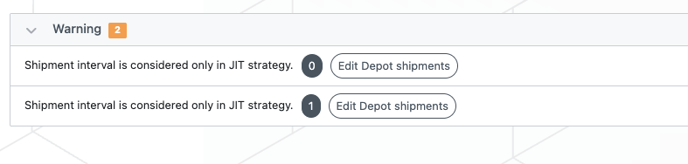
NEW - WARNING Shipment interval is considered only in JIT strategy
When JIT is defined in a shipping route, it takes into account the defined interval to organise shipments. However, in the case where JIT is unchecked, the corresponding shipments are sent as soon as the lots are released, regardless of the interval set. As a result, you will now receive a warning when JIT is disabled but you have an interval defined.
NEW - WARNING Shipment statistics are disabled while some shipment parameters that only impact shipment statistics are set
You will now receive a warning if you have shipment stats disabled, but have parameters impacting the statistics defined for shipments.
The parameters impacting shipment statistics only are: Interval, Min. shipment parts, Capacity, Cost, CO2.

3.3 Site shipment
NEW - ERROR SiteX shipment DNS cannot be greater than depot shipment DNS - depot shipment lead time
If, for a given route, site DNS > depot DNS - depot lead time, then system will never be able to ship kits to sites on this route.

3.4 Packaging lots
UPDATE - ERROR Sizes must respect Produced size >= Released size >= Available size

NEW - ERROR 'Size at pkg site' + 'size at depots' must be less than or equal to the 'available size'
