Table of contents
1. Risk & Sequence Strategies
1.1. Context of the update
Previously, a boolean parameter called Wait release determined whether a lot should be released before it could be consumed, or if consumption could start earlier, under certain conditions. In cases where early consumption was allowed, the system still tried to wait for the release when possible, only consuming the lot early if it was absolutely necessary to meet demands.
However, there was no option to force the system to always start consuming a lot immediately after manufacturing, without waiting for the release. To address this limitation, new functionalities and parameters were introduced to give you greater flexibility in how lots are handled.
In addition to this, a Shipment lead time parameter was introduced to account for the time to move material between manufacturing stages. Furthermore, a parameter to define strategies related to the sequence of release and shipment processes is now available as well.
1.2. Key Changes
-
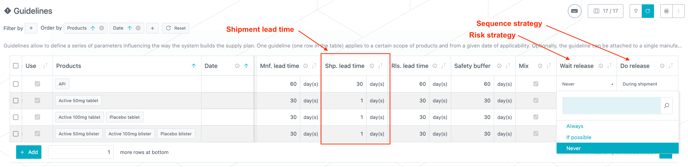
You can now access a new parameter in the Guidelines to define the Shipment lead time from the manufacturing stage (related to the product(s) of the guideline) to the next manufacturing stage.
-
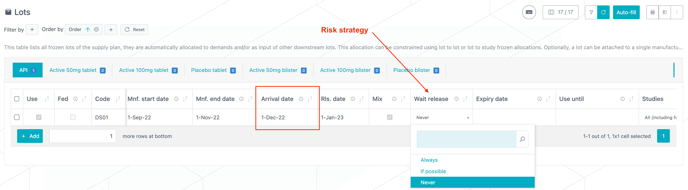
The Wait release boolean that was available in Lots (for frozen lots) and Guidelines (for new lots) is now replaced with a three-state Risk Strategy selection, providing more control over when lots are consumed. The new options include:
-
Always: The lot must always wait for release before consumption
-
If possible: The system will wait for release as much as possible, but will consume the lot before release if necessary to meet demands
-
Never: The lot will be consumed immediately after being manufactured, without waiting for release
-
-
In addition to the changes to the risk strategy, another three-state Sequence Strategy selection is introduced and defines the relationship between release and shipment, options include:
-
Release before shipment: Shipment must wait until the lot is released (release process handled at the origin site)
-
Release during shipment: Shipment and release can occur simultaneously
-
Release after shipment: The release can only happen after the shipment is complete (release process handled at the destination site)
-
-
A new Arrival date field is now available for lots. It is defined as the date of end of manufacturing plus the shipment lead time. This date is computed for new lots and must be entered, along with the other dates, for frozen lots. Note that depending on the Risk and Sequence strategies, the arrival date can be either before or after release date (see next section).
1.3.Risk and Sequence strategies interdependency
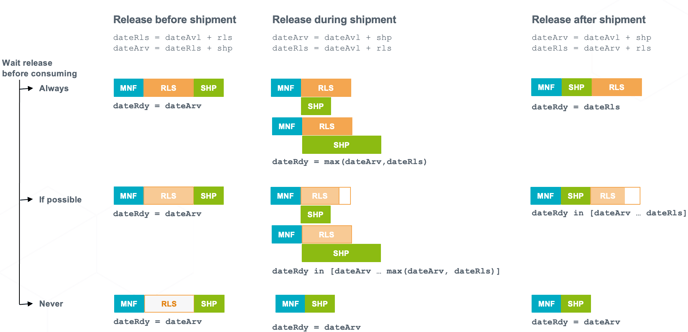
The combination of the Risk Strategy and the Sequence Strategy, along with the shipment and release lead times, defines the earliest date a lot can be consumed.
The interdependency between these parameters is depicted in the figure below where all the combinations of risk and sequence strategies are considered, with:
-
MNF representing the manufacturing lead time
-
SHP representing the shipment lead time
-
RLS representing the release lead time
-
dateAvl being the end of manufacturing date
-
dateRls being the release date
-
dateArv being the arrival date
-
dateRdy being the earliest date for consumption
📝 Notes
-
In the Release during shipment sequence strategy combined with either the Always or If possible risk strategy, the date of the first possible consumption depends on which lead time is the longest between release and shipment.
-
In the Release before shipment sequence strategy, the risk strategy does not influence the outcome. Regardless of the chosen risk strategy, the consumption of the lot will always be delayed until the combined period of both the release lead time and the shipment lead time has elapsed.
2. Excel report update
-
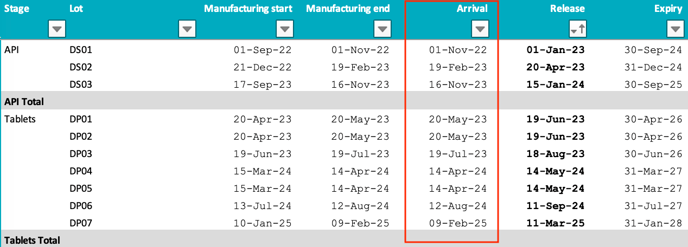
The Arrival date, entered by the user for frozen lots or computed by the system for new lots, is now available in the Lots table of the Excel report for project scenario.