
Table of contents
1.2. Guidelines in trial scenarios
2. Cross project partial import of clinical demands
1. Sampling and Released size
1.1. Released size 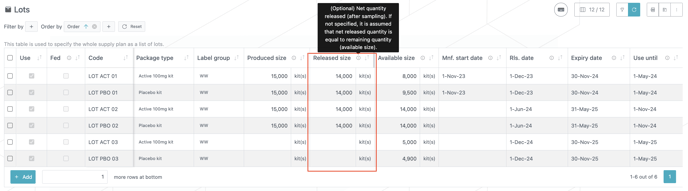
-
The notion of “Released (net) size” has been introduced for Lots throughout the system (in project scenario, as well as in internal and external trial scenarios), it refers to the net quantity released after sampling
-
Three different sizes are therefore now associated to each lot
-
Produced size : quantity produced (before sampling)
-
Released size : net quantity released (after sampling)
-
Available size : quantity still available for the planning (applicable for existing inventory)
-
-
According to these definitions, we have:
-
Released size = Produced size - sampling
-
Available size = Released size - quantity already consumed in the past and already discounted from demand such that it should not be considered for planning
-
-
At the trial level (in internal and external scenarios), only Available size is a mandatory input data, the two other sizes are optional and computed automatically by the system if not entered. The computed values are available in the results (see Excel export). These values are computed, if necessary, according to the following principle:
-
If Released size is left empty in the input data, the system assumes Release size = Available size, that is to say, it is assumed that no past consumption has to be considered for the planning
-
If Produced size is left empty in the input data, it is assumed that Produced size = Released size + sampling, where sampling is taken from the Guidelines applicable to the Package type and Label group of the lot (see Guidelines in trial scenarios)
-
-
Entering the Released size and/or the Produced size in the input data (i.e. in the Lots table) is required only to override the automatic computation by the system, for example to apply a different sampling to a particular lot.
-
For external scenarios, when importing lots from a Supply App production schedule, only the Available size is filled in, the system therefore assumes that Released size = Available size (imported size) and automatically adds the sampling to compute Produced size. The three sizes, as computed by the system, are available in the results(see Excel export), input data (i.e. Lots table in the UI) are not updated by the system.
1.2. Guidelines in trial scenarios
-
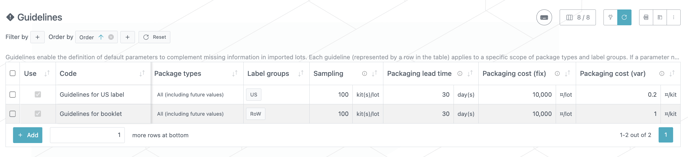
Guidelines have been added to external trial scenario in order to define the sampling quantity used to compute the Produced size from the Released size for lots imported from Supply App production schedule
-
Packaging lead-time and cost parameters, which were previously defined in the Package Types table are now defined in the Guidelines table. This applies to both external and internal trial scenarios. Defining packaging lead-time and costs in the Guidelines allows different values to be set per label group, as shown in the example above to model an higher cost for a booklet than for a US label. This also brings more consistency in the way Guidelines are used across project and trial scenarios.
1.3. Excel export
-
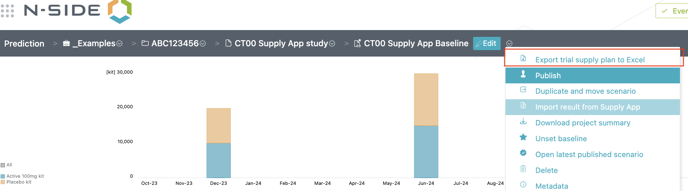
Exporting the supply plan to Excel is now available for external scenario
-
The format of the exported Excel file for external scenario is similar to the one for internal scenario, however the content is limited to what is applicable for a supply plan only scenario, which includes:
-
Summary
-
Lots
-
Monthly productions (relative to produced size and manufacturing start date)
-
Monthly supplies (relative to available size and release date)
-
Monthly product needs (upstream product required as input of the packaging lots)
-
-
Lots table in the Excel export (i.e. in output) contains the actual lot sizes and dates as computed by system:
-
As explained in previous section (see Released size), sizes that are not entered in the input data for Lots are reconstructed by the system using sampling information as defined in the Guidelines.
-
Similarly, if not specified in the input data, Packaging start date is reconstructed by the system using packaging lead-time from the Guidelines.
-
Released size, as shown below for the Lots table for external trial scenario Excel export, is now also displayed in Lots table of Excel report for internal trial scenario and project scenario.

-
2. Cross project partial import of clinical demands
-
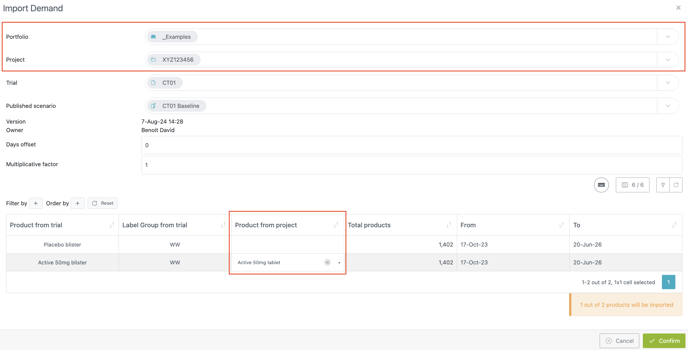
When importing a trial scenario into a project scenario, the trial owning the trial scenario is no longer required to belong to the project owning the project scenario it is imported to. In the import wizard shown below, it is now possible to select another Portfolio and another Project where the desired trial scenario can be found. When opening the wizard, Portfolio and Project selectors are pre-filled with the ones related to the project scenario.
-
When mapping products coming from the trial scenario to products of the project scenario, some entries can be left unmapped, as shown below for Placebo blister. In this case, only mapped products are imported, unmapped products are ignored.
-
These two features together enable handling for example umbrella studies combining treatments (compounds) from multiple projects. For such studies, clinical demands produced by the trial scenario have to be covered by the supply chains of different projects. Demands should therefore be split into different parts (subsets of upstream products), each parts should be imported into the related project scenario.
-
When printing an Excel report produced by the Prediction App, a mention “N-SIDE Restricted” now appears in the footer to align with the information classification policy often required by standards like ISO 27001.
-
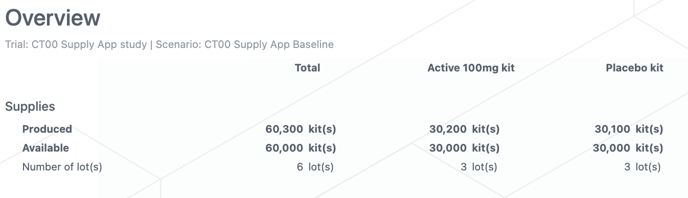
The Overview for external trial scenarios now shows both Produced and Available quantities, as shown below.
-
In internal trial scenarios, an info message is now displayed when parameters for depot and site shipments are not defined for all cases
4. Bug fixes
-
The issue causing safety margin curve, in the Coverage chart, being deleted when selecting a product without any value (all 0) for this curve is now fixed.
-
Package Types table in trial scenario is now ordered properly.