
Table of contents
1. From physical to available inventory
1. From physical to available inventory
1.1. Summary
Graphical representations of supplies and inventory in the Cockpit and the Excel report have been modified in order to be related to the date of availability of the supplies instead of to their date of manufacturing end. Inventory representation is therefore also changed from the physical to the available (released) inventory.
Note that these changes only affect graphical representation of the concepts but does not lead to any difference in the actual results of the production plan (list of lots and their properties remain exactly the same).
In the Cockpit, this impacts both Supply & Demand and Coverage views. In Coverage view, this change helps users better assessing the level of safety margin between supply and demand curves.
In the Excel report, this impacts the following sheets:
-
Monthly supplies
-
Monthly inventories
-
Coverage
1.2. Definitions
Following definitions are required to support the explanation of this change:
-
Four dates are considered for any given lot:
-
Date of manufacturing start : when the production is started
-
Date of manufacturing end : when the production is completed (given by the manufacturing start date plus the manufacturing lead-time)
-
Date of release : when the lot is released (given by the date of manufacturing end plus the release lead-time)
-
Date of availability : when the lot is actually available to be used by the next production stage or to feed a demand (given by the date of release OR the date of manufacturing end)
-
The date of availability is actually either the date of manufacturing end or the date of release depending on whether the lot can be used before being released or not. This later condition is set by the Wait release flag that can be defined on a specific lot (for frozen lots) or through the guidelines (for new lots). When Wait release is checked (default value), the availability date of the lot corresponds to its release date. When it is unchecked, the availability date of the lot corresponds to its date of manufacturing end. Unchecking Wait release is typically used in tight schedule when starting next production stage before the release of the previous one is required to meet final clinical demand on time, leading to work at risk (i.e. involving cost and capacity of next production stage before having the guarantee that used input product is valid).
-
-
-
For the purpose of these release notes, we define:
-
The physical inventory as the inventory related to the not yet released supplies, it is built based on the date of manufacturing end (i.e. the quantity produced flows into the physical inventory at the date of manufacturing end)
-
The released inventory as the inventory related to the released supplies, it is built based on the date of release (i.e. the quantity produced flows into the released inventory at the date of release)
-
The available inventory as the inventory related to the supplies that are available for further use, it is built based on the date of availability (i.e. the quantity produced flows into the available inventory at the date of release OR the date of manufacturing end, depending on whether the flag Wait release is checked or not)
-
Note that in the most common case where Wait release is always checked for all lots, the available inventory corresponds to the released inventory.
-
-
1.3. Changes
In previous versions, at project level, supplies visualized in the Cockpit were located in the timeline at the date of manufacturing end and, for consistency, the inventory displayed was the physical inventory. Still for consistency, (1) cumulative supply curve displayed in the Coverage chart was also based on the date of manufacturing end and (2) coverage duration was defined as the duration between this date of manufacturing end until the date of the last consumption of the supply.
This representation was not helping users to assess correctly the level of safety margin between the supply and the demand curves, leading to interpreting this margin as bigger than what it really was. Basically this margin was not considering the release lead-time.
The date of availability is now used, instead of the date of manufacturing end, to build the cumulative supply curve and to define the coverage duration. For consistency with other charts and all concepts displayed in the Cockpit (Supply & Demand, Inventory), the date of availability is now generally used in the way supplies are located in time and the available inventory is represented instead of the physical inventory.
📝 Note
At trial level, The Cockpit was already considering the available inventory (which is also the released inventory since IMP lots always must wait the release to be used). Hence, this change also provides more consistency in the graphical representation of the concepts (supplies, inventories, coverage duration) between trial and project levels.
1.4. Visual impacts
With this new way to locate supplies in the timeline, users should expect a visual change in the graphical representation of their existing project scenarios, both in the Cockpit and the Excel report.
In the Excel report this impacts following sheets:
-
Monthly supplies
-
Monthly inventories
-
Coverage
In the Cockpit, the visual changes apply to both Supply & Demand view and Coverage view, as shown in the examples below.
1.4.1. Supply & Demand view in the Cockpit
Before

After
-
Supplies are located in the timeline when they are available (i.e. released in this case) instead of when their production is completed.
-
The Inventory is related to the available inventory instead of the physical inventory.

1.4.2. Coverage view in the Cockpit
Before

After
-
Supplies are located in time when available (i.e. released in this case) instead of when produced.
-
The horizontal distance between supply and demand curves no longer includes the release lead-time (when supplies must wait release to be used) and therefore provides now a better appreciation of the safety margin in time.
-
The coverage duration is reflecting the duration of the demand covered from the availability date instead of the date of manufacturing end, typically leading to smaller values.

2. Other updates
2.1. Increase the possible time horizon for trial and project planning
Previously, the project/trial planning of more than 10 years from now was not accepted by the system making it impossible to model some scenarios.
The accepted time horizon for project/trial planning is extended to 20 years. Furthermore, this detection no longer relates to the absolute time (i.e. distance with respect to today) but only relates to the length of the planning horizon. Users could, for example, plan a project ending in 25 years if it only starts in 5 years (making the horizon length still not exceeding 20 years).
2.2. Removal of empty spaces in text fields
Empty spaces at the end of text fields are now automatically removed when the user stops editing the field.
2.3. Import of Supply App result in a scenario with errors
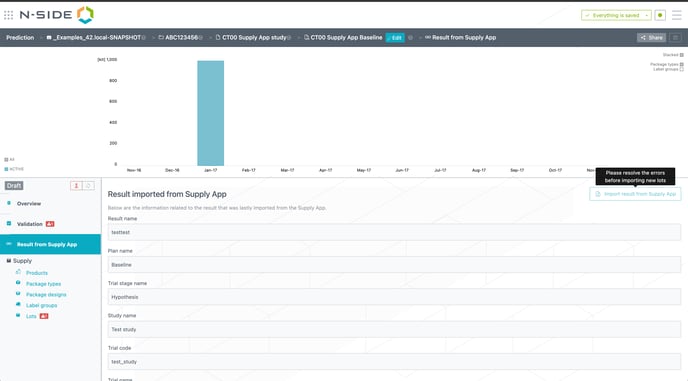
The import of a Supply App result in a trial scenario is now disabled when the scenario contains validation errors (see image below).
2.4. Actual recruitment table ordering
The Actual recruitment table in a trial scenario is now ordered by site group.
2.5. Improved performances
Users can benefit from a smoother user experience thanks to global performance improvements benefiting the reactivity and usability of the product.