
This release mainly focuses on improving depot shipment planning, offering a more intuitive, actionable, and reliable user experience.
1 - Depot shipments- 1.1 - Navigation, depature date and shipment planning feasibility
- 1.2 - Enhance operational recommendations, enforce constraints and streamline integration with external systems
- 1.3 - Other improvement related to depot shipment module
2 - Other updates
- 2.1 - Lot number selection when defining expiry extension
- 2.2 - Cosmetic updates on the Excel results report
- 2.3 - Easily create empty extracts
1 - Depot shipments
1.1 - Ease depot shipments definition within the depot shipment module
The module now streamlines the process of defining and managing depot shipments, making it easier for both new and experienced users to navigate.
1.1.1 - Improved interface for an easy-to-follow step-by-step approach
The interface has been reorganized into a clear, step-by-step workflow with descriptive guidance. Table names have also been updated for greater intuitiveness:
-
"Reserved shipment" remains "Reserved shipment",
-
"Shipment to be optimized" is now "Next shipment departures dates",
-
"Planned shipments" is now "Shipment planning".
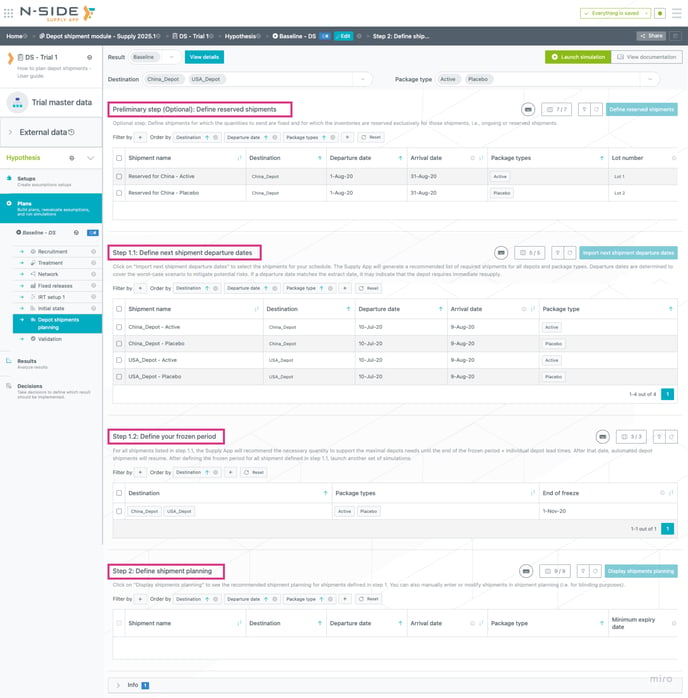
Some actions and visual elements have been hidden or removed to simplify the view.
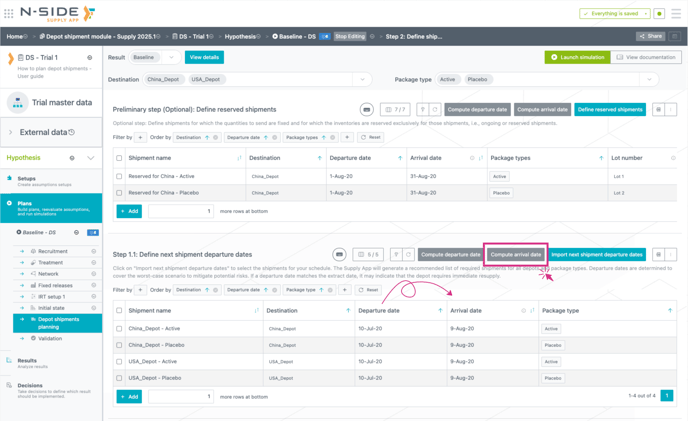
1.1.2 - Departure date in the depot shipment module
A new column, “departure date” has been added next to the existing “arrival date” with computation buttons to automate date calculations based on lead times.
This was added in the following tables: Reserved shipment, Next shipment departure dates and Shipment planning.
 For each row in these tables, users can choose to enter a departure date, an arrival date, or both. If both dates are entered, the lead time defined in the Network setup must be respected; otherwise, an error message will be triggered.
1.1.3 - Get a clear view on the feasibility of your shipment planning
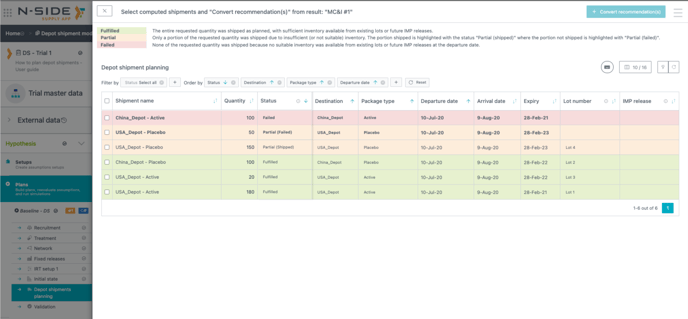
The "Display Planned Shipments" table has been replaced with a more intuitive and informative “Shipment Status” table. This updated table features a color coded status system, providing immediate insights into shipment recommendations and the feasibility of your planning.
Upon running a simulation in the Supply App, the Shipment Status table is generated to display the outcome of each requested shipment. This table is based on the inputs provided in: "Step 1: Define next shipment departure dates" and "Step 2: Define shipment planning".
Each shipment entry in the table is assigned a status and color code, to clearly indicate its result:
-
Fulfilled: The entire requested quantity was successfully shipped. This indicates sufficient inventory availability from existing lots or anticipated IMP releases to meet your request.
-
Failed: None of the requested quantity was shipped due to the unavailability of suitable inventory from existing lots or future IMP releases by the specified departure date.
-
Partial: Only a portion of the requested quantity was shipped due to insufficient or unsuitable inventory. In such cases, the table delineates the outcome into two distinct entries:
-
"Partial (shipped)": The quantity that was successfully shipped.
-
"Partial (failed)": The quantity that could not be shipped.
-
This structured approach enables users to quickly assess shipment outcomes.
This release introduces smarter, more actionable recommendations and improved control over shipment constraints, facilitating seamless integration with external systems. Notably, manual adjustments in the Excel results report are no longer necessary.
1.2.1 - Single lot recommendation
The Supply App now suggests a single optimal lot (and associated quantity) for each shipment, simplifying decision-making. While the primary recommendation is highlighted, the complete list of suggested lots remains accessible in both the Excel results report and the results dashboard.
What is happening behind the scenes: The Supply App now uses a new algorithm to compute a single optimal lot for each shipment. This algorithm processes the existing table of all suggested lots to generate a refined output. The results are presented in a new tab titled “Depot shipments planning” within the Excel results report.
The existing three tabs remain unchanged in the Excel results report and Results dashboard.
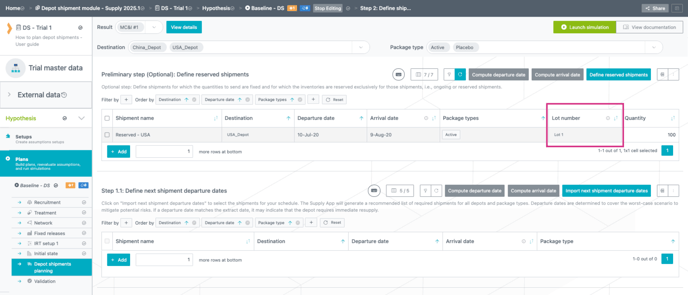
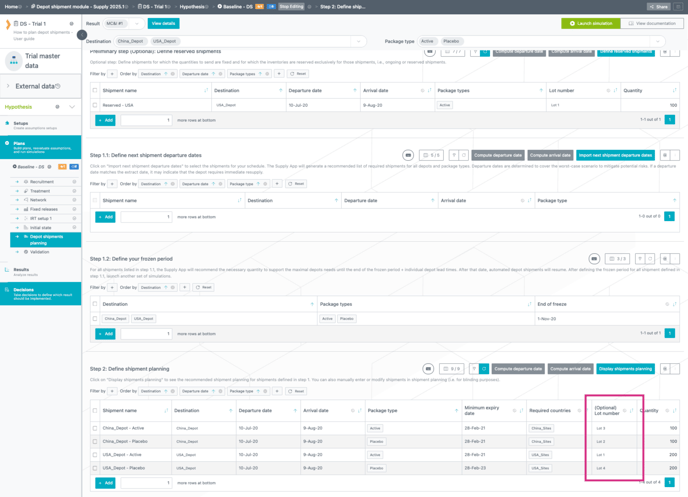
1.2.2 - Enforce lot number in depot shipment planning
Users can now enforce the use of designated lot numbers for each shipment.
-
In reserved shipment
-
Only lots available in inventory at the simulation start date can be selected.
-
The selected lot's quantity is reserved exclusively for the specified shipment.
-
-
In depot shipment planning
-
If a lot number is specified, no alternative lots will be considered for that shipment.
-
The selected lot's quantity is not reserved; fulfilment depends on the availability of sufficient quantity at the shipment's departure date.
-
The field is completely optional but can be leveraged to facilitate the integration with external systems. By inputting all shipments (including additional shipments for blinding) and specifying lot numbers in the Shipment Planning table, users can ensure alignment between the data transferred to the client's system and the Excel results report provided by consultants.
1.2.3 - Reporting in Excel results report
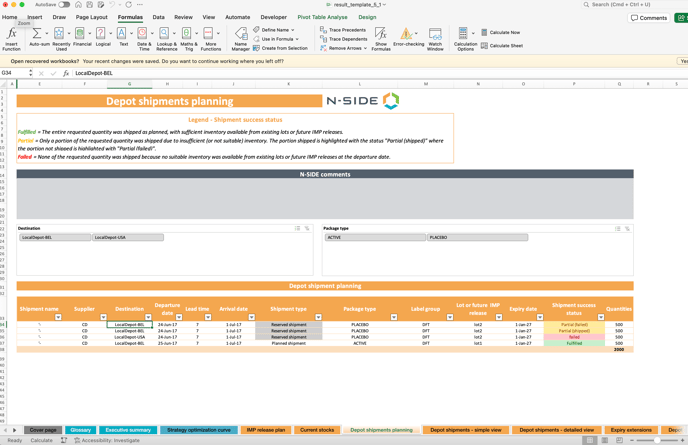
A new tab "Depot shipments planning" has been added to the Excel results report.
This tab provides:
-
Ready-to-use shipment planning table: summary of the shipment planning with respective status and lot number/IMP release for each shipment.
-
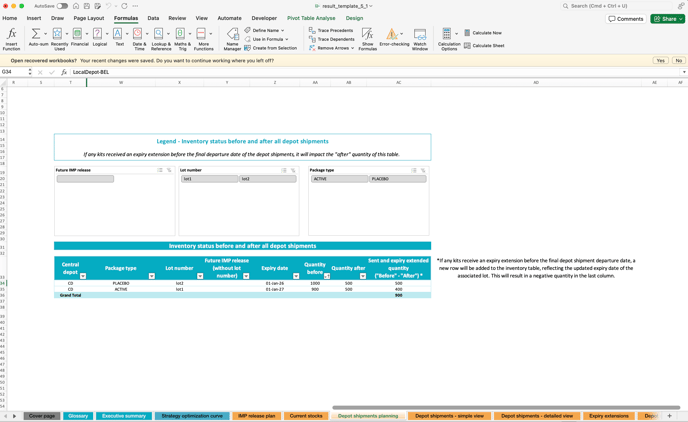
Inventory status before and after depot shipments: summary provides a comprehensive overview of stock levels at the central depot:
-
Initial Inventory: Quantity available at the start of the simulation.
-
Remaining Inventory: Quantity left after all planned depot shipments have been executed.
-
In cases where future IMP releases have a release date occurring before the end of depot shipments, they will also be displayed in this table, as some depot shipments might be made with them.
This summary offers clear visibility into remaining stock levels post-shipment, enabling better control over central depot inventory and helping to prevent potential stockouts.
1.3 - Other improvement related to depot shipment module
-
Kits in transit: The lots suggested for each shipment are now considering kits in transit, ensuring accurate recommendations.
-
Expiry extension: Lots recommended in the planning take into account information defined in the expiry extension module.
-
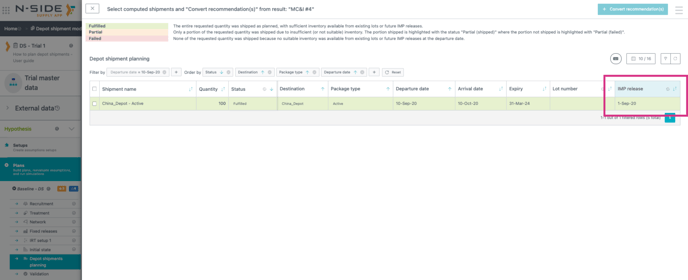
Future lot without lot number: For future IMP releases lacking assigned lot numbers, the system will now assign a placeholder name to facilitate easy identification. This placeholder follows the format “
dd-mmm-yy,” corresponding to the release date. These identifiers will appear in the new “Display Shipment Planning” view and within the Excel results report.
-
Single lot recommendation - mitigation in case of no solution found: The enhanced single lot recommendation feature, which suggests one optimal lot per shipment, is powered by a new algorithm that runs at the end of simulations. Under normal circumstances, which should apply in nearly all cases, this algorithm completes in less than 5 seconds. However, for very complex models (e.g., those with an enormous number of shipments and lots), the algorithm may take longer to process. To prevent it from delaying simulations, two mitigation actions have been implemented:
-
Time out: If the algorithm exceeds 20 minutes, it will automatically be canceled.
-
Toggle to deactivate the new algorithm: When launching simulations, the toggle is enabled by default but can be deactivated if needed.
-
In either scenario, the following outcomes will occur:
-
No lot recommendations will appear in the new "Depot shipments planning" tab of the Excel results report. However, the full list of suggested lots will still be available in the other tab related to depot shipments
-
No lot or IMP release suggestions will be shown in the "Display shipment planning" modal within the depot shipments module
-
-
-
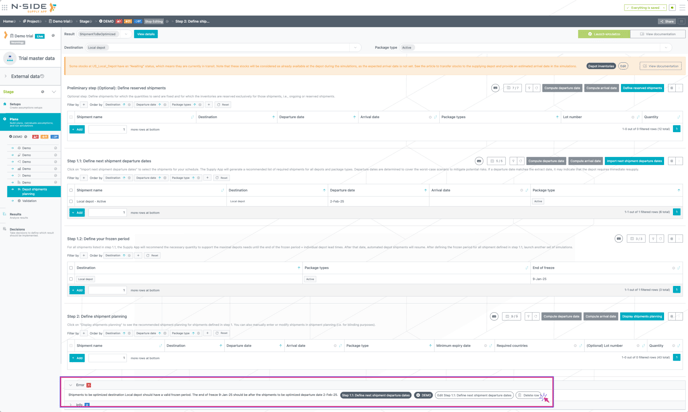
Delete action was added on error message for shipments outside of the frozen period
-
Bug fix: Supply App now correctly handles lot recommendations where lot allocation and label group are misaligned. Previously, this misalignment could lead to simulation risks and necessitated manual corrections. This is now fixed.
2 - Other updates
2.1 - Lot number selection when defining expiry extension
Users can now specify the lot number to extend in the expiry extension module within the Production setup.
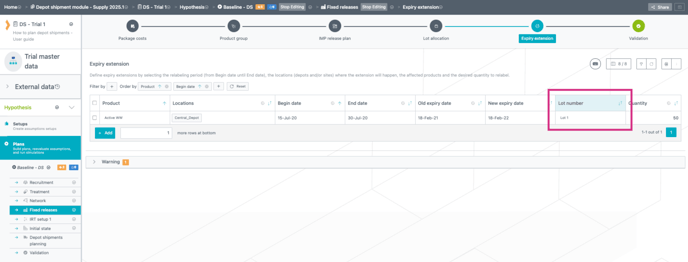
Currently, there is no update in the outputs (Excel and dashboards) regarding the selected lot for the expiry extension.
2.2 - Cosmetic updates on the Excel results report
Several cosmetic adjustments have been applied to the Excel results report, including:
-
Correction of typos
-
Addition of a new currency selection option in the executive summary
-
Frequently used tabs are now unhidden by default
2.3 - Easily create empty extracts
A new button, "Create Empty Extract," has been added to facilitate the creation of empty extracts. It is located in the “IRT extract' section.