
Table of contents
1. Enjoy a smoother user experience with reduced loading times
Loading performances have been improved. Loading the data in the app is now faster than before, e.g., opening the main page only takes a few seconds even for large databases.
2. Miscellaneous improvements
2.1. Modeling improvements
2.1.1. Easily model trials using different stopping dates
The Trial stopping criterion has been moved from the Trial master data and is now accessible at the plan level. Thanks to this, you are now able to give a specific trial stopping date (optional) to each plan, and run simulations as usual (see video below). A banner is displayed in the Trial Master data to warn you of this change.
📝 Note
As a consequence of this change, the "Last dose date" has been completely removed from the app as its usage became obsolete.
2.1.2. Import shipping routes with one single action
Functionalities of "+ Add route" and "Import corporate routes" are now merged together in one single action called "Import shipping routes". Therefore, you can now filter and import many routes at once (see video below).
Using the "Import shipping routes" button will import predefined routes directly from the Master data.
2.1.3. A more intuitive way to enter Resupply management data
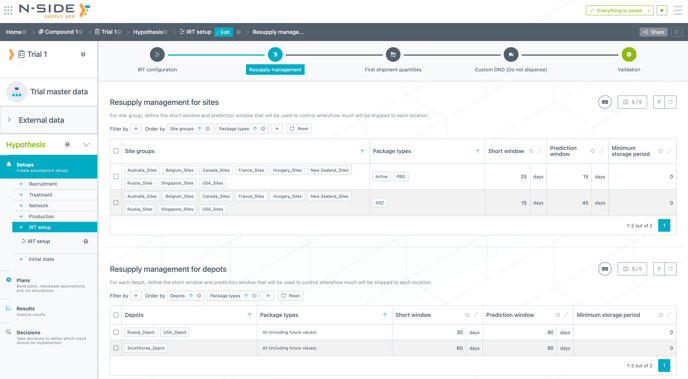
The "Resupply management" table is now split into two different tables (see image below). One table is for sites and the other one for depots. This brings clarity and makes the filtering/entering of data faster and easier.
2.1.4. Trigger the first shipment based on package type
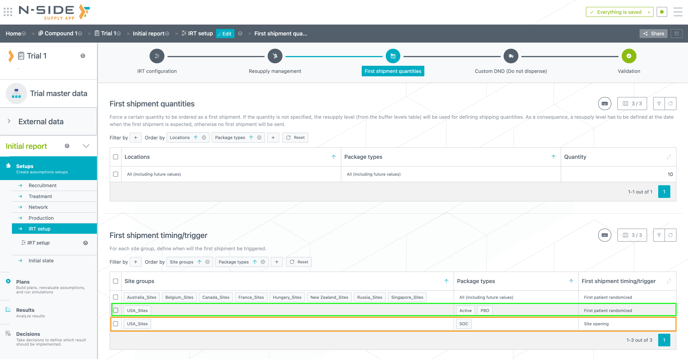
The first shipment timing/trigger rule has been updated. You can now define a different rule for a package type going to a particular site(s) thanks to the newly added "Package types" column (see image below). The new rules are applied to a unique combination of site group and package type.
For example, it is now possible to model particular cases where all package types are sent everywhere at first patient randomized except for the SOC package type that can be sent at site opening to the US sites (see image below)
2.2. User experience improvements
2.2.1. Keeping the App as easily manageable as possible
-
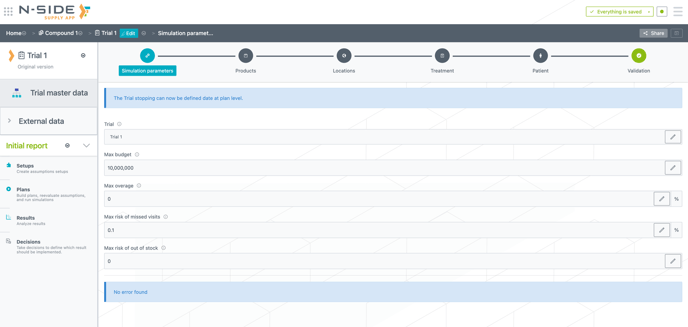
The "Points of attention" section has been removed from the Trial master data (see image below). The reasons for this are twofold: 1) it was used in the previous version of the Monitoring dashboard which is not accessible anymore starting from this version (see 2.3.2. below) and 2) the usage was almost nonexistent.
-
You can now remove unneeded space at the beginning/end of specific inputs with only one click (see video below). A tooltip is displayed on top of the button when the space has been removed but the changes have not been saved yet.
-
The severity in the messages for missing cost information has been lowered from an error to a warning. Therefore, not having that information in your trial will no longer be a blocking point.
The impacted fields are:
-
"Commercial value" table ("Warehousing costs" tab) in the Network setup
-
"Package costs" and "Packaging and labelling costs" tables ("Packages costs" tab) in the Production setup
-
-
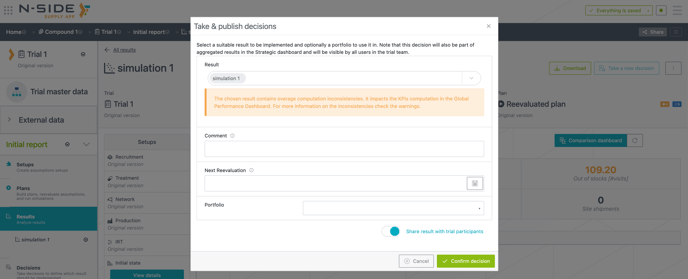
A warning banner is added to the decision window to warn you of overage inconsistencies in the selected result (see image below). You are now better informed of the inconsistencies in the overage computations (and their impact on the Global performance dashboard) when taking a decision.
-
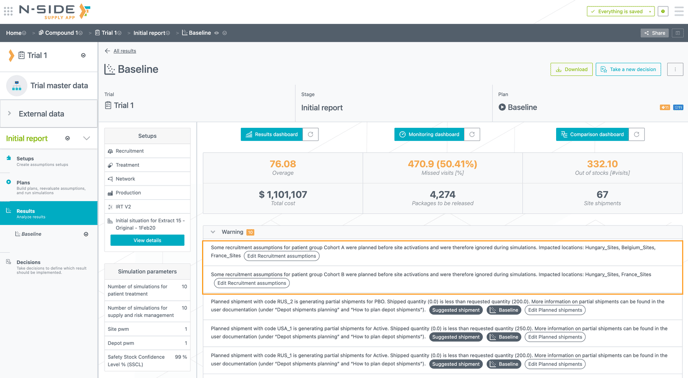
Warning messages related to enrolments being planned before site openings are now grouped. Less messages are displayed when the issue is similar in multiple sites (see image below).
2.2.2. Enjoy an improved user experience when working with tables
You can now select titles of columns and copy/paste them directly in an excel file.
Furthermore:
-
cmd + A(ctrl + Aon Windows) selects all rows on the present page without the header.-
Pressing
cmd + A(ctrl + Aon Windows) again will also select the header.
-
-
cmd + shift + A(ctrl + shift + Aon Windows) selects all rows in all pages without the header.-
Pressing
cmd + shift + A(ctrl + shift + Aon Windows) again will also select the header.
-
📝 Notes
-
You cannot paste data in a Supply App table if the titles are selected in the table when pasting.
-
Clicking on title cell will select it.
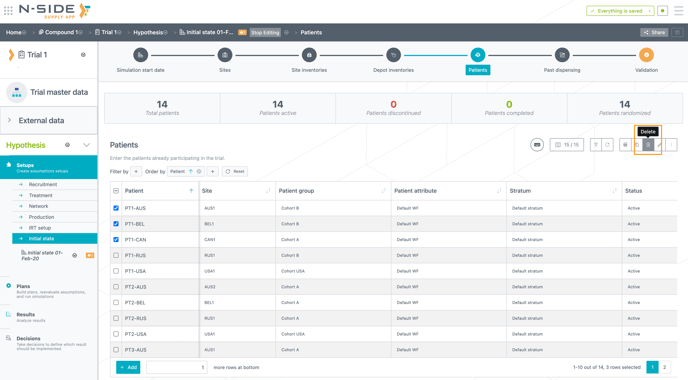
You can now also easily access the “Delete” button placed between the most frequent actions above the table (see image below).
2.3. Reporting improvements
2.3.1. Benefit from an improved readability of the IRT settings in the Result dashboard
The IRT settings sheet has been reworked to bring the following improvements:-
The chart is only displayed when a site group and a package type are selected
-
You now have visibility on the buffer levels evolution over time directly from the table (see video below).
-
The table and chart now consider the package type.
-
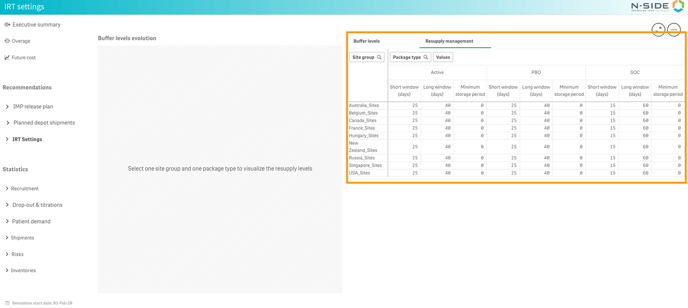
You can now benefit from a more seamless user experience with the redesigned "Resupply management" table (previously named "IRT setup at sites") accessible in the tab next to the buffer levels (see image below). This table now displays information on package types as columns instead of rows.
2.3.2. Monitoring dashboard retro-compatibility update
Results generated before Supply.2023.2 will not display the previous version of the Monitoring dashboard anymore.
⚠️ To continue accessing the Monitoring dashboard, you will then have to re-launch simulations for your result (if it was generated before Supply.2023.2).
2.3.3. Experience an improved management of planned depot shipments and shipments in the Strategic dashboard
2.3.3.1. Planned depot shipments
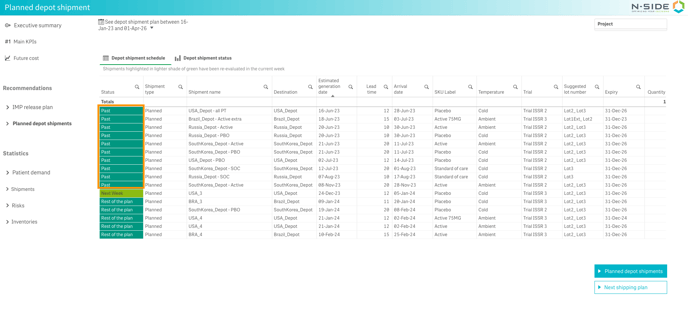
In the "Depot shipment schedule" and "Depot shipment status" tabs, You now have an overview of the planned depot shipments that were scheduled in the past (see image below).
Furthermore, you can see the next suggested departure date and associated arrival, which correspond to the depot coverage, by accessing the new "Next shipping plan" tab (see video below).
This new feature can help answer the following questions:
-
How many planned depot shipments arrived in a specific depot in the last 6 months?
-
What’s the earliest depot resupply date estimate?
-
Which depot is at risk of shortage in case of an issue (as a strike for example)?
-
When do I need to re-supply my depots and which one is critical (which one has the lowest coverage period)?
2.3.3.2. Shipments
The "trial" dimension has been added in all the tables of the "Shipments" tab. Therefore, you now have a better visibility on the forecasted quantities per depot and per trial at the same time (see video below).
2.4. Improvement of integrations with external systems (API)
-
The latest IRT data extract can now be retrieved from the Supply App through integration with external systems (API).
3. Bug fixes
3.1. Modeling fixes
-
When performing an update of the Draft master data using an excel file, the values for Status and Therapeutic area were not updated.
-
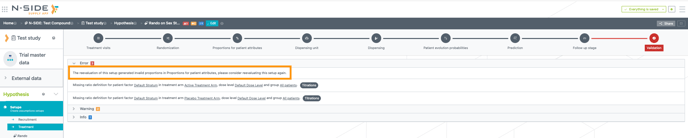
An “Oops“ screen appeared when reevaluating a plan with invalid values in the Treatment setup.
-
Extra validation steps checks are now added to prevent this. In addition, an error message is displayed (see image below) to inform you about this situation so you can edit the fields that are causing invalid proportions.
-
- The following issues are now fixed:
-
When the Network setup was empty, an unclear error was displayed at plan validation level.
-
The error message has been removed and a set of messages is now displayed, pointing out exactly to what is missing in the plan.
-
-
When running “memory demanding” simulations at the same time the Supply App could reach a point where the jobs in the queue started hard failing.
-
When the system runs out of memory (e.g., due to too many “memory heavy” simulations running at the same time), the resolution of this state no longer impacts the queued simulation jobs.
-
3.2. User experience fixes
The following issues are now fixed:
- When filtering and/or saving changes in some tables, the information blinked red and it displayed "Unknown ref".
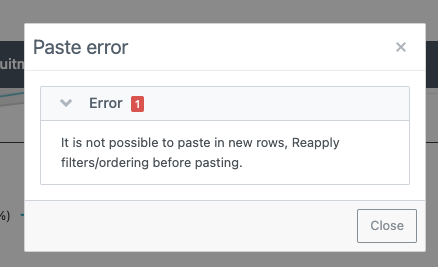
- When you tried to paste data in newly created rows, an unclear error message was displayed.
- A new message is now displayed (see image below), informing you that it is not possible to paste data in new rows and that you need to reapply filters/ordering before pasting.
-
An Advanced User that was contributor of an IRT data extract could not share it.
-
This is now fixed, and additionally:
-
If Advanced Users are owners of the IRT data extract, they can share it.
-
If Advanced Users are viewers of the IRT data extract, they can not share it.
-
-
-
When exporting the Treatment setup to an excel file, the order of the columns in the "Titration" table was different than the one displayed in the Supply App.