
Highlights
Easily model certain aspects of your trial: dispensing predictions, local sourcing and expiry extensions.
Share multiple data sets at once with single users/teams.
Table of contents
1. Easily model locally sourced package types
2. Easily model expiry extension campaigns
3. Easily model the dispensing prediction
4. Easier sharing of multiples data sets at once
1. Easily model locally sourced package types
In the new “Local sourcing” table of the “Package types” tab (Network setup), you can now enter the site groups that are locally sourcing package types. In the screenshot below, you can see an example where Australia and Belgium are locally sourcing the comparator.
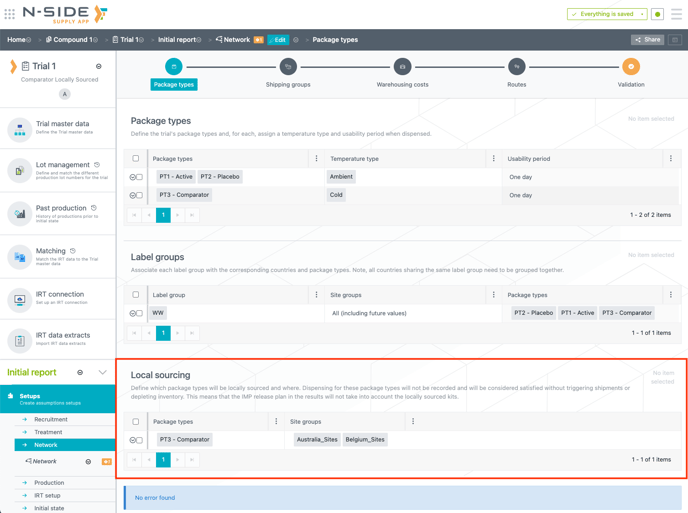
The simulations do not consider the demand for the entries in the "Local sourcing" table.
📝 Note
This new table is optional and should be only used for trials dealing with local sourcing.
2.1. Define expiry extensions
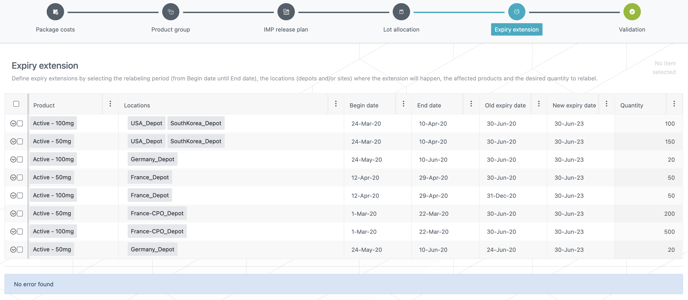
With the new “Expiry extension“ table of the Production setup, you can model expiry extension campaigns for products in your trials.
You can enter the quantity of a product you want to relabel within the location(s) and the period during which those kits are relabeled. During this relabelling period, the kits are removed from the stock at the begin date and then available again in the same location at the end date with a new expiry.
2.2. Visualize your expiry extensions and analyze their feasibility
With the new “check expiry extensions” view of the “IMP release plan” (Results dashboard), you can first visualize the relabeling periods with a chart and understand when and where they take place.
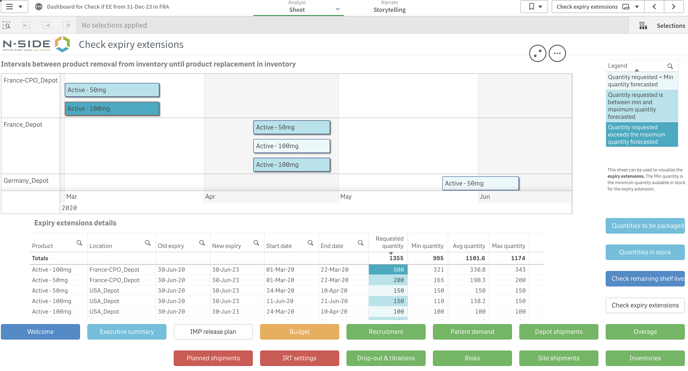
You can also analyze the feasibility of each campaign with a table by comparing the requested quantities you want to relabel (entered in the “Expriry extension” table) with the minimum, average and maximum forecasted quantities (outputs of the simulations). A color legend helps to understand the outputs quantities.
📖 User documentation
See “Results dashboard - IMP release plan” for more explanations on how to use this feature.
This view will help you answer the following questions:
-
When will the expiry extension campaign take place for each location?
-
What quantities are available to be relabeled during the extension period?
⚠️ Warning
This table does not give information on the risk the expiry extensions could raise. If you want to drive a risk analysis linked to the relabelling, you can do it with the Risks sheet.
3. Easily model the dispensing prediction
Prediction rules are now more explicit and more easily interpretable. You can easily model prediction modes that are not the default ones by:
-
Applying a prediction mode at randomization,
-
Applying a prediction mode for titrations,
-
Overriding default modes with custom predictions from some specific combination of treatment inputs.
📝 Note
Prediction modes are optional, existing trials will not be impacted by this new feature. Buffers are computed for unpredictable demand (following the site resupply algorithm) and if these prediction features are not used, what was unpredicted will remain unpredicted.
3.1. Prediction at randomization
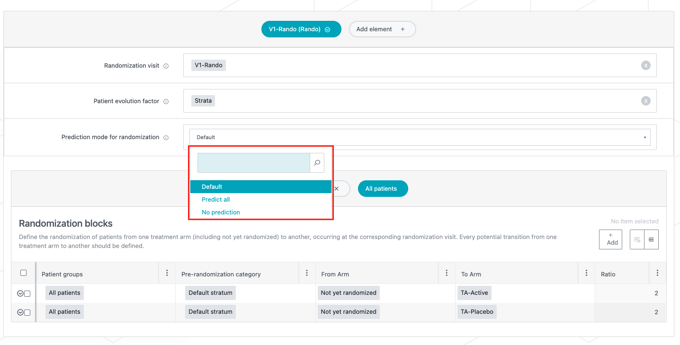
With the prediction mode for randomization you can choose if you want the kits dispensed at randomization to be predicted or not.
The attributes can be set as:
-
Default: The system predicts kits with certain dispensing, i.e., the system predicts the needs for the patient's next visit(s) based on the dose level the patient is on. In addition, if patients receive some kits at randomization regardless of the treatment arm, these kits will be predicted too.
-
Predict all: the system predicts kits for all possible dispensing at randomization. This can be useful in case you model a smart prediction.
-
No prediction: The system predicts no kits at randomization.
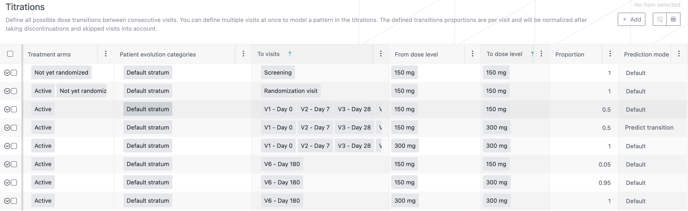
3.2. Prediction for titrations
A new “prediction mode” has been added in the “Titrations” table so that you can decide to predict (or not) each transition (row) in the table. The modes can be set as:
-
Default: The system only predicts kits for transitions where patients stay on the same dose level and uses buffers to cover for the probability of down/up titrating.
-
Predict transition: The system predicts the transition so that buffers do not need to do so. The “predict transition” mode applies to each titration individually. For example, if you want to predict one up-titration and one down-titration for a specific dose level, you will need to enter two lines: one for the up-titration and one for the down-titration.
3.3. Custom predictions
If you want to define any other kind of prediction rules (e.g, you want to predict the second visit dispensing for all treatment arms and all dose levels), beside the ones you can define for the randomization and titrations, you can enter overriding custom predictions in this new “Prediction” table.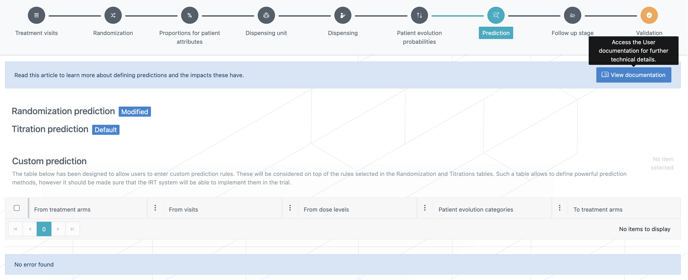
You can define any dispensing predictions from/to specific treatment arms, visits, dose levels and patient evolution categories.
⚠️ Warning
Make sure that the IRT system is able to implement these custom predictions for your trial.
📝 Note
This table is not automatically populated with the predictions coming from randomization and titrations but you can see if they have been modified or not with the blue badges above the table (see screenshot above).
4. Easier sharing of multiples data sets at once
4.1. Share multiple data sets at once
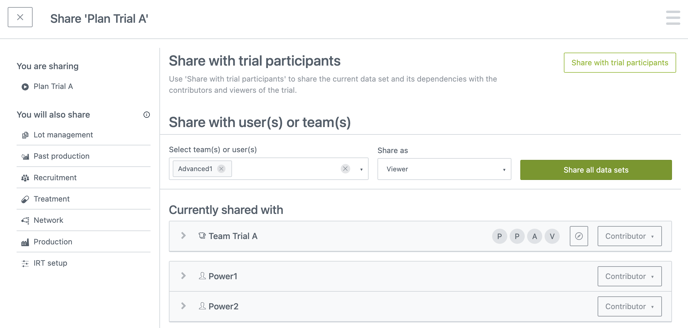
When you share a data set, such as a trial or a plan, you will now automatically share its dependencies, i.e. all the data sets needed for the correct usage of what you are sharing. A data set with its dependencies is called a sharing unit.
Previously this was only possible by using the “Share with trial participants“ button on some data sets. That functionality remains, but now you can also share an entire sharing unit with individuals or teams, via the “Share all data sets“ button.
By sharing the main data set, you will also upgrade the relation of the dependencies, i.e., making it at least as permissive as before (e.g., when upgrading to viewer, the collaborator will stay contributor if they were before, and viewer otherwise).
4.2. Visualize dependencies when sharing a data set
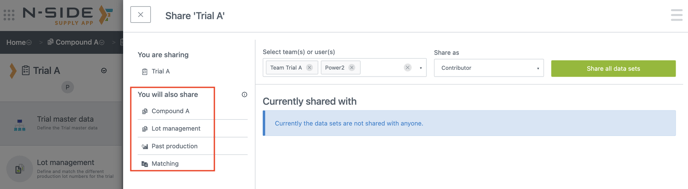
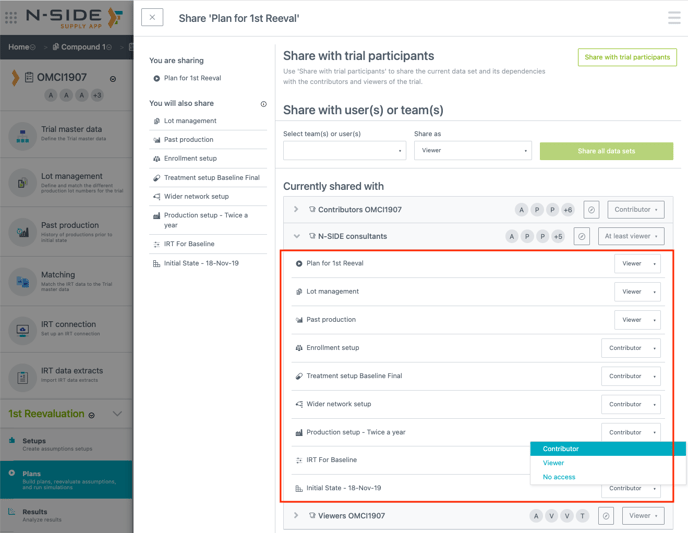
When sharing a data set, you can visualize the dependencies that will be automatically shared with it (see red frame on the screenshot below).
4.3 Access and update individual relations for each data set at one place
You can now check the summarised relation of a team or a user with the sharing unit (see red frame on the screenshot below):
-
Contributor: Contributor for all data sets in the sharing unit.
-
At least Viewer: Viewer of some data sets and Contributor of the others.
-
Viewer: Viewer for all data sets in the sharing unit.
-
Partial Access: Missing accesses to some of the data sets.
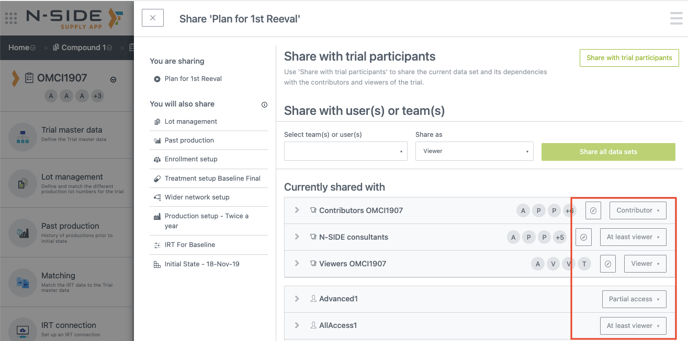
More than seeing the current relation with the sharing unit, you can also access the relations of an individual user or team with the dependencies of a sharing unit (see red frame on the screen shot below). This way, you can have an inventory of the relations and update each of them for a team or a user without needing to go through each dependency and update the relation separately.
5. Other updates
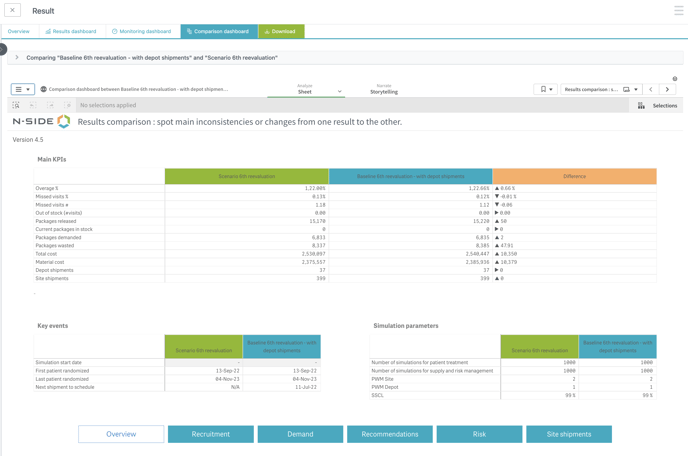
The Comparison dashboard “Overview” sheet has been reworked to bring more clarity to your usage.
6. Bug fixes
Deleted users appeared in the sharing drop-down menu. This is now fixed.
7. User documentation
The following articles are added (or have been modified) to enrich the documentation and help you in your usage of the N-SIDE Supply App