
Table of contents
Treatment visits
In the Treatment visits tab, you start by selecting all the visits that the patient might go through during the trial, exception made for the potential follow up visits that should be defined in the Follow up stage tab. As a reminder, the visits are defined in the Trial Master Data, and the order of the visits list is important, as patients will follow the visits in that order.
💡 Tip
You can easily enter visits in the Treatment visits table by using the Align with Trial functionality. This action will fill in the table with all treatment visits (and their order) defined in the Trial Master Data.You also need to define an out of window threshold for each visit. This number will be used to filter out patients from the trial actuals if they are still registered as "active" but have not shown up to any visit in months. The out of window is the number of days on top of the visit interval window that a patient has to stay inactive for the system to consider that this patient has actually dropped out.
When all visits have been defined, you can input the visit intervals (between consecutive visits) and the corresponding visit windows (representing the variability on a given interval). A baseline visit can be defined (non-mandatory). If there is a baseline visit, all following visit intervals (and visit windows) will be computed with respect to that specific baseline visit.
Define a visit schedule per patient group
You can assign specific visits to patient groups (in the Treatment visits table) thanks to the Patient groups column. For example, this can be used to model a visit schedule per cohort (see image below) as the same visit can be assigned to multiple patient groups.
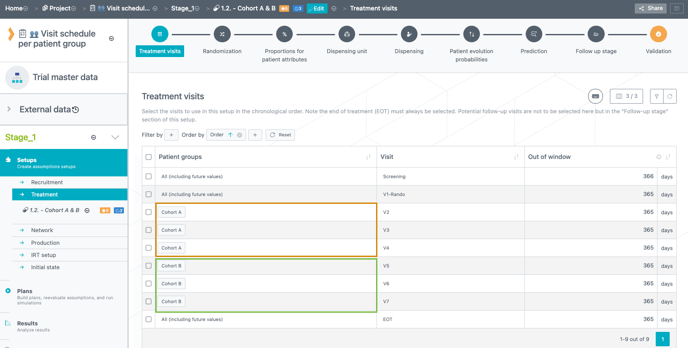
Moreover, you can define a visit schedule per patient group in combination with a baseline visit and therefore without using skipped visits.
⚠️
-
If skipped visits are used for other dimensions (ex: treatment arm, dose level etc.) the baseline visit cannot be used.
-
The baseline visit must be the same for all patient groups.
E.g.: If the randomization is defined as the baseline visit, it will apply to all patient groups.
Define a visit interval per patient group
You can also define a visit interval per patient group (in the Visits intervals table) thanks to the Patient groups column (see image below).
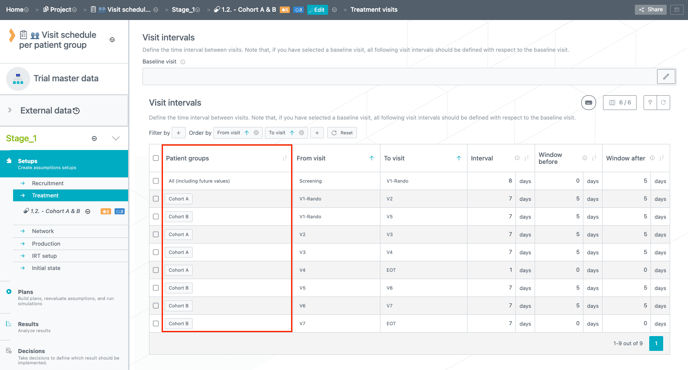
The same visit interval can be defined for multiple patient groups.
⚠️ You must define all possible visit intervals relevant to each patient group. If you define an impossible transition for a given patient group, the system will display an error.
Randomization
In the Randomization tab, you have to first define what is/are the randomization visit(s) and what is the patient evolution factor and what is the prediction mode for randomization.
The patient evolution factor is used to assign attributes to patients when the randomization is over, which means that they will be used after randomization. The patient evolution factor can be used to define different titration schemes or probabilities depending on some patient attributes (e.g. older patients are more likely to down-titrate) and it can impact re-randomization (if any) and skipped visits as well.
⚠️ If the pre-randomization factor is the same as the patient evolution factor, assignments of attribute categories from the randomization to re-randomizations/titrations/skipped visits are independent. However, this will have an impact only if pre-randomization and patient evolution factors are actually impacting randomization and re-randomization/titration/skipped visits, respectively. There will be no impact in cases where pre-randomization and patient evolution factors are defined by an identical patient attribute which was created by default by the system (i.e. that is actually not impacting anything in the trial).
📖 For more information on how to use patient attributes : How to use patient attributes
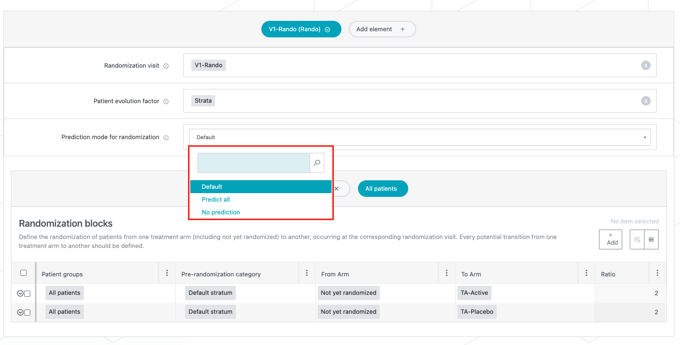
With the prediction mode for randomization you can choose if you want the kits dispensed at randomization to be predicted or not.
The attributes can be set as:
-
Default: The system predicts kits with certain dispensing, i.e., the system predicts the needs for the patient's next visit(s) based on the dose level the patient is on. In addition, if patients receive some kits at randomization regardless of the treatment arm, these kits will be predicted too.
-
Predict all: the system predicts kits for all possible dispensing at randomization (and only for the randomization visit). This can be useful in case you model a smart prediction.
-
No prediction: The system predicts no kits at randomization.
💡 Tip
The system only predicts the randomization visit from the visit before. If you want to predict the randomization from an earlier visit, you can fill the custom prediction table (see Treatment setup - Prediction & Follow-up stage).
Randomization blocks
Pre-randomization categories that are used to randomize patients and impact randomization blocks are defined below, in the Randomization blocks table.
Randomization blocks are defined per patient group and pre-randomization category. This allows for example to use patient groups as cohorts and randomize different cohorts to different treatment arms to assign them different treatments. To enter data for a specific patient group, the user selects this patient group in the table header.
❗At least one treatment arm should have a randomization ratio different from 0 for all strata. Otherwise these treatment arms will be considered as non-reachable.
Randomization graph
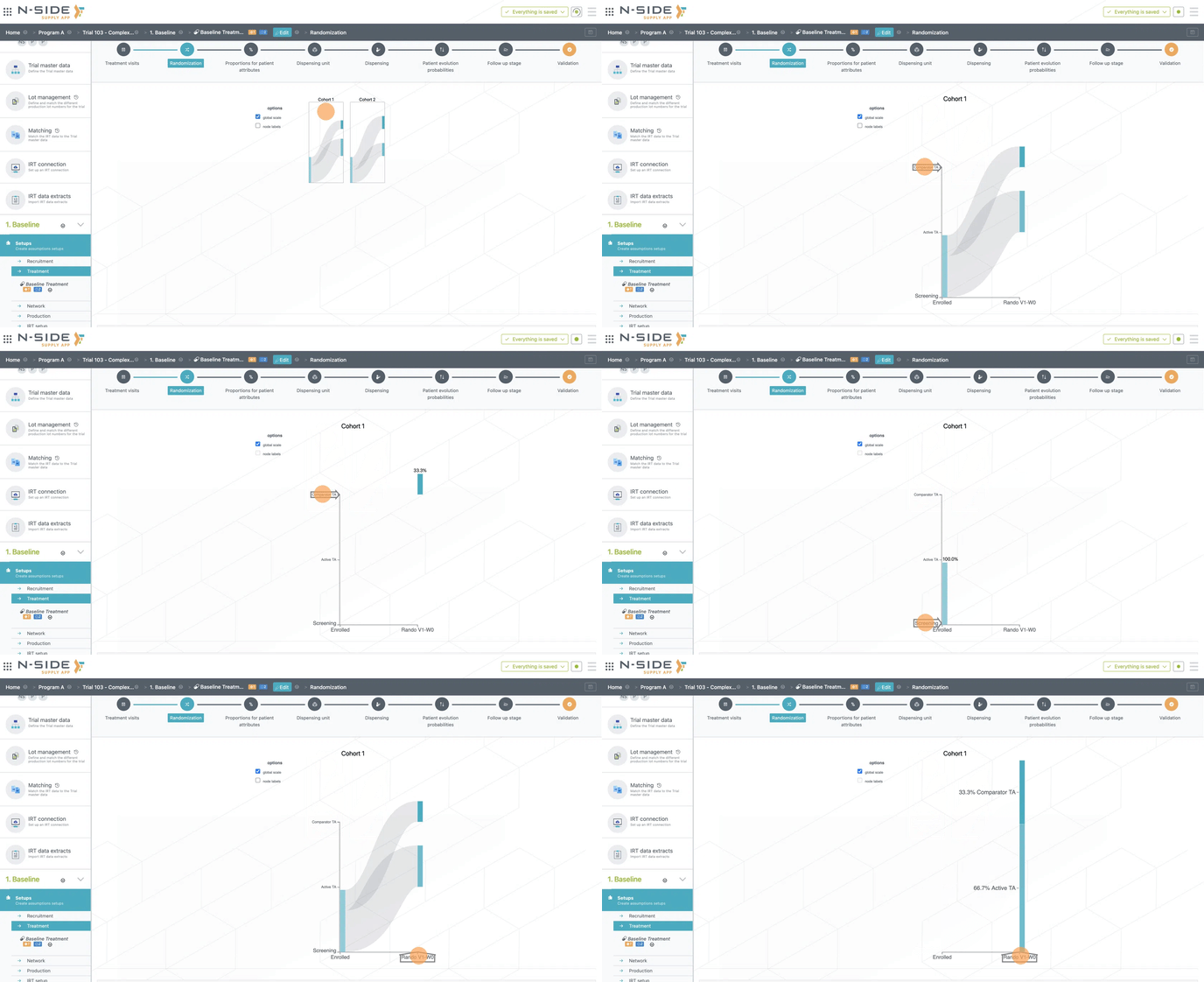
The randomization graph displays the data entered in the randomization blocks. Different actions can be performed by clicking on different parts of the graph:
-
In case of patient groups, clicking on the graph of a specific patient group will zoom in on this group.
-
Clicking on a treatment arm shows the proportion of patients on this treatment arm at the randomization visit.
-
Clicking on a visit shows the split of proportions of patients between treatment arms at this visit.
Geographic stratification
The Geographic stratification table allows to use different randomization tables for different regions. The stratification will be done either at country level (one geographic stratification row per country), region (a few countries per row) or trial level (all countries in one row).