
Access the dashboard
You can access the Strategic dashboard through the Dashboards, in the home page of the Suite. There, you can select the portfolio of trials for which you want to visualize the dashboard.
Executive summary
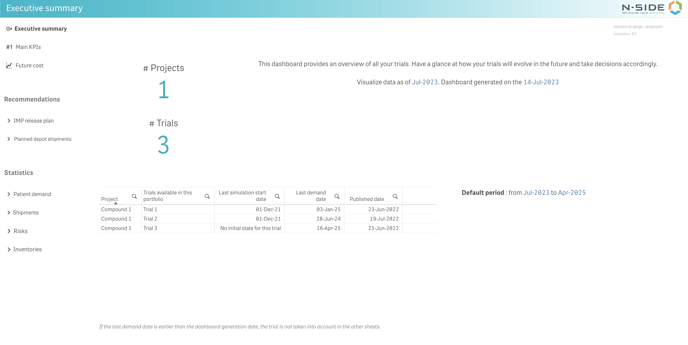
In this sheet, you can find a quick description of the dashboard’s capabilities, the month as of which data is shown and the dashboard generation date.
Below this information, there is a list of available trials in the dashboard with their respective previous simulation start date, dashboard generate date and published date (i.e. date of the publication of the trial in the portfolio).
Main KPIs
In this sheet, you can see an overview of several KPIs (Key Performance Indicators) regarding the portfolio of trials available in the dashboard.
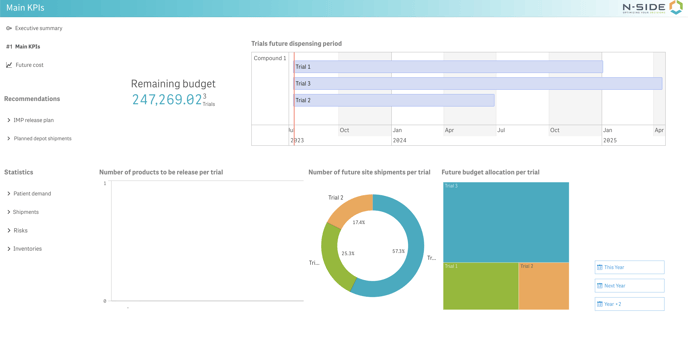
On the left you will find information about the budget that this portfolio will represent in the future and, next to it, a Gantt chart displaying the future dispensing period for each trial of the portfolio. Clicking on a trial in the chart will filter the data accordingly.
In the middle, you can see the future number of products to be packaged per trial in a bar chart and the future number of shipments to be sent to sites per trial in a pie chart. On the right, you can see detailed information about the allocation to each trial in the tree map.