
Table of contents
- Number of simulations for patient treatment
- Number of simulations for supply and risk management
- Prediction window multipliers (PWM) at sites
- Prediction window multipliers (PWM) at depot
- Safety Stock Confidence Level
This article provides more details regarding simulation parameters as well as good practices on how to use them.
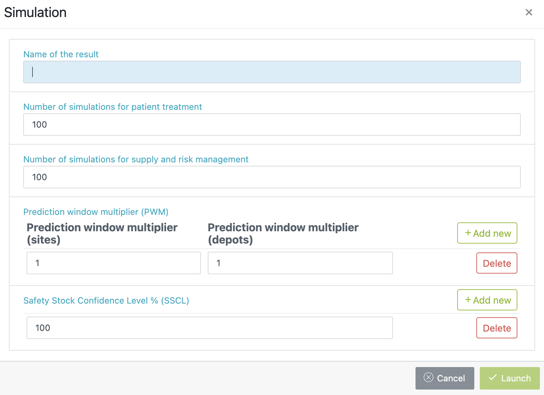
Number of simulations for patient treatment
This is the number of simulations that are run on the recruitment and demand parameters. This will notably simulate the buffer levels at sites (only if they are not fixed) and will recommend you the most appropriate levels based on the worst case scenario (see “Safety Stock Confidence Level” below for more details) observed.
✅ Good practices
-
The more variable the recruitment, the more simulations you should run so that more cases are taken into account. This is even more applicable when you have a low number of patients combined with unlikely events.
-
In addition, the more simulations, the more optimal buffer levels recommendations.
-
It is recommended to run at least 100 simulations for preliminary results, whatever the variability of the recruitment.
-
If buffer levels are fixed, you can consider running less “patient treatment” simulations than “supply and risk management” simulations (see below) for intermediary results.
-
It is recommended to run 1000 simulations for final results (depending on the complexity and running time of the trial).
Number of simulations for supply and risk management
These simulations are again run on the recruitment/demand parameters, as well as on the supply parameters (productions and shipments), to estimate the risk associated between both. This will notably simulate the buffer levels at depots and will recommend you the most appropriate levels based on the worst case scenario (see “Safety Stock Confidence Level” below for more details) observed.
✅ Good practices
-
Run the same number of simulations as the number of “patient treatment” simulations (see above). Indeed, the more “supply and risk management” simulations, the more accurate the estimation of the risk will be. With the only exception of when you simply want to check the recruitment/demand of the trial, in that case you could run less simulations.
-
It is even more recommended to run 1000 simulations for final results (depending on the running time of the trial) as the majority of the results statistics will come from this set of simulations.
Prediction window multipliers (PWM) at sites
This parameter decides upon your prediction length at site level. Within your IRT setup, you defined a prediction window at sites (Resupply management tab) that will be multiplied by the number you enter as PWM. For example, if you entered 7 as the number of days for your prediction window at sites and you choose a PWM of 2, the simulations will be run with 14 days (7x2) of prediction window at sites.
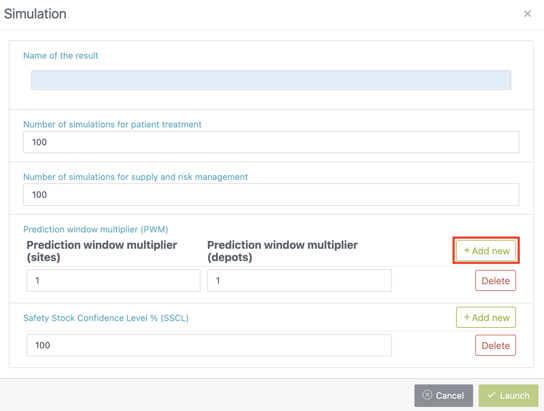
You can run simulations with multiple PWMs at sites by clicking on Add new (see screenshot below).
✅ Good practices
-
This is a very helpful feature when it comes to creating a Strategic Optimization Curve (SOC) which tests different PWMs. It gives you the opportunity to run your plan on different prediction windows and analyze which strategy is the most cost-risk beneficial to your trial.
-
Use a PWM aligned with the visit interval so that when the site is resupplied, it is resupplied to cover at least one visit interval.
Prediction window multipliers (PWM) at depot
This parameter works the same as the PWM at sites. It multiplies your prediction window at depots by the number you entered as PWM.
✅ Good practices
-
The prediction window at depot is usually computed based on the depot shipment coverage period and generally does not change during the trial duration. Therefore, it is recommended to “fix” the value of the prediction window in the IRT setup (Resupply management tab) and leave the PWM at 1 (by default).
-
This value is not played with for a Strategic Optimization Curve (SOC) as the prediction window at depot is not managed by the IRT system. It represents a static value for the trial.
Safety Stock Confidence Level
The level of risk covered by the minimum buffer levels, called the safety stock confidence level (SSCL). This parameter is a percentage : 0% meaning that no worst case scenario is covered and 100%* that you cover all worst case scenarios.
Example : Let’s take a simple example where we have 100 simulations for “patient treatment” and 200 simulations for “supply and risk management” and we choose a 95% SSCL.
The buffer levels at sites (“patient treatment” simulations) will be computed on : 100 simulations - 5 (5% worst cases) = 95 simulations.
The buffer levels at depots (“supply and risk management” simulations) will be computed on : 200 simulations - 10 (5% worst cases) = 190 simulations.
However, the risk will be estimated for the 200 “supply and risk management” simulations using all buffer levels defined above (i.e. sites and depots). Therefore, there is no removed worst cases when the risk is estimated. This allows to quantify how buffer levels are covering (or not) the variability observed during simulations.
✅ Good practices
-
The SSCL used depends on the complexity and uncertainty of the trial. As a general rule, we recommend to use 99% for final results in order to be conservative. Nonetheless, setting up this parameter remains at the discretion of the user and depends on the trial characteristics.
-
100%* should only be used when there is a very unlikely event (e.g. very rare titration path) that you want to cover.
⚠️ Attention points
-
Pay attention that using a 100% SSCL can result in an increased overage as the system could be overproducing to cover extreme and very unlikely events.
-
Using 100% SSCL does not guarantee that the very unlikely event you want to cover will actually be happening in the simulations, simply due to its high unlikeliness. In this case, it is usually recommended to set up the min buffer levels (in the Resupply management tab of the IRT setup) yourself in order to cover this unlikely event.
ℹ️ We are there to support you!
If you have any questions regarding these parameters and how to setup them for a specific trial, please reach out to the N-SIDE Service desk for support (e.g. coaching request).