
The Power User has the responsibility to setup new trials and optimize plans with varying degrees of complexity.
Key activities:
-
Enter new trials in the Suite or reevaluate trials that are already modelled modify pre-existing trials
-
Create and update all setups, including Trial Master Data, Matching, and IRT Extracts
-
Generate final results and publish these into dashboards
-
Enhance collaboration by sharing setups, plans and final results
-
Leverage capabilities of all dashboards
We can distinguish the User Flow, i.e., operational usage of the N-SIDE Supply App from the User Journey, i.e., global view of the role.
Here is a summary of the Power User Journey in the N-SIDE Supply App:
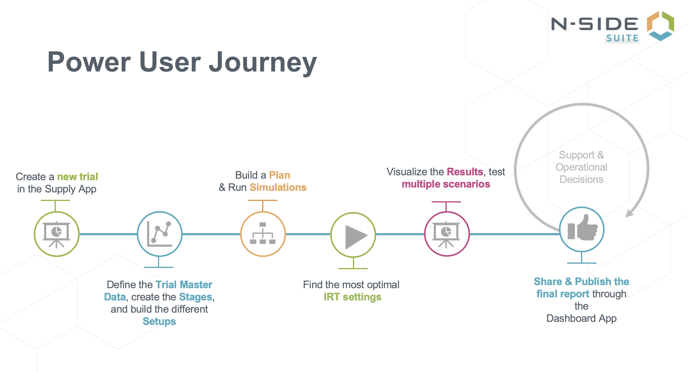
Below are all the articles (separated into subsequent journey steps) an Power User can read to carry out this journey:
|
Journey step |
Articles |
|
|---|---|---|
|
Create a new trial |
||
|
Define Trial Master Data |
||
|
Create stages |
||
|
Build setups |
Recruitment |
How can I control the variability of the recruitment in my trial (in a region or country)? |
|
Treatment |
||
|
Production |
How to build a safe and optimal IMP release plan What is the difference between label group, lot allocation and required countries? |
|
|
Depot shipments planning |
Why is the system sending less kits than the requested quantity in my planned shipment? Why are my planned shipments not respecting the shipping groups? |
|
|
Build a plan and run simulations |
N-SIDE Supply App - Running simulations N-SIDE Supply App - Simulation parameters : Details & Good practices |
|
|
Find the most optimal IRT settings |
||
|
Visualize the results |
I have out-of-stocks/missed dispensing risk in my results, what should I check? |
|
|
Publish decision |
||
|
Share plans and results |
||
|
Check Monitoring dashboard |
User flow example | |
|
Update setups/reevaluate assumptions/run additional scenarios |
||