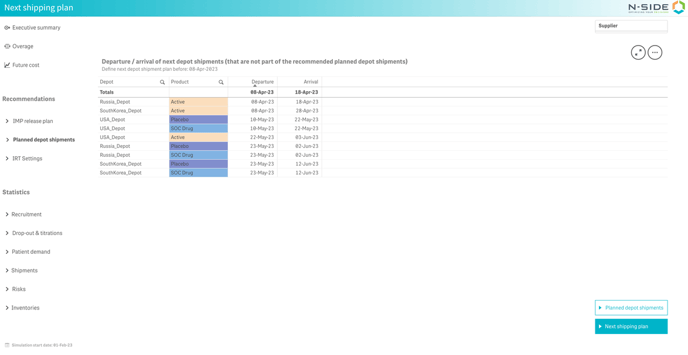
There are two main views for this sheet : Planned depot shipments and Next shipping plan.
Planned depot shipments
A Depot shipments schedule table is displayed as soon as you select the Planned depot shipments sheet.
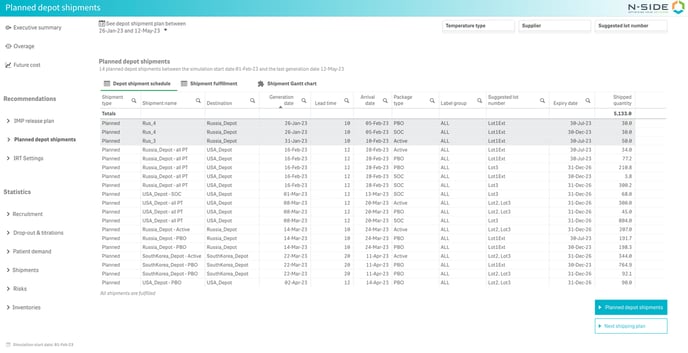
The table displays information related to your shipments notably : lead time, arrival date, expiry date and quantity shipped. Note that cells in lines corresponding to shipments with an earliest departure in the past (before the simulation start date) have a grey background.
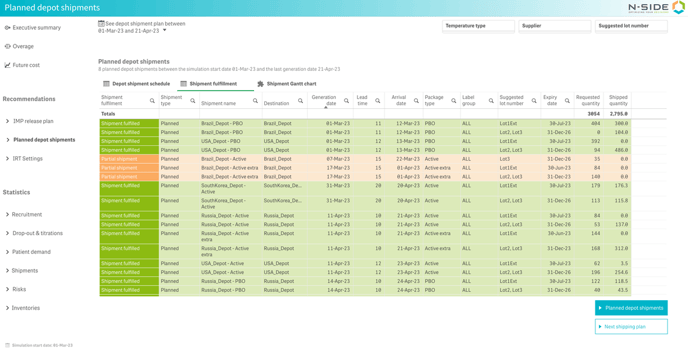
Next to Depot shipment schedule, you can directly see the fulfilment (fulfilled or partial shipment) of planned depot shipments (Shipment fulfillment). Partial and fulfilled shipments are highlighted in different colors:
-
Green if the requested quantity equals the shipped quantity.
-
Orange if the requested quantity is bigger than the shipped quantity.
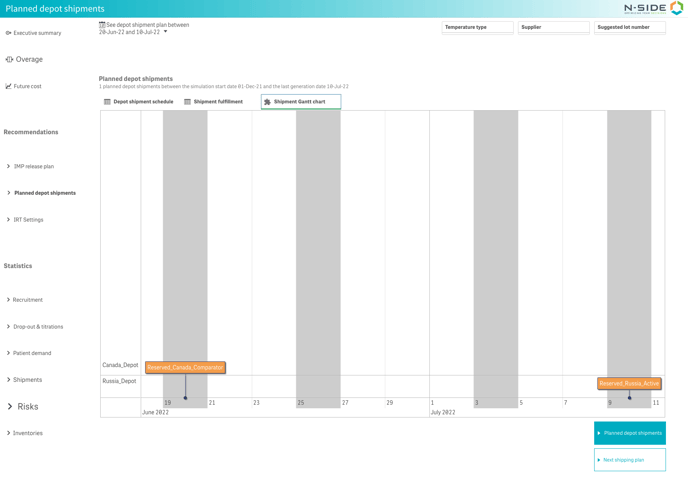
The Shipment Gantt chart displays each shipment as an event box which displays some information when users hover over it : destination, departure date, arrival date and package type(s). Shipments are sorted chronologically by departure date and the chart is reactive to filter selection (temperature type, package type, destination and suggested lot number).
Next shipping plan
This view displays the departure/arrivals of the next shipment that are not part of the recommended planned depot shipments. This way you can see before when you should plan your next depot shipment plan.