Inventories
With this view, you can visualize the inventories per depot and site. Meaning that you can see the expiry date/status/quantity of a specific lot for a specific depot or site.
You can use the bottom right buttons to switch between depots and sites (see red frame in the image below).
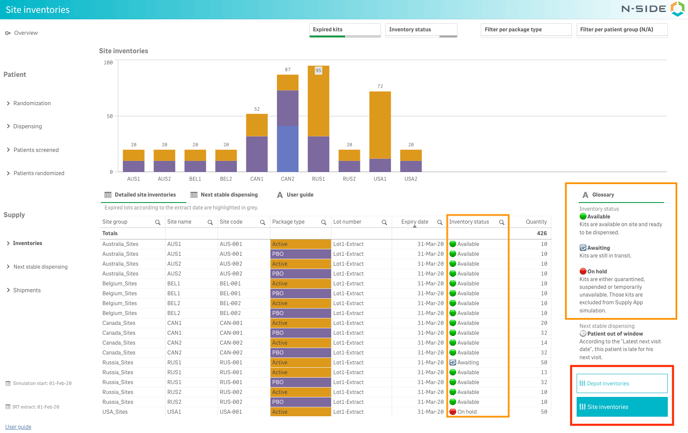
You can visualize kits with "Available", "Awaiting" or "On hold" status reported in the IRT data extract with the Inventory status column and the Glossary (see orange frames in the image above).
You can also see the expired kits in depots and/or sites (with regards to the extract date). They can be displayed in the table and you can filter them out with the filter at the top right of the page (see image above).
Next stable dispensing
In the Site inventories view of the Inventories sheet, you have access to the Next stable dispensing table (see image below).
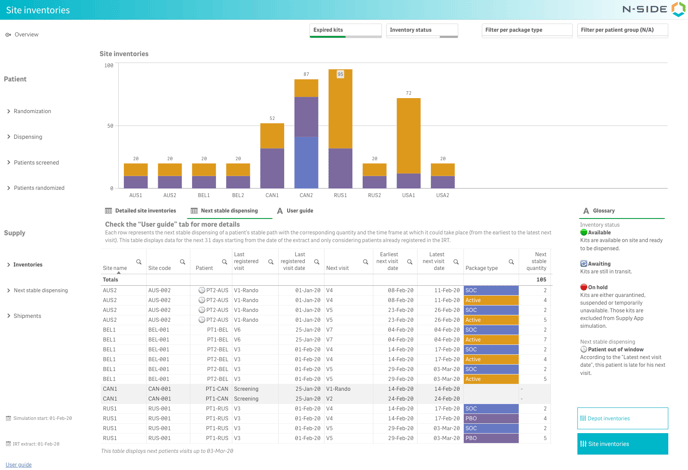 With that table, you can have an overview on the upcoming visits for the next 31 days of already registered patients for each site.
The Earliest next visit date and the Latest next visit date (see image above) are computed based on the Last registered visit date from the IRT data extract and take into account the visit intervals, visit windows as well as a potential baseline visit.
In addition to the next visit information, you can also get insights into the next dispensing if the patient has a stable path in his treatment. In this case, the Package type and the Next stable quantity columns display the dispensing at those next visits for that stable path. If there is no stable dispensing for the visit, those two columns will remain empty.
💡 What is a stable path?
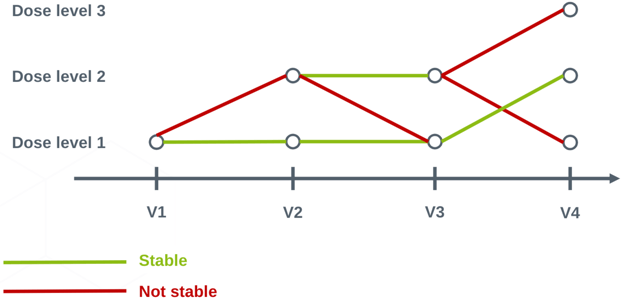
Stability implies that patients are expected to remain on their current patient group, treatment arm and dose level (eg. patients will not be randomized, titrate or change weight) unless there is a 100% chance of transitioning to another specific state.
If patients cannot stay on their current treatment arm (eg. randomization) or dose level (they have to titrate to other dose levels), the dispensing is considered as unstable.
Here are a graph and a few examples to illustrate the concept:
-
Patient last visit is V1 (Dose level 1) → next stable dispensing is at V2 (Dose level 1)
-
Patient last visit is V2 (Dose level 1) → next stable dispensing is at V3 (Dose level 1)
-
Patient last visit is V2 (Dose level 2) → next stable dispensing is at V3 (Dose level 2)
-
Patient last visit is V3 (Dose level 1) → next stable dispensing is at V4 (on Dose level 2 as it is the only possible stable path)
-
Patient last visit is V3 (Dose level 2) → next visit is V4 but there is no stable dispensing as patient has to titrate to many other Dose levels.
⚠️ What is not displayed in the table?
-
The table does not display the next visits beyond 31 days after the IRT data extract date.
-
The table does not take into account new patients that could be recruited during those next 31 days as they are not registered in the IRT data extract yet.
-
The table does not show the dispensing of locally sourced package types as they are not part of the supply chain.
-
"Discontinued" and "Completed" patients are not reported in the table as they do not have any future dispensing visits anymore.
📝 Note
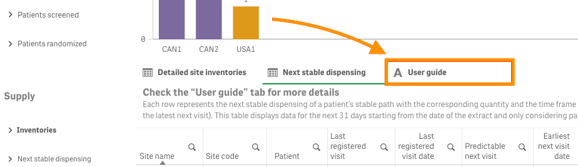
A User guide is always available next to the table to remind you how to read the table and what is not considered as stable.
Compare the next stable dispensing with your stocks
The Next stable dispensing table allows for the correlation between upcoming dispensing and current inventory levels (see video below), offering insights into stock coverage.
Filters applied to the Site inventories bar chart and both Detailed site inventories and Next stable dispensing tabs are persistent, facilitating seamless analysis. Note that "On hold" kits can be filtered out for a more accurate analysis.
With this new table, you are now able to answer the following questions:
-
Which sites are expecting patient visits in the coming month?
-
How many patients should return for their next visit in the coming month?
-
What is the stable dispensing in the coming month at my sites for patients already registered in the IRT data extract?
-
Are there enough kits available at sites to at least cover the stable dispensing of registered patients for the next month?
📝 Note
If the bar chart is not sufficient to visualize both inventories and next stable dispensing, you have the option to regenerate the Monitoring dashboard once again to have it open in a separate window and compare both views (see image below).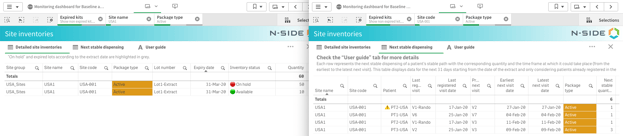
Easily spot “out of window” patients
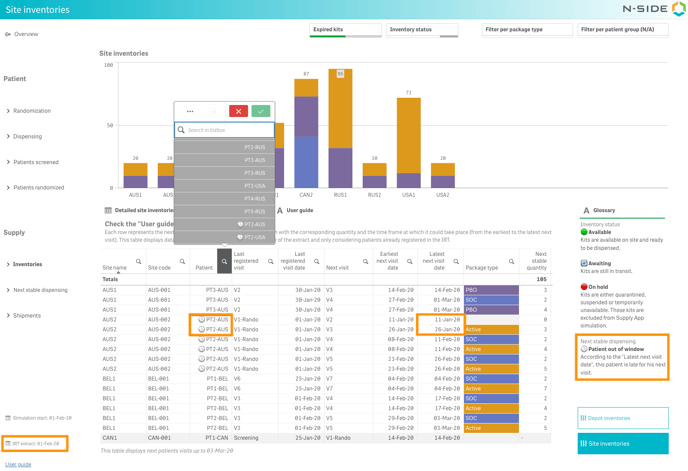
You can also easily spot patients late for their next visit. Those patients are marked with a 🕒 if their latest next visit date is prior to the IRT data extract date, meaning they are “out of window” (see image below).