
Access the dashboard
There are two ways to access this dashboard.
You can go to the Dashboards. Then, select a portfolio in which the results for the relevant trial are published and click on View details. You can then open the Monitoring dashboard in another tab.
Otherwise, you can go to the N-SIDE Supply app and look for the results you want to monitor and click on View details. You can then open the Monitoring dashboard in another tab.
Overview
You can visualize a summary of the monitoring alerts in one single page so that you are aware of the current status of your trial and if there are any deviations affecting it. You can start from there and deep-dive into a more detailed analysis.
The chart and map display a maximum of five levels of alert that you can find in the alerting legend:
-
Over trend: today’s actual is superior to the maximum forecast of the day,
-
Faster trend: today’s actual is close to the maximum forecast of the day (5% below or less close to the bound)
-
Within bounds: today’s actual is within the minimum and maximum bounds (at least 5% away from those bounds)
-
Slower trend: today’s actual is close to the minimum forecast of the day (5% above or less close to the bound)
-
Under trend: today’s actuals is inferior to the minimum forecast of the day.
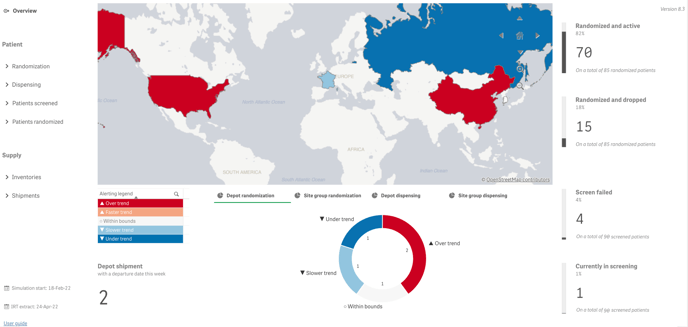
The overview gives a summary of the situation in one page:
-
Randomization monitoring: the number of depot or site group per alert level (below the map)
-
Dispensing monitoring: the number of depot or site group per alert level (below the map)
-
The total number of enrolled and randomized patients (on the right)
-
The number of depot shipments departing in the 7 coming days (bottom left)