
The Initial state setup is the only one that is not mandatory to define in order to run simulations. It can be modified by Advanced Users and Power Users.
The data can either be defined by the user from scratch or imported from the IRT database (see the IRT Connection section for more information).
Simulation start date
The Simulation start date tab lists the date from which all the following data should be considered.
📝 Note
If the data is coming from an IRT extract, this date will be the date on which the extract import was performed.
When running simulations, everything that is prior to the simulation start date will be considered as part of the past, and not simulated. This means that if a release in the Production setup is defined before the simulation start date, it will be ignored as the kits of that release should already appear in the inventories.
Sites
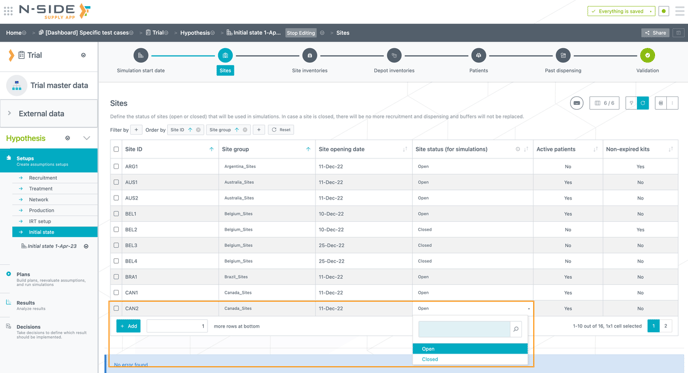
The Sites tab contains information on sites used in the trial, including their status (open or closed). You can define sites as "closed" in the "Sites status (for simulations)" column (see image below). This allows the system to ignore these closed sites in the simulations, e.g. if the recruitment is stopped at this site.
⚠️ Important information
- The "open/closed" status will be used during the simulations and it is not coming from the IRT data extract. It needs to be defined manually.
- By default, all sites are set as "Open" in the "Site status (for simulations)" column.
To easily identify potential sites to close, you can use the “Active patients” column (see image below). A site can be closed only if there are no active patients in it. For example, if a site is not recruiting anymore, but there are active patients still receiving treatment there, that site cannot be closed.
The “Non-expired kits” column (see image below) gives you information on the potential loss of kits if a site is closed.
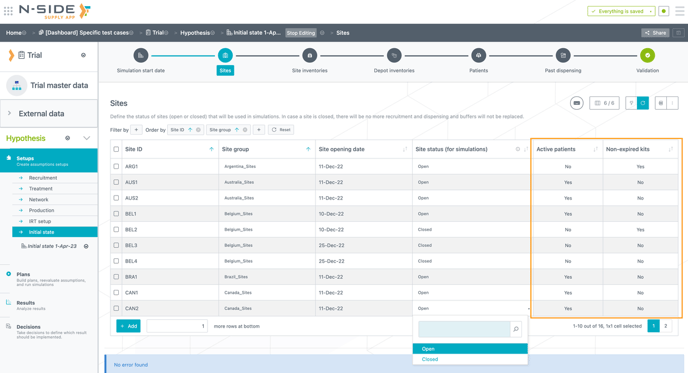
You can filter the table and display only sites without active patients, and then use the edit bulk to close all of them.
Impacts of site closure on simulations
In the simulations, the following information is considered:
- New patients, dispensing and buffer replacements are not predicted at closed sites anymore.
-
The information about how many sites have been opened and closed is kept and the system prevents to open new sites when the expected number of sites has been reached. For example, 5 sites are expected to be activated in Belgium. If 2 open sites and 1 closed site are defined in the initial state, the system is going to take all of that information into account, and therefore, it is going to open only 2 extra sites.
-
Patients linked to a closed site are still counted as part of the recruitment assumptions and recruitment constraints.
-
Patients and inventories which are in the initial state and linked to closed sites, can be kept without triggering any error message.
-
Complete site group history (open and closed sites) is used in the reevaluation of patient attributes, dropouts and titrations.
Sites inventories
This tab shows the current inventories in the active sites. Lot number, expiry date and quantity are defined for each package type in the inventory of a site. The sites in this section should already be defined in the Sites groups tab.
Depot inventories
This tab shows the current inventories in the depots. Lot number, expiry date and quantity are defined for each package type per depot.
💡Identify kits in transit
You can identify kits that are still in transit to the depots/sites with the Status column (in the Site inventories and Depot inventories tables).
Only the "Available" and "Awaiting" statuses are displayed (see image below) given that the others are not used in the simulations. 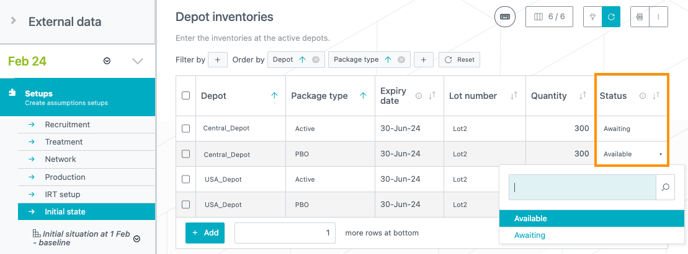
If you are modeling your depot shipments for a plan that has "Awaiting" stocks at local depots (in the Initial state), a warning banner will inform you about the depots for which the kits are not available yet (see image below).
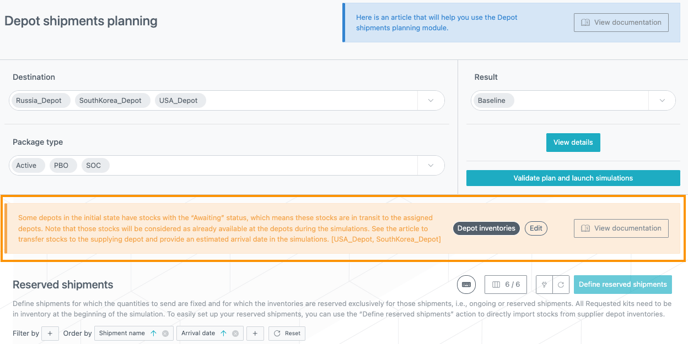
✅ Good practice for more accuracy in your results: To avoid those "Awaiting" kits to be shipped by the system before they are available, you can move your stocks back to the supplier depot and create a reserved shipment.
Patients
The Patients tab shows the current status of all patients registered in the trial. On top of the patients table is a summary on the patients statuses showing:
-
The total number of patients registered in the trial.
-
The number of patients still active.
-
The number of patients that discontinued the treatment.
-
The number of patients that completed the treatment.
-
The number of patients that were randomized.
In the table, the following information are available for each patient currently in the trial:
-
The site where the patient was enrolled (defined in Sites groups tab).
- The associated site group
-
The patient group
-
The patient attribute (e.g. weight group)
-
The stratum
-
The status: you can give a specific status (active, discontinued or completed) to a patient.
-
The last visit date
-
The last visit
-
The treatment arm
-
The current dose level
-
The baseline visit date
-
The screening date
-
The randomization date
-
The completion date
-
The number of consecutive visits on the same dose level, prior to the last know dose level. This information will be useful to know if prediction should be used right away for the patient.
📝 Notes
- The site group is only displayed for initial states created as of the 2024.4 version of the Supply App.
- The Supply App does not use the site group information when running the simulations. Therefore a blank space or the wrong site group will not have any effect on the results.