
Table of contents
- General use
- Specific case 1 : How to model central vs. local sourcing
- Specific case 2 : What if multiple factors impact the dispensing
General use
The N-SIDE Suite for Clinical Trials enables you to model complex trials using patient attributes (e.g. strata, weight, BSA) that will be used to impact different parts of your trial configuration (randomization, re-randomization, dispensing, titrations and skipped visits).
To understand how to use patient attributes you can follow this 5-steps process:
-
Define patient attributes and attribute categories
-
Define randomization blocks
-
Define proportions for patient attributes
-
Define dispensing units and dispensing per category
-
Define titrations per patient evolution category
Step 1 : Define patient attributes and attribute categories
To define patient attributes and attribute categories, go to the Trial Master Data and the Patient tab.
Let’s first define patient attributes and take, for example, a trial including a stratum (the gender in this case) that will impact the randomization and a weight that will be impacting the dispensing. As the gender will impact the randomization, it should be chosen as the pre-randomization factor (see screenshot below).
Then, we have to define attribute categories specific to each patient attribute. Attribute categories will be female and male for the gender and people weighting less (or equal) than 70kg and people weighting more than 70kg for the weight (see screenshot below). Note that we will keep using these examples of patient attributes and attribute categories throughout this article.
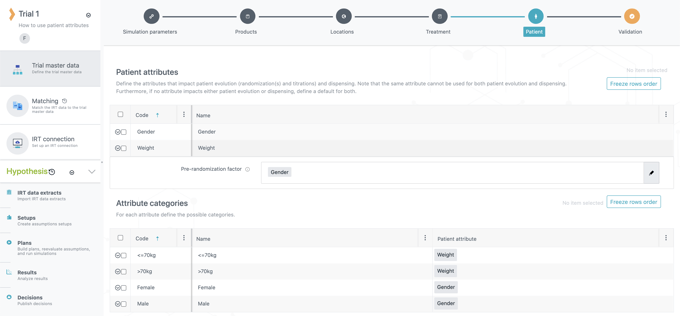
Step 1 : Define patient attributes and attribute categories
Step 2 : Define a patient evolution factor and randomization blocks
Now that patient attributes and attribute categories have been defined, we can define a patient evolution factor and randomization blocks. To do that, go to the Randomization tab in the treatment setup.
The patient evolution factor is the patient attribute that will impact re-randomization (if any), titrations and skipped visits. In this example, gender would be the patient evolution factor (see screenshot below).
Randomization blocks can be defined per male and female (see screenshot below) as the gender is the pre-randomization factor (see step 1) that will impact the randomization of the trial. In this example, let’s choose the same ratio for female and male (2:2) for both treatment arms (active and placebo). You could also choose a different ratio per attribute category or a split of the attribute categories across treatments arms (only females on active for example), if needed.
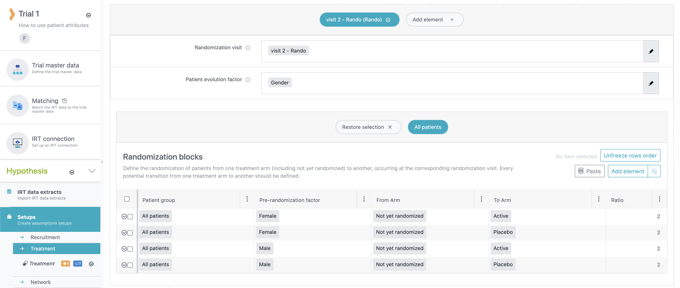
Step 2 : Define a patient evolution factor and randomization blocks
Step 3 : Define proportions for patient attributes
The next step is to define proportions for patient attributes in the tab of the same name in the treatment setup.
Proportions must be defined for each patient attribute. Let’s choose the same proportion for the gender and the weight : 60/40 for female/male and for <= 70kg/>70kg (see both screenshots below). These proportions will be used in all trial steps impacted by patient attributes (randomization, dispensing, titrations and skipped visits). The proportions between patient attributes could also be different if needed.
|
If a patient attribute is used to impact randomization (i.e. pre-randomization factor) or titrations (i.e. patient evolution factor), you will not be able to define different proportions per site groups for this attribute. This is allowed only for the dispensing factor (see step 4). |
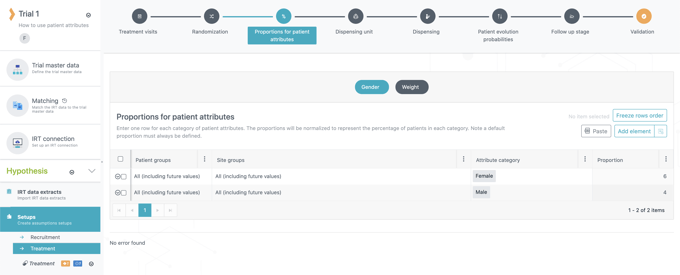
Step 3 : Define proportions for patient attributes (gender)
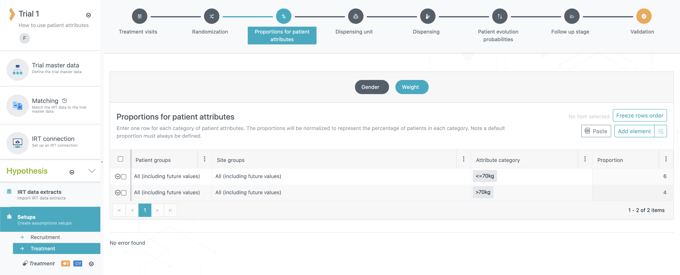
Step 3 : Define proportions for patient attributes (weight)
Step 4 : Define dispensing units and dispensing per category
Then, we have to define which patient attribute (and therefore its attribute categories) will be impacting the dispensing. To do that, go to the Dispensing unit tab in the treatment setup.
As the weight will be impacting the dispensing, its corresponding attribute categories will be used to define the number of kits that will be dispensed for each dispensing unit. In this example, we will dispense 1 kit of active/placebo for the attribute category “<= 70kg” and 2 for “> 70kg” (see screenshots below).
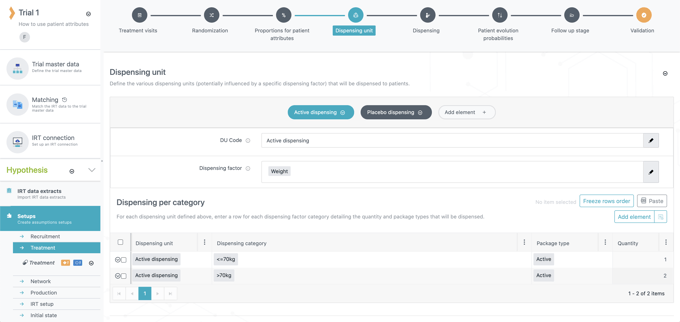
Step 4 : Define dispensing units and dispensing per category (active dispensing)
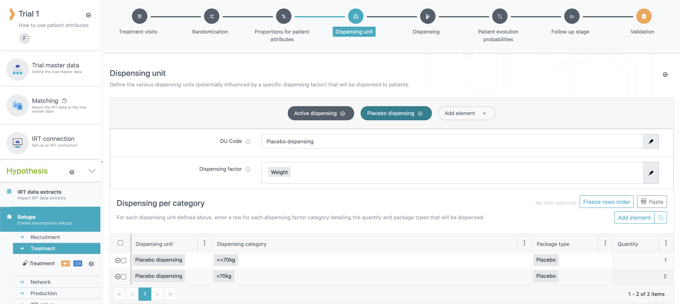
Step 4 : Define dispensing units and dispensing per category (placebo dispensing)
Step 5 : Define titrations per patient evolution category
Finally, we have to define how the titrations will be impacted by the patient evolution factor (and its categories) that was selected previously (gender in this case, see step 2). To do that, go to the Patient evolution probabilities tab in the treatment setup.
For this last step, let’s choose an example where women have a probability of up-titrating of 5% and men have a probability of up-titrating of 10% (see screenshot below). The patient evolution factor can also be used for the skipped visits in the same manner as for titrations.
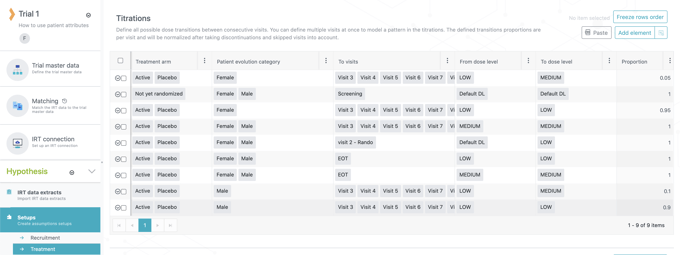
Step 5 : Define titrations per patient evolution category
Specific case 1 : How to model central vs. local sourcing
If your trial has central and local sourcing, you can model it by using patient attributes with a similar process as described above but without steps 2 and 5 as they are not related to patient attributes impacting the dispensing:
-
Use “central vs. local sourcing” constraint to define patient attributes and attribute categories
-
Define which countries will be centrally or locally sourcing
-
Define how the dispensing will be impacted by the “central vs. local sourcing” constraint
Let’s take a simple example where you have 4 countries (Brazil, Poland, Sweden and USA), among which Brazil and USA are locally sourcing the comparator package type, and all countries are centrally sourcing the active package type. In this example, the locally sourced comparator kits will not be taken into account in the dispensing and IMP release plan as the sites will be directly and locally sourced.
Step 1. Use “central vs. local sourcing” constraint to define patient attributes and attribute categories
As we will use patient attributes to model central vs. local sourcing, we first have to define these in the Trial Master Data, in the Patient tab. There, we will use the “central vs. local sourcing” as a patient attribute that will be functioning as a dispensing factor (see step 3). Secondly, we have to define two attribute categories for our “central vs. local” attribute : central sourcing and local sourcing (see screenshot below).
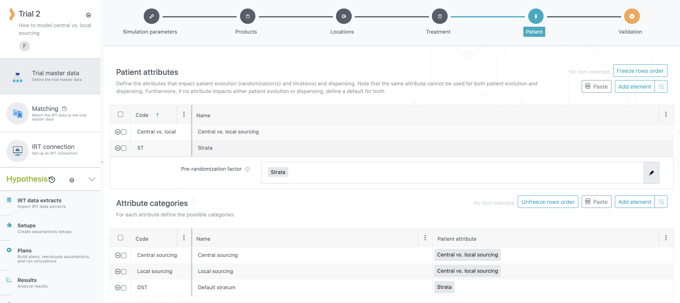
Step 1. Use “central vs. local sourcing” constraint to define patient attributes and attribute categories
Step 2. Define which countries will be centrally or locally sourcing
For this step, go to the Proportions for patient attributes tab of the treatment setup. As Brazil and USA are locally sourcing the comparator they will have the “local sourcing” category and the other countries will have the “central sourcing” category (see screenshot below).
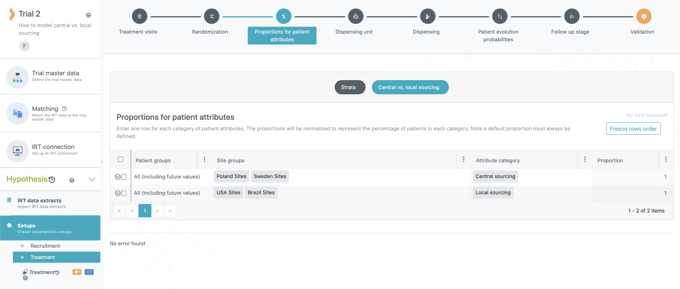
Step 2. Define which countries will be centrally or locally sourcing
Step 3. Define how the dispensing will be impacted by the “central vs. local sourcing”
Finally, we have to define the dispensing units and how the dispensing will be impacted by the “central vs. local sourcing” patient attribute. For that, go to the Dispensing unit tab of the treatment setup.
There, we will logically choose the “central vs. local sourcing” as the dispensing factor of the two dispensing units (i.e. active and comparator dispensing units, see screenshots below). As for the dispensing per category, 1 kit of active will be dispensed for all countries, whether they are sourcing centrally or locally, and 1 kit of comparator will only be dispensed for the “central sourcing” category. Indeed, as Brazil and USA are locally sourcing the comparator we will define a dispensing of 0 comparator kit for them (see screenshots below).
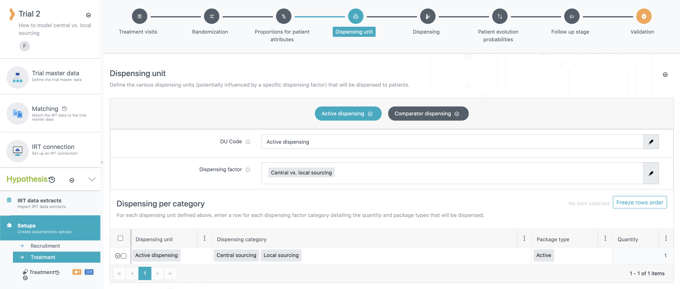
Step 3. Define how the dispensing will be impacted by the “central vs. local sourcing” (active dispensing)
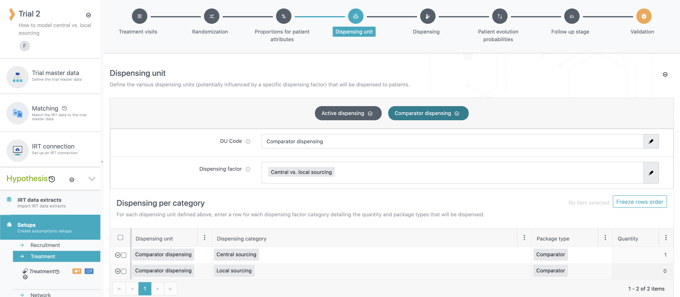
Step 3. Define how the dispensing will be impacted by the “central vs. local sourcing” (comparator dispensing)
Specific case 2 : What if multiple factors impact the dispensing
If the dispensing of your trial is impacted by multiple factors, you can use combinations of patient attributes and combinations of attribute categories to model it. We will use a similar process as for the specific case 1 but with an additional step :
-
Define combinations of patient attributes and combinations of attribute categories
-
Define proportions for patient attributes
-
Define dispensing units and dispensing per category taking combinations into account
-
Define the dispensing
Let’s take an example where the dispensing of your trial is impacted by central vs. local sourcing and by the weight of patients. The central vs. local sourcing assumptions are the same as for the previous specific case : 4 countries (Brazil, Poland, Sweden and USA), among which Brazil and USA are locally sourcing the comparator package type, and all countries are centrally sourcing the active package type. The locally sourced comparator kits will not be taken into account in the dispensing and IMP release plan as the sites will be directly locally sourced.
The dispensing assumptions are the same for active and comparator and are available in the table below:
Table 1. Dispensing assumptions
|
|
|
Number of kits dispensed per dose level and weight range |
|
|---|---|---|---|
|
Weight range (kg) |
Proportion |
Low |
Medium |
|
50-60 |
20% |
1 |
2 |
|
61 - 70 |
50% |
2 |
3 |
|
71 - 80 |
30% |
3 |
4 |
Step 1. Define combinations of patient attributes and combinations of attribute categories
The first step is to define patient attributes and attribute categories in the Patient tab of the Trial Master Data.
As only one patient attribute can impact the dispensing, we will have to create a combination of central vs. sourcing and weight as dispensing factor (see step 3) as displayed in the screenshot below.
Then, we will logically have to do the same for the attribute categories. As countries are centrally or locally sourcing the comparator, we have to create combinations of each weight range with central and local sourcing (see screenshot below). This way, we will cover every potential dispensing combination.
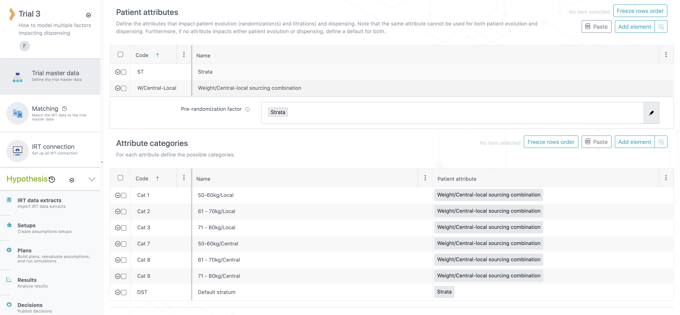
Step 1. Define combinations of patient attributes and combinations of attribute categories
Step 2. Define proportions for patient attributes
The second step is to define which countries will centrally or locally sourcing the comparator and the proportion of each weight range in the trial. To do that, go to the Proportions for patient attributes tab of the treatment setup.
As Brazil and USA are locally sourcing the comparator they will have the “local” tagged combinations of attribute categories and the other countries will have the “central” tagged combinations of attribute categories. The proportion for each weight range will be the same as defined in table 1. The proportion for a specific weight range will be the same whether it is associated to central or local sourcing (see screenshot below).
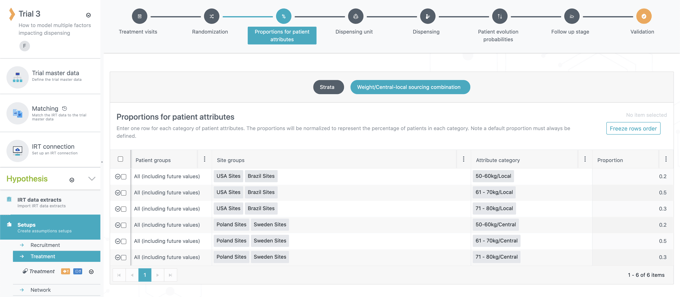
Step 2. Define proportions for patient attributes
Note
In the case where patient attributes have different proportions, see the note at the bottom of the page.
Step 3. Define dispensing units and dispensing per category taking combinations into account
The third step will be to define dispensing units and dispensing per category. To do that, go to the Dispensing unit tab of the treatment setup.
There, we will logically choose the “weight/central-local sourcing combination” as the dispensing factor (see screenshots below). For the dispensing per category, as the quantity of kits dispensed depends on the weight range and the dose level, we will define dispensing units based on the package type (active or comparator) and the dose level. In this way, we will be able to properly define how many kits will be dispensed per weight range for each dispensing unit.
Therefore, as we have 2 package types and 2 dose levels (low and medium), we will create 4 dispensing units (see screenshots below) :
-
Active - Low
-
Active - Med
-
Comparator - Low
-
Comparator - Med
As the active is centrally sourced for all countries, we will group the combinations of categories having the same weight range for a specific dispensing quantity (see table 1 for quantities). Indeed, even though Brazil and USA have been tagged with the “local” combination (see step 2), they are centrally sourcing the active package type, and patients from these countries will receive the same quantities of kits as in other countries.
Below is the example for the “Active - Low” dispensing unit :
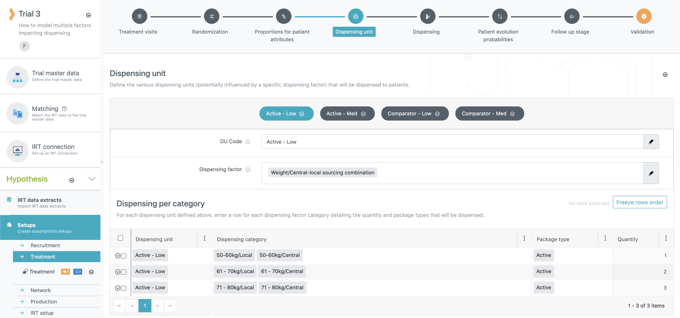
Step 3. Define dispensing units and dispensing per category taking combinations into account (Active - Low)
The process will be the same for “Active - Med” except for the quantities, which should be modified according to table 1.
For the comparator package type, as Brazil and USA are locally sourcing it, “local” tagged combinations should be group together with a dispensing quantity of 0 (see screenshot below). The other combinations (“central” tagged) will be spread according to their weight range (as for the active package type).
Below is the example for the “Comparator - Low” dispensing unit :
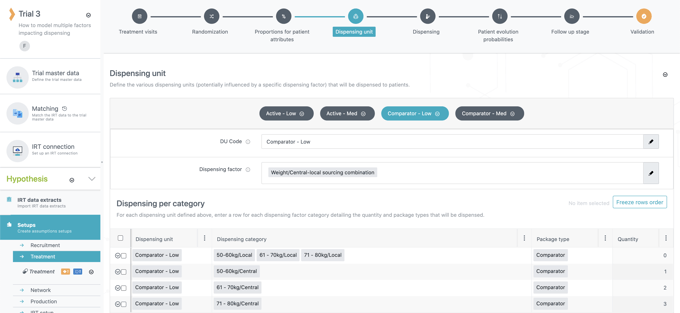
Step 3. Define dispensing units and dispensing per category taking combinations into account (Comparator - Low)
The process is the same for “Comparator - Med” except for the quantities, which should be modified according to table 1.
Step 4. Define the dispensing
Finally, the last step will be to define the dispensing in the Dispensing tab of the treatment setup. This step will be quite easy as the quantities dispensed were actually already defined at the previous step.
Patients on the active treatment arm and on the low dose level will receive an “Active - Low” dispensing unit, patients on the medium dose will receive an “Active - Med” and so on for the comparator treatment arm. As the quantities per weight range and per dose level were already defined at the previous step, the quantity for each dispensing unit will be 1 (see screenshots below). For example, a patient weighing 75 kg and who is on the low dose level of the active treatment arm will be dispensed 1 “Active - Low” dispensing unit, meaning 3 kits of active (see screenshot with “Active - Low” example above).
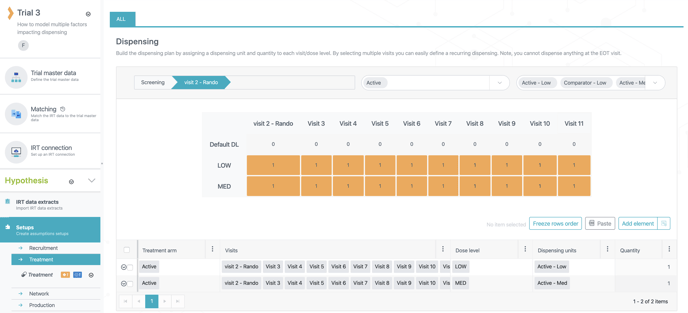
Step 4. Define the dispensing (Active)
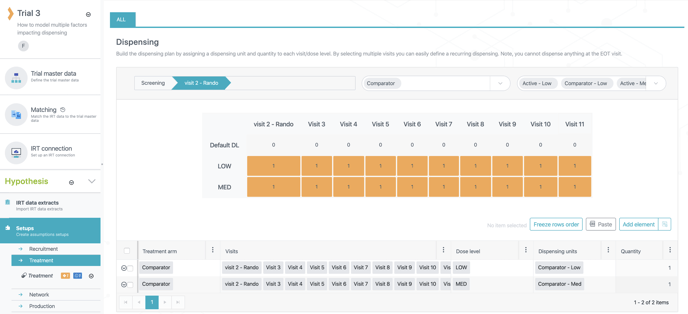
Step 4. Define the dispensing (Comparator)
Note
In the case where the dispensing of your trial is impacted by two (or more) patient attributes that have different proportions, you should multiply these probabilities for each possible combination.
For example, if the dispensing is impacted by these two attributes and their probabilities :
|
Gender |
Proportion |
|---|---|
|
Male |
40% |
|
Female |
60% |
|
Weight |
Proportion |
|---|---|
|
<50kg |
20% |
|
>50kg |
80% |
The resulting proportions of combinations will be as follows :
Male <50kg : 0.4 x 0.2 = 0.08
Male >50kg : 0.4 x 0.8 = 0.32
Female <50kg : 0.6 x 0.2 = 0.12
Female >50kg : 0.6 x 0.8 = 0.48
The resulting proportions of combinations will be as follows :
Male <50kg : 0.4 x 0.2 = 0.08
Male >50kg : 0.4 x 0.8 = 0.32
Female <50kg : 0.6 x 0.2 = 0.12
Female >50kg : 0.6 x 0.8 = 0.48