
Highlights
Benefit from a global overage analysis at portfolio level with the Strategic dashboard.
Update the overage of existing results in a few seconds.
Table of contents
1. Analyze the global overage across trials with the Strategic dashboard
2. Easily update your result overage
1. Analyze the global overage across trials with the Strategic dashboard
You can now access the new “Overage” sheet to:
-
Analyze the global overage/waste/allocation at portfolio level (“Overage” view).
-
Gather information on the future waste and the remaining budget of your trials (“Future waste” view).
The dashboard only considers information from results with a last demand date in the future (with respect to the dashboard generation date).
As a consequence, the overage only includes ongoing and future trials.
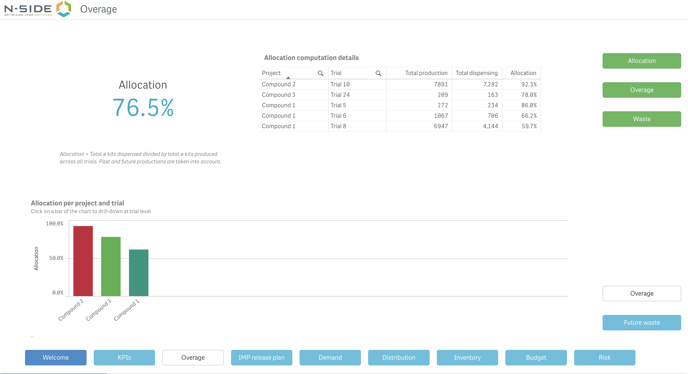
1.1. Deep dive into the overage analysis (“Overage” view)
Get insights into the global allocation/overage/waste across all your trials but also per compound/trial.
This will help you answer questions like:
-
What are the projects/trials that are driving the overage (or waste) of my portfolio/projects?
1.2. Focus on future optimization
With the “Future waste” view, you can easily spot trials on which to focus your attention for a potential future optimization, i.e., trials with a high future waste, a high level of future production and a high remaining budget.
You can also dig deeper in the analysis and access more information with the “Show computation details” button.
This view will help you answer questions like:
-
What are the trials displaying the highest future waste?
-
What is driving the future waste?
-
Is there enough remaining budget to optimize the trials and reduce the waste?
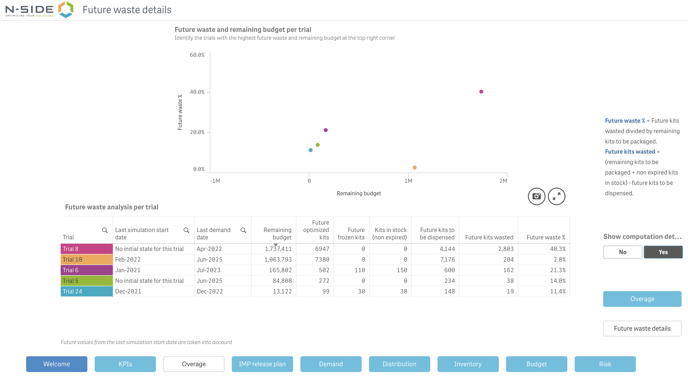
Kits in stock only consider kits that are not expired at the time of the simulation start date
1.3. Allocation KPI
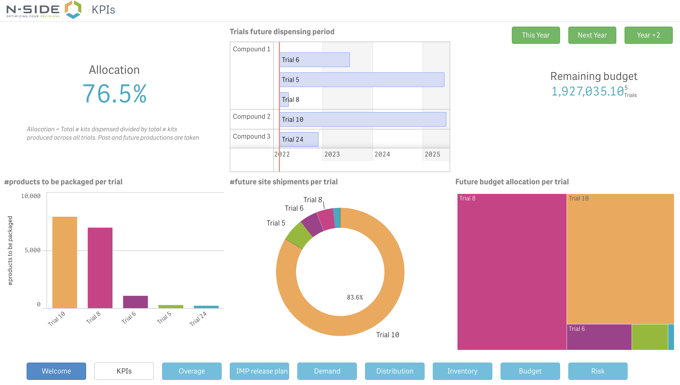
The allocation KPI is now part of the “KPIs” sheet.
2. Easily update your result overage
You can now update the overage of existing results in three specific use cases:
-
You want to update the global overage of your trial using past productions data.
-
You want to recover the overage per package type in the Results dashboard (past productions data not required).
-
You want to leverage the global overage analysis in the Strategic dashboard
2.1. Update the global overage of your trial (past productions data)
The “Past production” section introduced in Supply.2022.1 allows users to get the global overage as a global performance metric of their trials.
However, this means that results generated prior Supply.2022.1 have a future overage only.
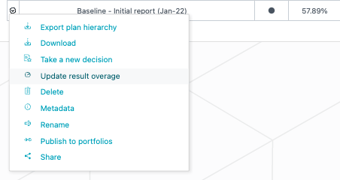
In order for you to leverage this feature without having to re-generate results, you can now use the new “Update result overage” action.
This action is available for Power and Advanced Users and works as follows:
-
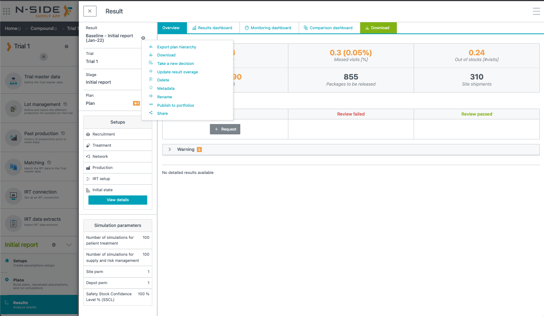
Access and trigger the action from the result contextual menu.
-
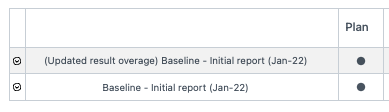
A copy of the existing result is created.
-
Relevant past productions are associated to the result and the overage is re-computed.
-
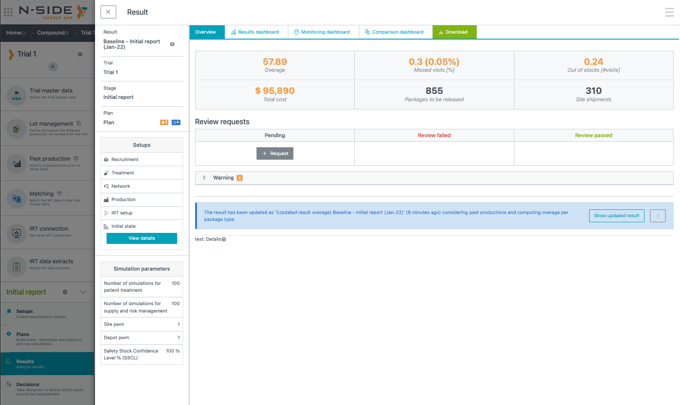
The name of the result is updated.
-
An info banner (linking the updated results) is added to the original result (see screenshots below).
2.2. Retrieve the overage per package type (Results dashboard)
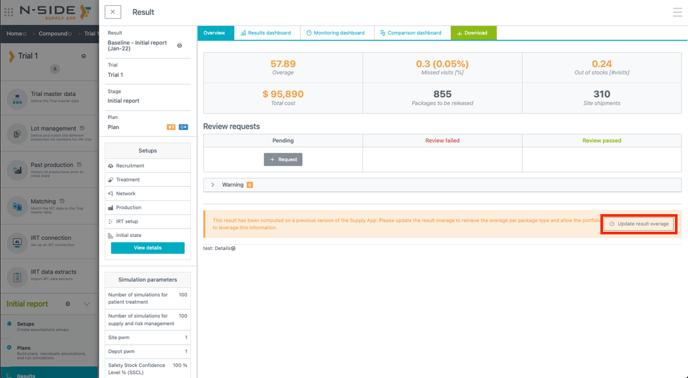
The overage per package type is not available anymore for all results generated prior Supply.2022.1.
You can retrieve this data without having to re-generate your results by using the “Update result overage” action from the banner describing the issue in the result overview.
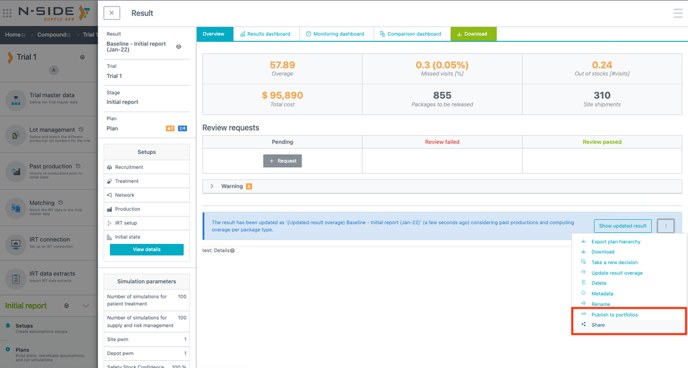
You can then share the updated result with the other trial participants and publish it to the relevant portfolios if needed.
2.3. Leverage the global overage analysis across trials (Strategic dashboard)
The “Overage” sheet is empty in the cases explained in the table below.
|
Result generated |
Result published |
Actions to take |
|---|---|---|
|
Before Supply.2022.1 |
Before Supply.2022.2 |
Update the overage and re-publish the result. |
|
After Supply.2022.1 |
Before Supply.2022.2 |
Re-publish the result. |
There is a warning message to identify trials which are not considered in the “Overage” sheet (see screenshot below).
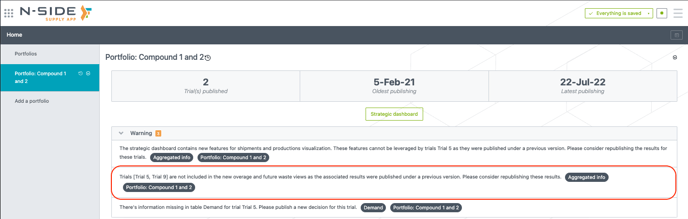
If you see this warning message:
-
Access the details of the latest results (left of the list) for the trials mentioned in the message.
-
Check if there is the following warning banner.
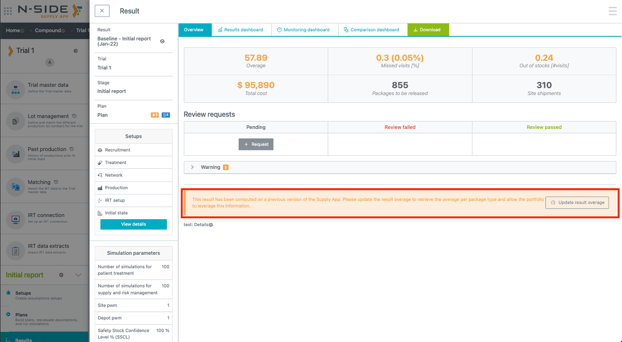
If there is the warning banner: update the overage and re-publish the result (see previous point 2.2.)
-
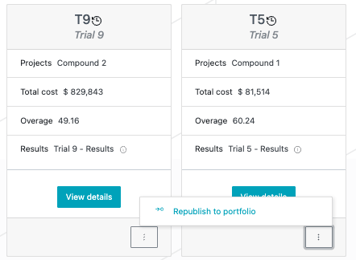
If there is no warning banner: simply use “Republish to portfolio” on the associated trial card.
3. Other updates
You can now access all actions available from the contextual menu of a result from a result overview (side panel).
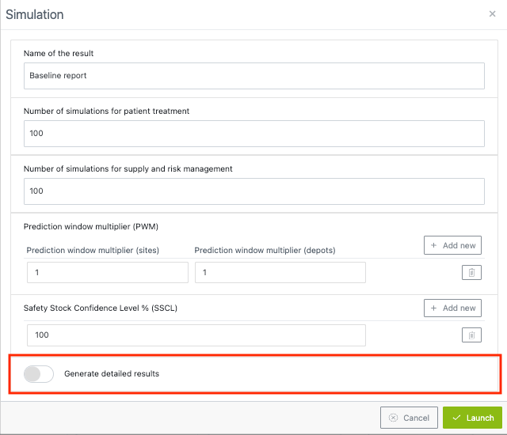
When launching simulations, you have now the possibility to generate (or not) the “Detailed results” file. Generating this file should only be done to verify DND values as it contains really big data sets and therefore can significantly increase the simulation time.
Tax and loss percentage are now imported when using “Import corporate routes” action from the “Routes” tab (network setup).
4. User documentation
The following articles are added (or have been modified) to enrich the documentation and help you in your usage of the N-SIDE Supply App:
- Strategic dashboard - Access & KPIs
-
Strategic dashboard - Overage
5. Patches (bug fixes)
2022.3.1
The publishing date is now properly set in the following parts of the App:
-
Portfolio KPIs: “latest publishing” field
-
Strategic dashboard: “Publication date” field of the “Welcome” sheet
-
Production App: result publication date when importing a result from the Supply App.
This is now fixed for all new publications in portfolios.