Table of content
- 1. Pre-define the next manufacturing lot codes to align with reality [Project scenario]
- 2. Visualize all lots directly in the cockpit [Project & trial scenario]
- 3. Better model mixable lots constraints [Project scenario]
- 4. Various improvements
- 4.1 Scenario list readability and usability [Project & trial scenarios]
- 4.2 Improved generation of lot codes from Supply App [Trial scenario]
- 4.3 Improved scenarios view to show archived scenarios [Project & trial scenarios]
- 4.4 Improved access of the share action on a scenario [Project & trial scenarios]
- 4.5 Better navigate in the application by using your keyboard
- 4.6 Monthly inventories sheet at excel extract [Trial scenario]
- 4.7 Publish information at the assumptions extract [Project & trial scenarios]
- 4.8 Bug fixes and miscellaneous enhancements
1. Pre-define the next manufacturing lot codes to align with reality [Project scenario]
A new optional feature allows users to define a predefined list of unique lot codes per product, ahead of a campaign. This enables predictable and controlled lot coding during campaign setup.
In a project scenario, the new table Predefined codes stores predefined lot codes per product, and is available from the Planning section of a project scenario. This feature should be used when you want to give exact names to lots generated by the system. Hence, it allows for specific lot names to be assigned without freezing them.
In the below example, new lots for product API will be assigned the codes defined in this table, unless the code is already taken by a frozen lot.
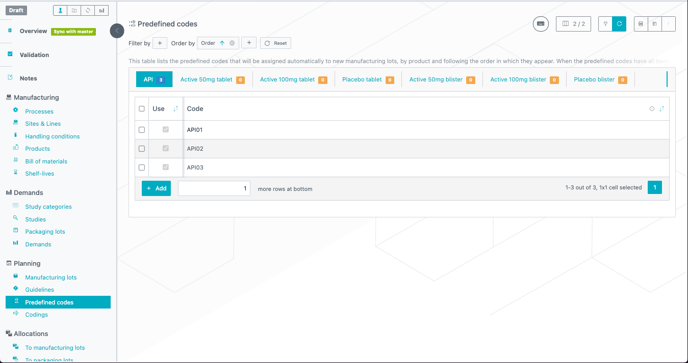
Code assignment logic:
-
Codes are assigned from the predefined list in order when creating new lots.
-
If a code is already used by a frozen lot, it is skipped.
-
Once all predefined codes are used, or if there is no predefined codes, the system falls back to automatic code generation based on existing coding rules.
Example:
-
A frozen lot with code GMP1-4533 already exists in the Manufacturing lots table.
-
The predefined list of codes for product API is: GMP1-4533, GMP2-9573, GMP3-1183.
-
A generation rule with coding prefix DS and a 2-digit coding starting from 03 is defined in the Codings table
Result:
-
First new lot → GMP2-9573 (skips GMP1-4533 which is taken)
-
Second new lot → GMP3-1183
-
Third new lot → DS03 (generated)
-
Fourth → DS04, and so on…
2. Visualize all lots directly in the cockpit [Project & trial scenario]
A new dynamic view is available in the scenario cockpit to display the complete list of manufacturing lots at project level and packaging lots at trial level, both frozen and newly generated, for the current scenario. Project master cockpit was also updated.
This view remains visible while navigating across tables, helping users define allocations or perform analysis more efficiently.
Key Features:
-
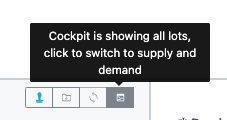
Access: Click twice for project and once for trial on the cockpit view button to switch to the new view.
-
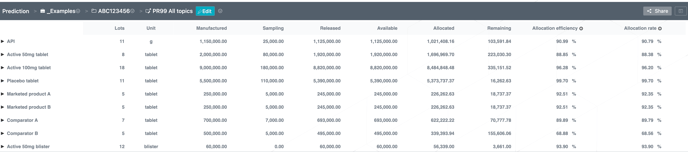
Project scenario content:
-
Frozen and generated lots, with their sizes.
-
Grouping by product, with collapsible sections.
-
The lot count per product.
-
Allocation rate computed as: allocated / available.
-
Allocation efficiency computed as: (sampling + allocated) / produced.
-
-
External trial scenario content:
-
Lots with their sizes.
-
Grouping by package type and label group, with collapsible sections.
-
The lot count per package type and label group.
-

-
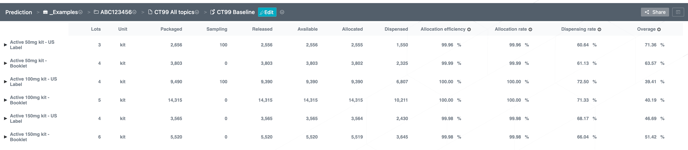
Internal trial scenario content:
-
Frozen and generated lots, with their sizes.
-
Grouping by package type and label group, with collapsible sections.
-
The lot count per package type and label group.
-
Allocation rate computed as: allocated / available.
-
Allocation efficiency computed as: (sampling + allocated) / produced.
-
Dispensing rate computed as: dispensed / available.
-
Overage computed as: (packaged / dispensed) - 1.
-
-
Project master update:
-
added Allocation rate computed as: allocated / available.
-

Example of allocation efficiency/rate:
For instance, in a project scenario, if DS01 has size manufactured 150,000 including 15,000 of sampling, meaning we have 135,000 available and 115,795 are allocated, then
allocation efficiency = (15,000 + 115,795) / 150,000 = 87.20%
allocation rate = 115,795 / 130,000 = 85.77%

3. Better model mixable lots constraints [Project scenario]
The new options in the Mix parameter in project scenario guidelines and frozen lots make it possible to restrict mixing lots only if they come from the same site and/or through the same process. Mixable constraints can now be better represented.
With the mix parameter, you can define how lots can be mixed together to feed a given product. For example, the following scenario can now be configured:
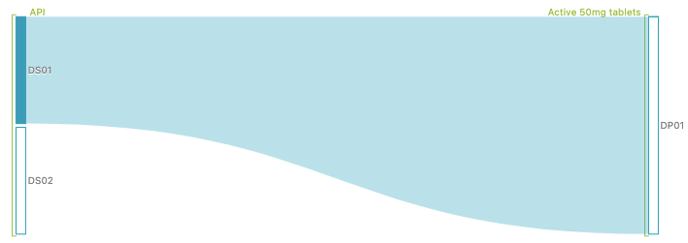
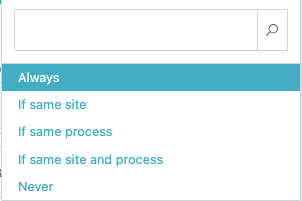
In the above situation, can we mix DS01 and DS02 to answer the same product need? The parameter can be defined per frozen lot or per guideline and takes the following values:
-
Always: always allow the lots to be mixed; this is the equivalent of having the previous box checked
-
If same site: allow the lots to be mixed only if they are from the same site
-
If same process: allow the lots to be mixed only if they were manufactured using the same process
-
If same site and process: allow the lots to be mixed only if they are from the same site and manufactured using the same process
-
Never: this lot should never be mixed with a lot of the same product; this is the equivalent of having the previous box unchecked
Note that the parameters only impact the mixable characteristic of lots of the same product. For example, if DP01 requires a second product, DS01 and DS02 are allowed to be mixed with a lot of the second product regardless of the mix parameter.
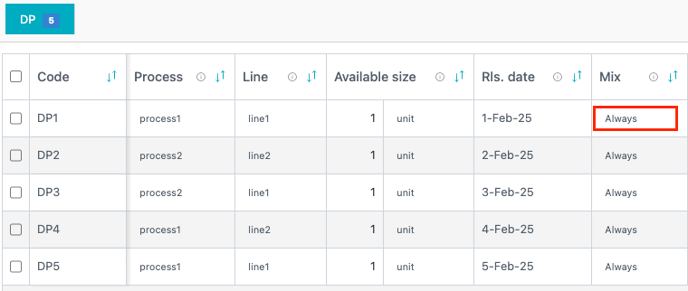
Let us look into a more complete case to see the impact of every parameter. Consider a hypothetical simple case with:
-
one demand requiring 2 units of DP
-
5 lots
-
DP1 from site1 and process1
-
DP2 from site2, process2
-
DP3 from site1, process2
-
DP4 from site2, process1
-
DP5 from site1, process1
-
-
DP2 to DP5 are set with mix=Always
-
all lots have a size of 1
Each site has one line:
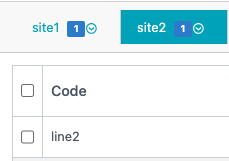
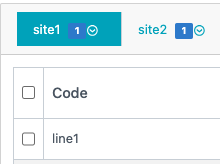
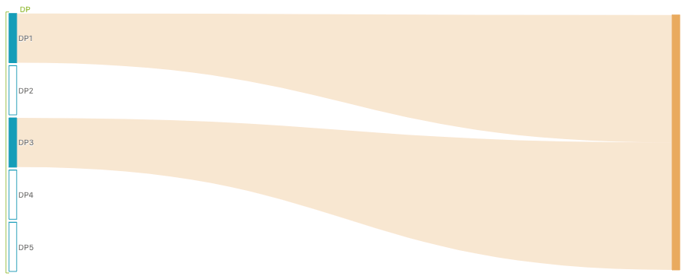
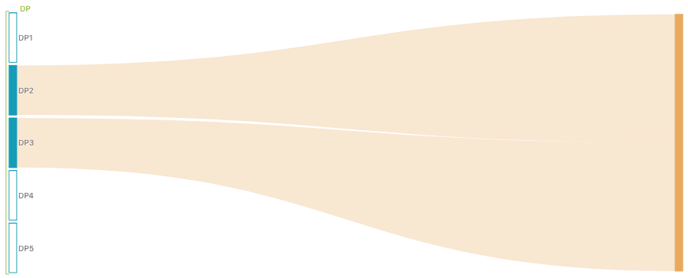
Let us consider what happens when we change the mix of DP1 such that it takes all possible values:
|
Mix parameter of DP1 |
Allocation result |
Explanation |
|---|---|---|
|
Always |
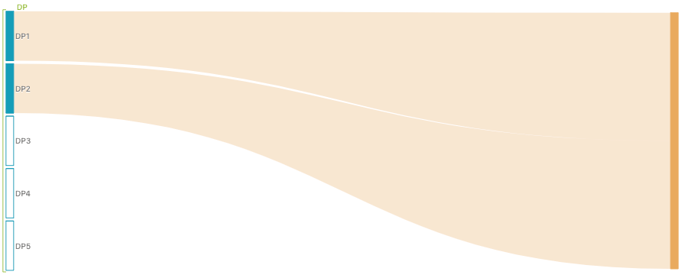 |
None of the lots have Mix restrictions,, hence the first lots that can complete the demand are used |
|
If same site |
|
DP2 does not come from the same site as DP1, hence it is not mixed with DP1. However, DP3 is from the same site so it is used to complete the demand. |
|
If same process |
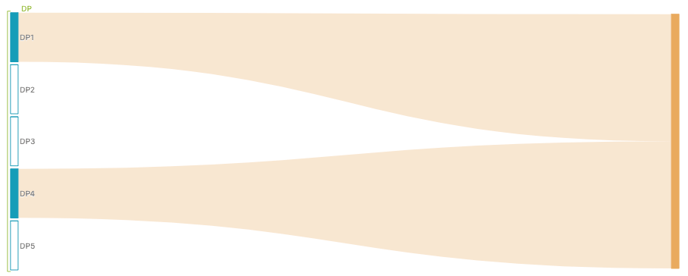 |
DP2 and DP3 are not manufactured according to the same process, hence they are not mixed with DP1. However, DP4 is manufactured according to the same process so it is used to complete the demand. |
|
If same site and process |
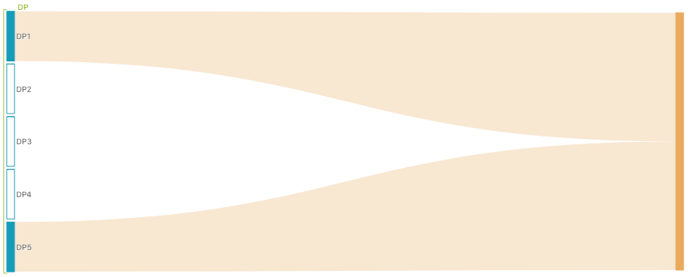 |
DP2 and DP4 do not come from the same site, hence they are not mixed with DP1. DP2 and DP3 are not manufactured according to the same process, hence they are not mixed with DP1. However, DP5 is from the same site and is manufactured according to the same process so it is used to complete the demand. |
|
Never |
|
When checking if DP1 should be allocated to the demand, the system decides to skip it as DP1 is not mixable with other lots and its size is not sufficient to cover the need of the demand. Hence, the system tries the next lots and uses both DP2 and DP3 which are mixable. |
4. Various improvements
4.1 Scenario list readability and usability [Project & trial scenarios]
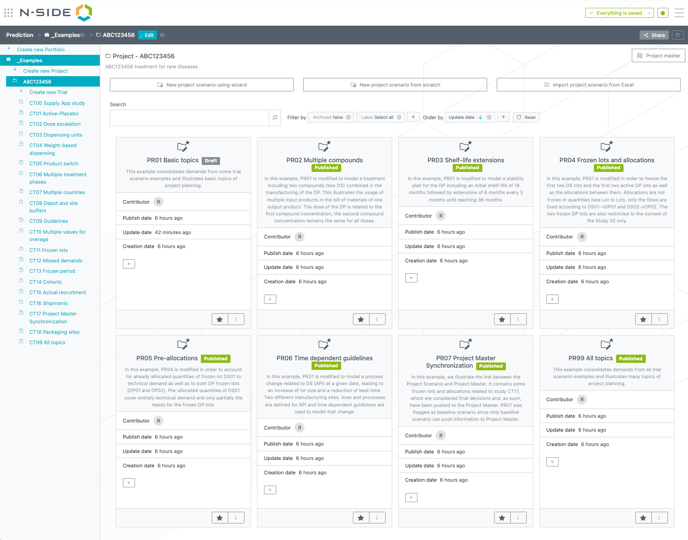
Enhancements were made to the scenario cards view to improve clarity and ease of use when managing multiple scenarios.
-
Optimized card size:
The size of scenario cards is now dynamically adjusted to better fit the window, allowing more content to be visible without scrolling.
-
Label filtering:
The labels filter is now visible by default when opening the card list view, helping users to filter by labels with less clicks. It is automatically set to “Select all”, so no labelling filter is applied unless explicitly changed.
-
Default filtering values
When a filter on the owner is set, the filter value is automatically set to the current user by default.
When a filter on the baseline is set, the filter value is automatically set to “true”.
4.2 Improved generation of lot codes from Supply App [Trial scenario]
Lot codes are no longer duplicated when importing results from the Supply App.
For lots without predefined codes in the Supply App, the system auto-generates codes like LOT-01, LOT-02, etc., in the trial plan.
Previously, importing a result could cause a code conflict if a lot with the same code (e.g., LOT-02) already existed in the project master.
This has now been fixed: the system verifies existing codes and skips any that are already taken.
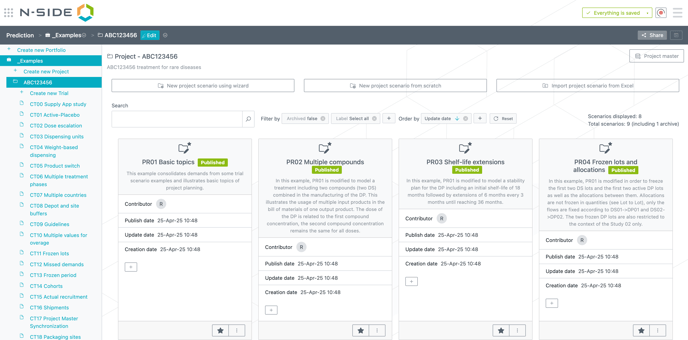
4.3 Improved scenarios view to show archived scenarios [Project & trial scenarios]
Information about the number of archived and non-archived scenarios for both trials and projects was added to the UI.
4.4 Improved access of the share action on a scenario [Project & trial scenarios]
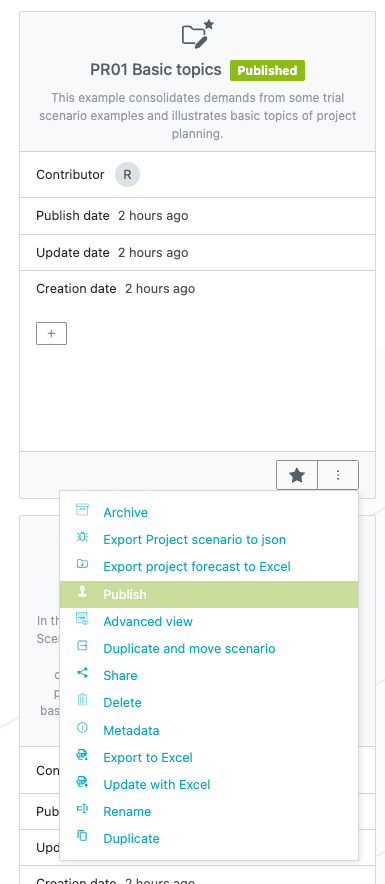
The share action was added as an option in the menu of scenario cards for both trials and projects.
4.5 Better navigate in the application by using your keyboard
-
Enabled TAB and Shift+TAB shortcuts to navigate input fields.
-
Added keyboard shortcuts to improve ease of use of the edit mode and save functionalities:
-
cmd + e/ctrl + e to start editing
-
cmd + enter/ctrl + enter to save
-
cmd + escape/ctrl + escape to stop editing
-
4.6 Monthly inventories sheet at excel extract [Trial scenario]
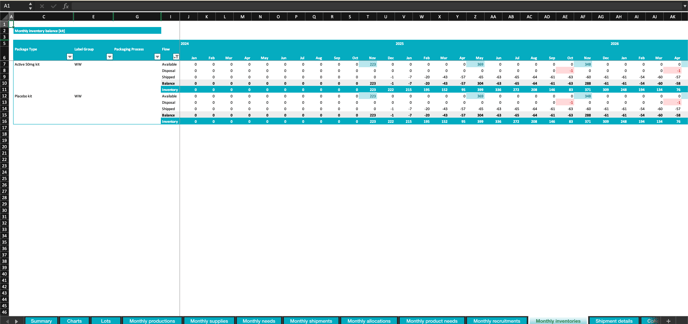
A new monthly inventories sheet was added to the trial scenarios Excel forecast.
4.7 Publish information at the assumptions extract [Project & trial scenarios]
New columns were added in the extracts for publishing information for both trials and projects. The two new columns are:
-
last_published_date: Date
-
is_latest_version_published: Boolean
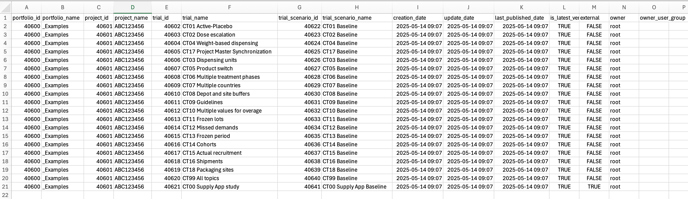
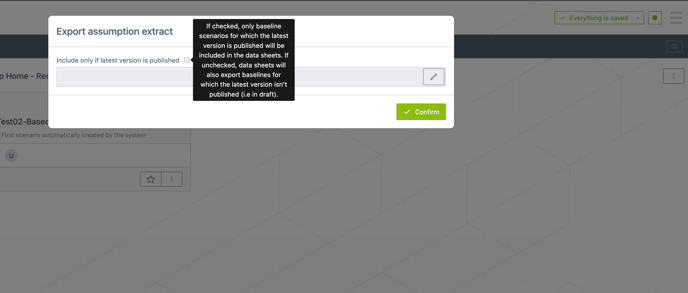
The user now also has the ability to specify whether they want to include scenarios whose latest version is not published.
4.8 Bug fixes and miscellaneous enhancements
-
Fixed an issue where trial/project managers could not set and unset baselines on trials/projects respectively.
-
Fixed an issue with guideline dates that could generate an “oops screen”