Table of contents
- 1. Restrict usage of manufacturing lots
- 2. Scenarios archiving and navigation improvements
- 3. Packaging sites and processes
- 4. Various improvements and fixes
1. Restrict usage of manufacturing lots
Additional constraints on the usage of a manufacturing lot are available in the project scenario. This allows you to model supply constraints when lots cannot freely be used among all lots and demands.
To do so, this new usage constraint is specified for frozen lots in the “Manufacturing lots” table and for new lots in the “Guidelines” (see below in the two screenshots).
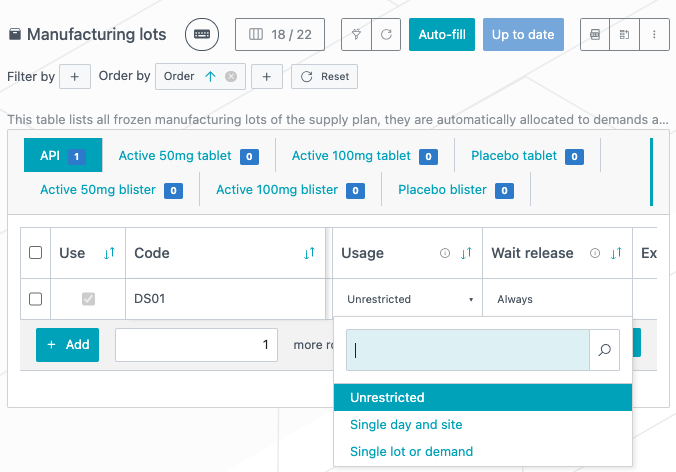
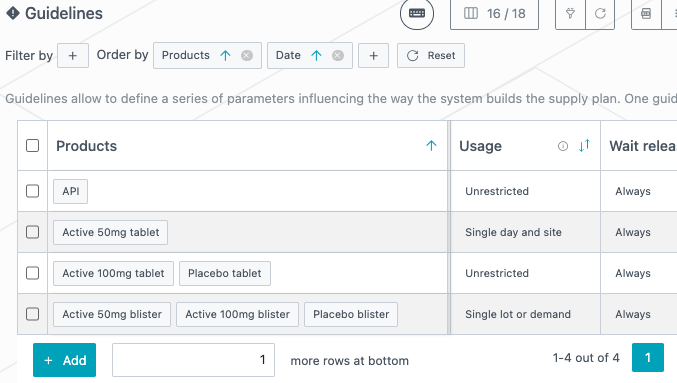
This new parameter “Usage” can take 3 different values:
-
Unrestricted (default value): no additional constraint on the lot.
-
Single day and site: all subsequent lots and demands consuming this lot must do so at the same date and at the same site. It can be consumed by lots and demands at the same time.
-
Single lot or demand: this lot can only be consumed by one subsequent lot or by a single demand.
For “Single day and site” values, demands are considered as being all part of the same site since site information for demand is not available at project scenario level. If a lot does not have a site associated, it is considered as being at the same site as all demands.
This means the following allocation planning is accepted:
-
DS001: is a lot with the parameter usage set at “Single day and site”;
-
DP001: is a lot that requires DS, with no manufacturing site associated (manufacturing line column is empty) and with a manufacturing start date on 1-Sep-24;
-
sampling-DS: is a non-linked demand that requires DS on 1-Sep-24
-
allocation DS001 → DP001 and DS001 → sampling-DS are both accepted as the system considers DP001 and sampling-DS as being at the same site, and they both require the input at the same date (1-Sep-24).
1.1 Example
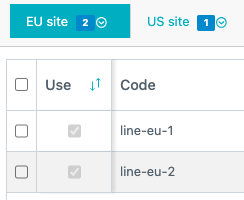
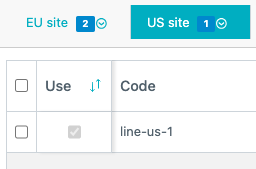
Let us consider the following example in which we have one lot of DS that can feed four lots of DP. We have two manufacturing sites: an EU site, which contains two lines, and a US site, which contains one manufacturing line.
These lots of DP have the following properties:
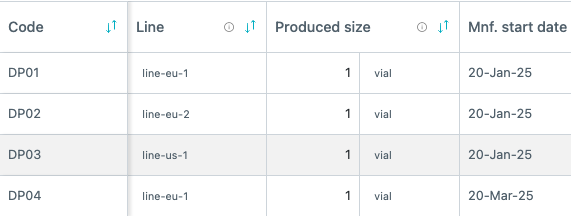
Let us see how the allocations behave by updating the “Usage” parameter of the DS lot.
|
Usage parameter |
Allocation result |
Explanation |
|---|---|---|
|
Unrestricted |
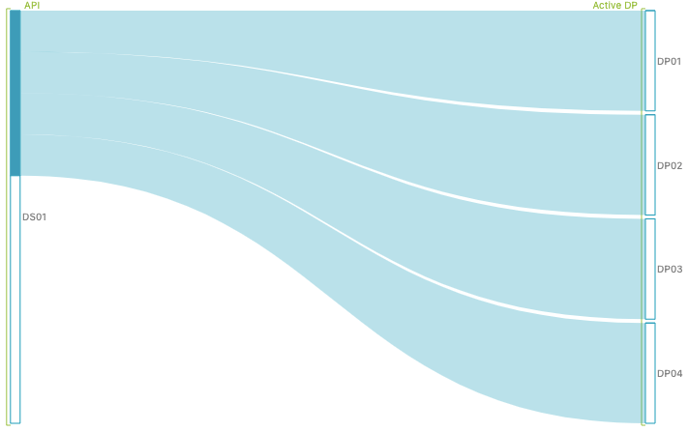 |
Without restriction the DS lot can feed all subsequent DP lots. |
|
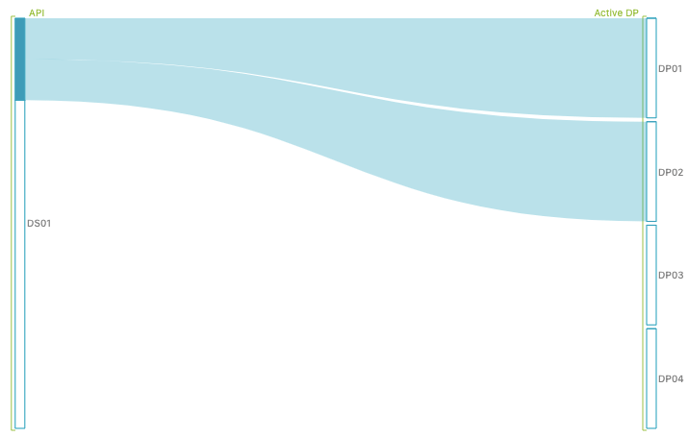
Single date and site |
|
The DS lot can only feed subsequent lots/demands that are on the same date and at the same site.
|
|
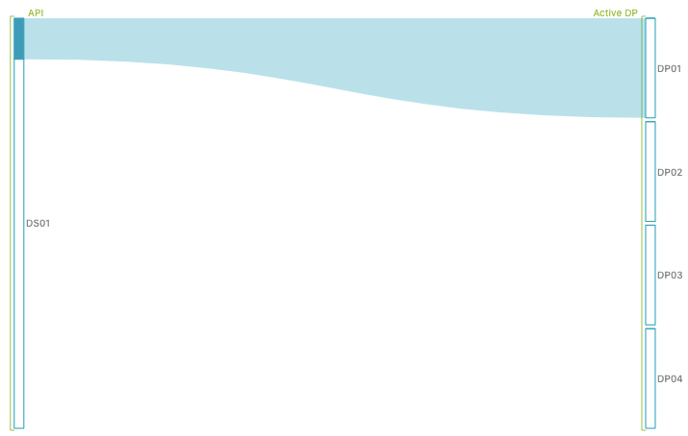
Single lot or demand |
|
The DS lot can only feed one subsequent lot or demand. It is first allocated to DP01, hence it can only feed that lot. |
2. Scenarios archiving and navigation improvements
Managing a large number of scenarios in a project or trial folder can become cumbersome, especially when scenarios are duplicated for reevaluation. Over time, finding specific scenarios can be challenging, leading to a lack of clarity on current activities. Our latest update introduces efficient archiving and navigation enhancements to streamline your workflow.
2.1. Find the right scenario thanks to filtering and ordering capabilities
We have introduced a new toolbar above project and trial scenarios. This makes it possible to search, filter, and sort them efficiently. The search bar facilitates quick access to scenarios by name. These filters and sorting options ensure you are always able to manage and locate your scenarios effectively, enhancing productivity and clarity within the Prediction App.
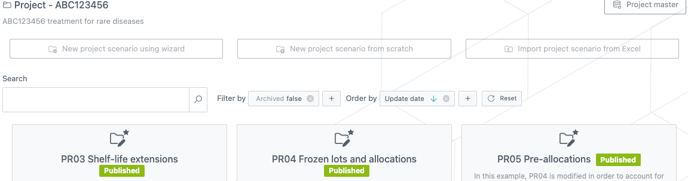
In the first screenshot below, you can see the available fields to filter the scenario view. In the second screenshot below, you can see the available fields to order the scenario view.
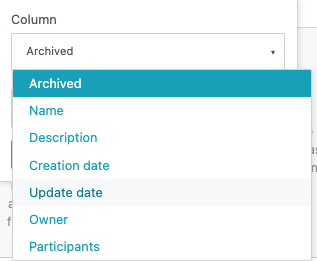
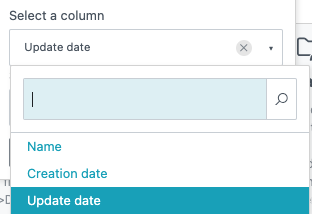
We have added
-
The ability to filter by internal and external studies in the Trial scenarios view.
-
The ability to filter by baseline status in both the Trial and Project scenarios views.
-
The ability to filter by archived status in both Trial and Project scenarios views.
-
The ability to sort by publish date in both the Trial and Project scenarios views.
2.2. Archive scenarios to clean your views
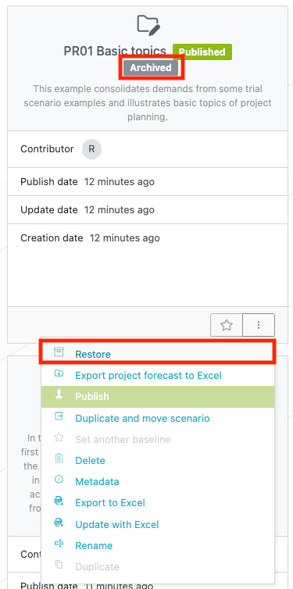
A new Archive action is now available for both trial and project scenarios. You can easily archive scenarios to declutter your workspace. Archived scenarios are clearly labeled, and are by default filtered out of the view. You can restore them at any time via the Restore action.
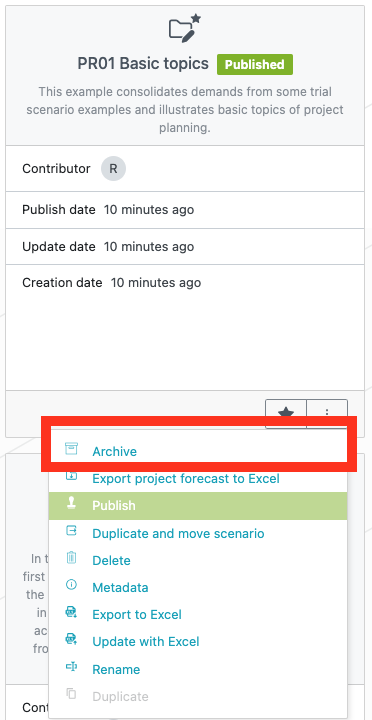
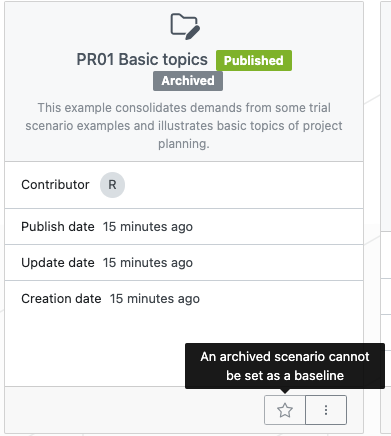
Note that archived scenarios cannot be set as a baseline, and scenarios lose Baseline status if they are archived.
3. Packaging sites and processes
New information is available in trial scenarios: packaging site and processes. This optional information allows different shipment routes to be defined via packaging site origin and allows for reporting per site/processes.
3.1 Processes
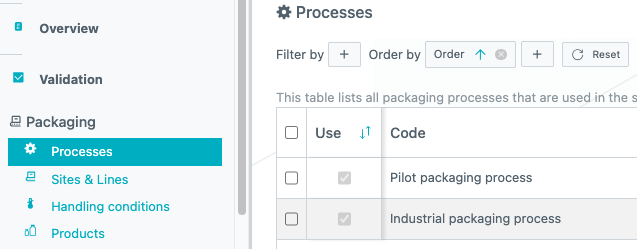
Processes are defined in a new table in in the Packaging section.
3.2 Packaging sites and lines
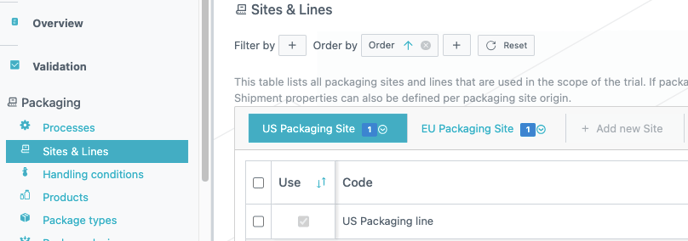
Packaging sites and their corresponding lines are defined in a new table in the Packaging section.
Each tab represents a packaging site, and each row represents a packaging line within that site.
3.3 Packaging assignments
The packaging origin and the packaging process are assigned to packaging lots through Packaging assignments (section Packaging). In this table, a combination of package types and label groups can be linked to a packaging line and process. When packaging sites and processes are defined in the scenario, all combinations must be defined in this table.
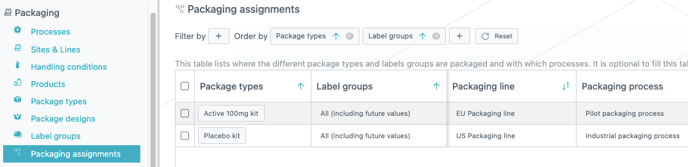
In the example above, we indicate that active kits are packaged in a packaging line in the site “EU Packaging site” with the process “Pilot packaging process”.
3.4 Shipments impact
By defining Packaging sites, we split routes depending on their packaging origin. The parameters of these routes are defined in the existing shipment tables.
3.4.1 Depot shipments
In the Depot shipments table, a new Packaging sites column was added to designate the origin of the shipment.
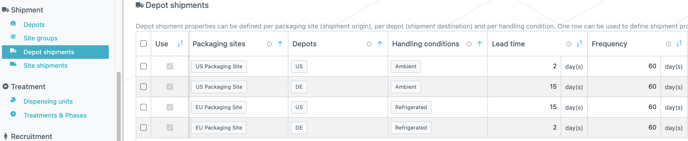
In this example above, there are two depots, US / DE, and two packaging sites. Furthermore, there are two possible handling conditions. This gives four possible shipment properties.
3.4.2 Site shipments
The same packaging sites information is also present in the Sites shipment table. However, since it is already possible to define origin depots in Site groups and to assign a site group to site shipments, the packaging site information is only relevant when a site group has no depot assigned. It must be empty otherwise.
Here is an example of site shipment properties where all site groups are connected to a depot, hence “Packaging sites” column must be empty.
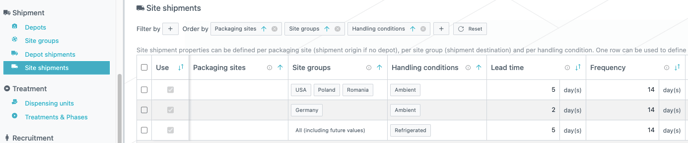
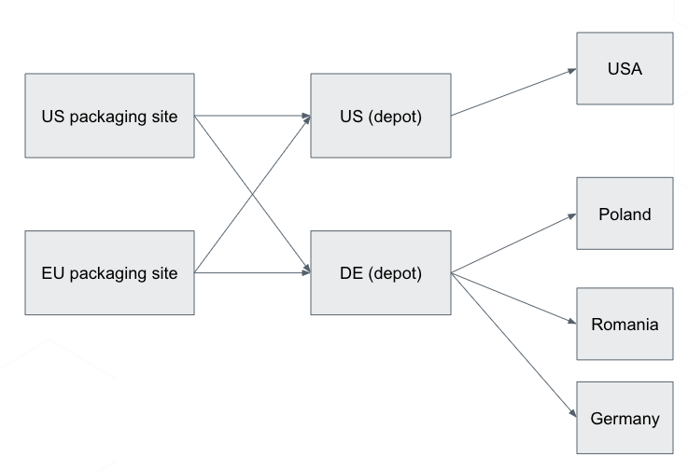
The two previous screenshots define properties on depot shipments and site shipments for the following network, where we have two packaging sites, two depots and 4 site groups all connected to a depot.
3.4.3 Example shipment from packaging site to site group
Let us define shipment properties for the following network, where we only consider one packaging site, and there is no depot for USA.
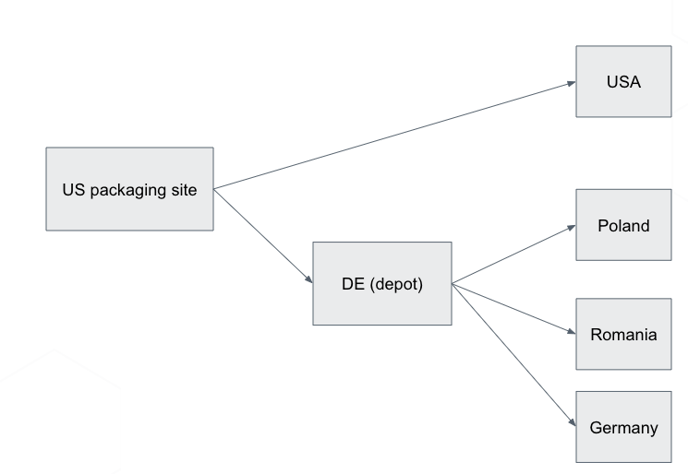
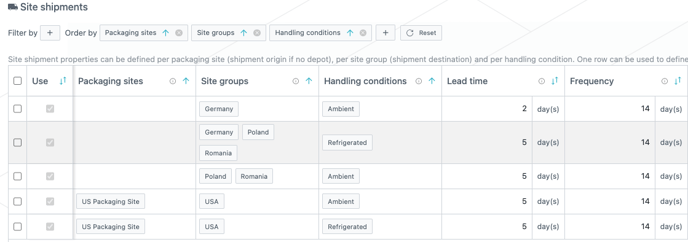
As such, only for depot shipments, only parameters for routes between US packaging site and DE depot are defined.

And the site shipment table, will contain routes from US packaging site to USA, as the site group is directly shipped from the packaging site.
3.5 Reporting
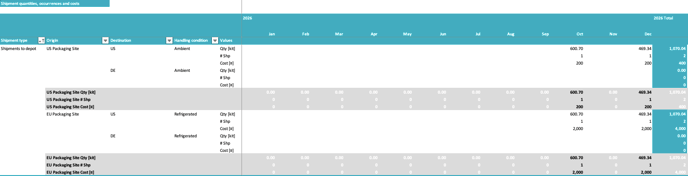
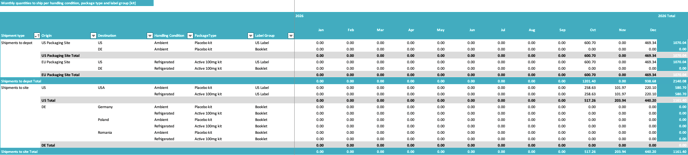
The Excel report of trial scenario contains information related to the packaging sites & lines as well the packaging processes.
The “Lots” sheet indicates packaging information for each lot in the last three columns.
 Packaging process is also indicated in “Monthly productions” and “Monthly supplies” sheets.


Origin contains the defined packaging site in “Monthly shipments” and “Shipment details”.
4. Various improvements and fixes
-
Added the ability for Project Managers to update the baseline status of any project scenario, regardless of contributor or owner status.
-
Added the ability for Trial Managers to update the baseline status of any trial scenario, regardless of contributor or owner status.
-
Updated the tooltip description of the allocated size field in project scenario allocation tables to clearly indicate that the field is optional.
-
Added the demand code for non-linked demands in the Excel project result report.
-
Renamed the “Freeze Parents/Freeze Allocations” column to include a name and description for better clarity.
-
Fixed an issue where the release size unit in allocation tables within the project master was not displayed correctly.
-
Resolved an issue where tooltips would persist on screen (e.g., in the sidebar menu).
-
Added a new archive status column in the Excel extract for scenarios.