Table of contents
1. Visualize your inventory coverage in the cockpit (for trial and project scenarios)
2. Visualize your inventory coverage in the Excel report (for project scenarios)
1. Visualize your inventory coverage duration in the cockpit (for trial and project scenarios)
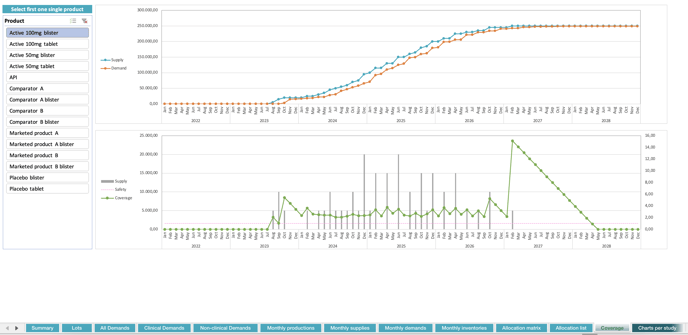
The former Spl vs Dmd view of the cockpit is now named Coverage and is extended to include a second chart (bottom chart, see images below). Thanks to these, you can now visualize the coverage duration (green curve) of the inventory and compare it to the requested safety margin (pink curve).
This new chart is available both for trial scenario and project scenario (respectively on the images below).


The coverage duration (green line) is defined for a given month as: the number of days between the last day of the month and the date of the very last demand covered by the lots available in the inventory at the end of the month. In other words, it represents the duration until which the inventory available at the end of the month is used according to the supply plan, i.e. according to the way lots are allocated to demands.
- For example, let us suppose the end of manufacturing of a lot is on 15-Aug-23 and the very last demand consuming that lot, according to the supply plan, is on 20-Dec-23. This lot will contribute to the inventory coverage duration as follows:
- Aug-23 : 111 days (number of days between 31-Aug-23 and 20-Dec-23)
- Sep-23 : 81 days (number of days between 30-Sep-23 and 20-Dec-23)
- Oct-23 : 50 days (number of days between 31-Oct-23 and 20-Dec-23)
- Nov-23 : 20 days (number of days between 30-Nov-23 and 20-Dec-23)
- Dec-23 : 0 days
-
-
The above sequence is computed for all lots and, for each month, the maximum amongst all lots defines the coverage duration.
-
The coverage duration safety margin (pink line) is an input parameter, defined by the user in the guidelines, as a number of days. It is used to anticipate production (i.e. lot release) from its first consumption by this number of days, i.e. to build a safety margin in time.
The safety margin is a soft constraint. It is considered by the system as long as it remains feasible but it can be reduced to avoid missed demand. If this margin is completely fulfilled, then the inventory at any time (any day) is guaranteed to cover further demand in the plan, at least for that number of days. In such case, the inventory coverage duration, as defined above, remains greater than the safety margin at any day, including at the end of the month. This translates into the green curve being above the pink threshold in the chart.
📝 Notes
- If there is no demand for a long period (i.e. for a period greater than the safety margin), the inventory coverage duration may drop below the threshold (even reaching zero). This is not an indication that the safety margin could not be inserted into the plan, but rather that there is no demand to cover in the time horizon of the safety margin.
- The coverage and safety margin durations are computed in days but displayed in months (more precisely in multiples of 30 days).
- The product selector (legend at the bottom left corner) now only allows to select a single product.
- The former Spl & Dmd view has been renamed Supply and Demand.
2. Visualize your inventory coverage duration in the Excel report (for project scenarios)
The full content of the Coverage charts (as described above) is now also available in the Excel report (Coverage sheet, see image below), for project scenarios.
📝 Note
In the Coverage sheet, you must first select a single product for the chart to make sense.
3. Other updates
3.1. Benefit from a more understandable cockpit
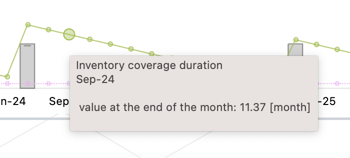
To ease the triggering of tooltips on cockpit components (dots, bars), the component now expands when you hover over it.
3.2. Export the cockpit as an image
Hold shift key and left-click anywhere in the cockpit to take a snapshot of its live content and download it as a png image file (named as cockpit.png).
3.3. Synchronized filters in the Excel report
In the Excel report (trial and project), filters are now connected to multiple charts. Duplicated filters have been removed. For example, in the “Charts per study” sheet, top and bottom charts now respond consistently to the same single set of slicers (Stage - Product), instead of having a set of slicers for each chart.
3.4. "Valid for" parameter update
An empty demand “Valid for” parameter is now interpreted as not having an expiry constraint (i.e. lower expiries can be accepted). A zero (0) “Valid for” value is equivalent to the previous behavior, having no remaining shelf-life needs (i.e. it can expire the day of the demand but should be valid for that day).