
Knowledge Base for Supply App
How to build a safe and optimal IMP release plan
Table of contents
Context
With the Results dashboard, you can view the complete IMP release plan of your trial and check the overlaps between releases but also the remaining shelf-lives of each lot that is in your inventories. This information is extremely useful to better understand the impact of the release schedule on the safety and the overage of your trial.
This article aims to give you guidelines on how to build a safe release schedule and to help you leverage the Results dashboard information. We’ll describe how to check the release overlap of your trial and identify non-optimal overlaps that can lead to risk or overproduction.
❗These guidelines are theoretical and that their application is dependent on the characteristics of each trial.
In this article, we will take a simple example : a trial where the recruitment starts on the 1-Dec-2020 with two local depots (Brazil and USA) and two packages types (active and placebo) with a 12 months shelf-life for both.
Why is it important to choose a good release overlap?
ℹ️ As a general guideline we can say that :
The bigger the overlap, the more frequent are the releases, the less patient demand variability we cover with each release and therefore the less overage we have.
⚠️ Having a insufficient overlap can lead to patient risk or high overage as we would face situation where :
- Kits could not be available in time to replace the ones that will expire at sites.
- We cover too much demand variability with each release.
✅ Therefore we can say that a good overlap is an overlap that does not lead to patient risk or to a high overage (depending on the trial specificities).
Let’s try to build a good overlap in order to have no patient risk and a relatively low overage.
How to compute the minimum overlap needed?
ℹ️ As a general guideline we can say that :
Minimum overlap needed between releases = kit life* + Short window (sites + depots) + Prediction window (sites + depots) + Minimum storage period (sites + depots).
*Kit life ≈ maximum visit interval (+ visit window or + 2 X visit window if there is a baseline) or 1 day for an injection.
Note that this kit life is dependent on the usability period:
- If the validity is “Next dispensing of any kit type”, the maximum visit interval is the duration between two dispensing visits.
- If the validity is “Next dispensing of that kit type”, the maximum visit interval is the duration between two dispensing visits of that specific kit type.
- In both cases, skipped visits intervals are taken into consideration.
For short and prediction windows and minimum storage period definitions, please read this page : IRT setup – Resupply management & First shipment
Using the kit life allows to cover situations where the kit usability is either “one day” or “next dispensing of any/that package type”. Using short and prediction windows allows to reduce the overage as it will increase the overlap and therefore increase the frequency of releases. The more frequent releases, the less overage as we keep more flexibility to adapt changes during the course of the trial. In other words, if we have more frequent releases, we cover less patient demand variability with every release.
In our example, we have the following characteristics:
- Usability period : next visit
- Visit interval: 28 days (+/- 3)
- The resupply parameters are displayed in the screenshot below :
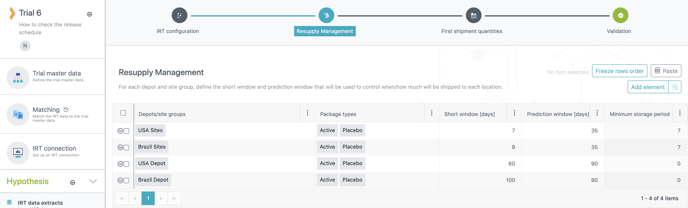
We can now define the minimum overlap formula with the following elements :
- Kit life = 28 + 3 (visit window). (Note that, if there is a baseline visit, the kit life is : interval + (2 X visit window)).
- Short window at sites = 9 (we take the worst case therefore the longest short window from Brazil sites)
- Short window at depots = 100 (same reasoning as for sites)
- Prediction window at sites = 35
- Prediction window at depots = 90
- Minimum storage period = 7
Therefore the minimum overlap = 31 + 9 + 100 + 35 + 90 + 7 = 272 days ≈ 9 months
Let’s build a schedule with a 9 months overlap (releases every 3 months), a 6 months overlap (releases every 6 months) and 3 months overlap (releases every 9 months) to see the differences in terms of patient risk and overage.
Example
Access the Results dashboard
To access the IMP release plan information, first go to the Supply plan sheet of the Results dashboard.
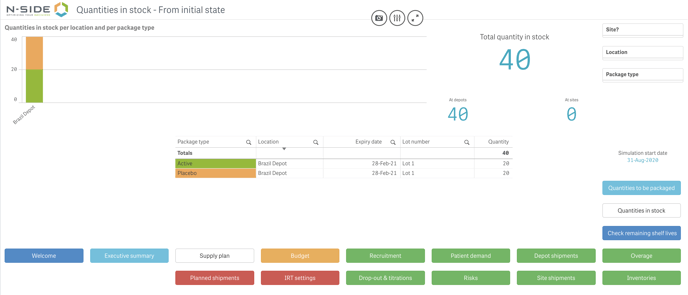
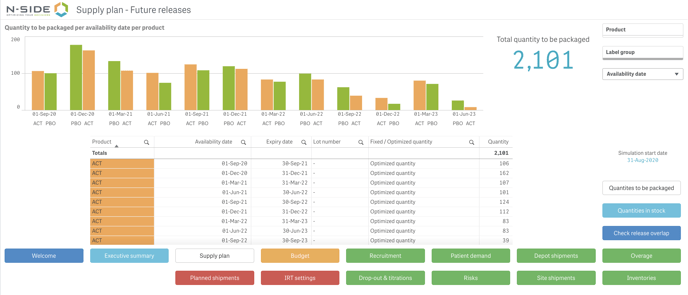 This sheet has two main views :
- Quantities to be packaged which displays futures releases in time and the quantity for each package type per release (see screenshot above)
- Quantities in stock (at the simulation start date) which displays quantities in stock per location and per package type (see screenshot below).
Check release overlap, overage and patient risk
When in the Quantities to be packaged view, click on the Check releases overlap button to access a new view displaying the release schedule with overlaps (see screenshot below).
9 months overlap (releases every 3 months)
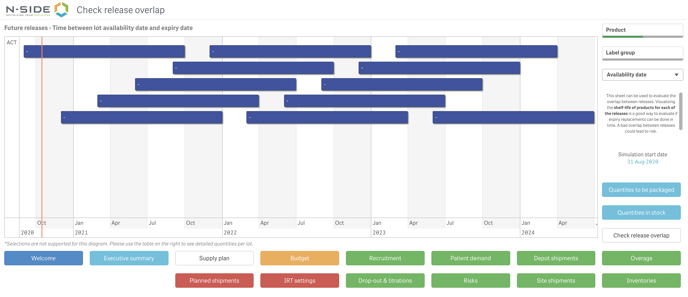
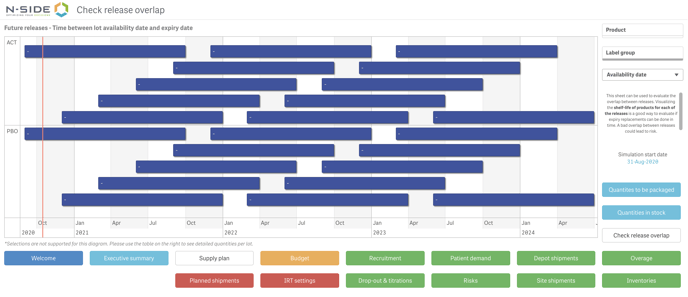 The bars displayed in the chart correspond to the time between the availability date and the expiry date of the lot.
The chart can be filtered by product and availability date/release date. The release date being the availability date minus the release period (if any). You can also see additional information by hovering over each horizontal bar, among which the expiry date and the shelf-life.
If we filter on the active product we can clearly see all releases and the large overlap between consecutive rectangles (see screenshot below).
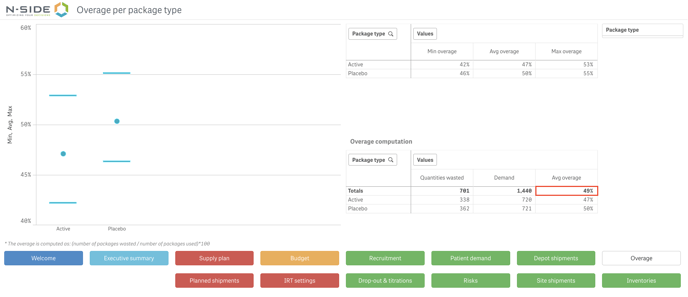
 If you want to have a look at the overage, you can click on the Overage sheet. In this sheet, you can find information per package type : minimum, average and maximum overage as well as quantities wasted and demand. The total quantities wasted, demand and average overage are also displayed. If we look at the total average overage, we can see it’s about 50% for this example (see screenshot below).
 Finally, we also need to check the patient risk. To do that, go to the Risks sheet. We can see that no significant risk is displayed (see screenshot below).

| We can fairly say that this overlap is quite optimal as it does not lead to patient risk or too much overage. |
6 months overlap (releases every 6 months)
Let’s do the same analysis for a 6 months overlap/release frequency. The Gantt chart is displayed in the screenshot below.

Regarding the overage, we can clearly see that it is higher than with the longer overlap as the total average reaches almost 80% (see screenshot below). As explained before, as we reduced the overlap, we reduced the frequency of the releases and therefore each release has to cover for a higher variability, leading to more packages produced.

Finally, if we check the Risks sheet, we can see that there is no difference with the previous configuration in terms of patient risk (see screenshot below).


| Choosing this overlap will still allows to have a safe trial but with a higher overage. |
3 months overlap (releases every 9 months)
Let’s take a 3 months overlap for the last example. We can clearly see on the Gantt chart below that the overlap and the number of releases is greatly reduced.

For the overage, as expected, it is even higher with this configuration as the total average reaches 120 % (see screenshot below). We reduced even more the frequency of the releases therefore the variability covered by each release is also higher.

As for the risk, we can clearly see in both screenshots below that there is a significant risk of missed dispensing/visits at Brazil sites.
The risk appears every 9 months and the dates correspond to the expiry of the first 3 releases (30-Sep -21; 30-Jun-22 and 31-Mar-23).
This risk is due to the fact that the overlap is similar to the lead time to Brazil depot which is not ideal as the kits will arrive at the depot just when the previous ones will expire. Moreover, the system is taking into account the do not dispense constraint which is :
Do Not Dispense (DND) = Expiry date – kit life
In this example, the kit life is approximatively equals to the maximum visit interval which is 28 days + 3 days of visit window. Therefore, the kits that are on sites will not be dispensed anymore 31 days (34 if there is a baseline visit) before the actual expiry date. If we take the example of the 30-Sep-21 expiry date, the kits will not be dispensed after the end of August and the next release will barely have the time to arrive at the depot at this moment which explains the risk in August and September 21. Some kits will not be dispensed due to the fact that some patients could have their dispensing visits when kits have not yet reached the site because of the DND constraint and the lead time to sites.
⚠️ Having an overlap similar or close to a lead time is therefore not optimal and should be avoided as much as possible. Whether it is from an overage or a patient risk standpoint.
Check remaining shelf-lives
The same logic regarding the overlaps can be applied if you have lots that are in stock. If you want to see lots that you have in stock with their remaining shelf-lives, you can go to the Quantities in stock view of the Supply plan sheet and then click on Check remaining shelf-lives (see screenshot below).

In this example, we filtered on the active package type and we can see that we have 3 lots in stock and that the third one has an expiry date of 31-Mar-22. Therefore, if we want to schedule the next release without risk and with a faily low overage, we can schedule it 9 months before the expiry date of Lot 3 (i.e. 1-Jun-21).
In conclusion, taking into account the elements of the trial and potential constraints, the overlap should always be long enough to avoid patient risk and decrease the overage as much as possible.
What if you want to check the overlap of several trials?
If you want to check the release overlap of several trials at the same time, you can do it with the Strategic dashboard. To do it, go to the Production sheet of the dashboard and click on the Check release overlap view. By hovering over an horizontal bar, you can see several information among which the expiry date, the shelf-life and the name of the trial (see screenshot below).

The chart can be filtered by project, SKU or trial. This can be interesting for planning purposes related to the supply plans of the trials you are managing.
This will help you leverage the release overlap information of your trials in a single dashboard.
